Please for the love of all mankind..please enable downloads of pending transactions! (Q Mac)

Please, please, please do this. It will enhance the user experience so much!
Comments
-
Pending transactions are displayed in a tab below the register. You don't want to download the "pending" transactions as they are just that, pending. Vendors will sometimes post $1 transactions just to validate the account, then delete them. Downloading these transactions would garbage up you register with a lot of invalid transactions, leading to an inaccurate balance.
0 -
Quicken Mac does not show pending transactions at all. (Unless the financial institution codes them improperly as real transactions, which creates a host of other problems.)
Quicken Mac Subscription • Quicken user since 19936 -
So it garbages up the register, per Ralf C. Jacobs agrees…. So why is this implemented in Windows and not Mac? AT the very least, don't show the transactions, but show the bank balance that takes into consideration pending. It used to do this, and I just talked to support, and they said no, it didnt…. Well, yes, it did. Now I have to go to my bank after looking at Quicken to see the real balance. Waist of time….
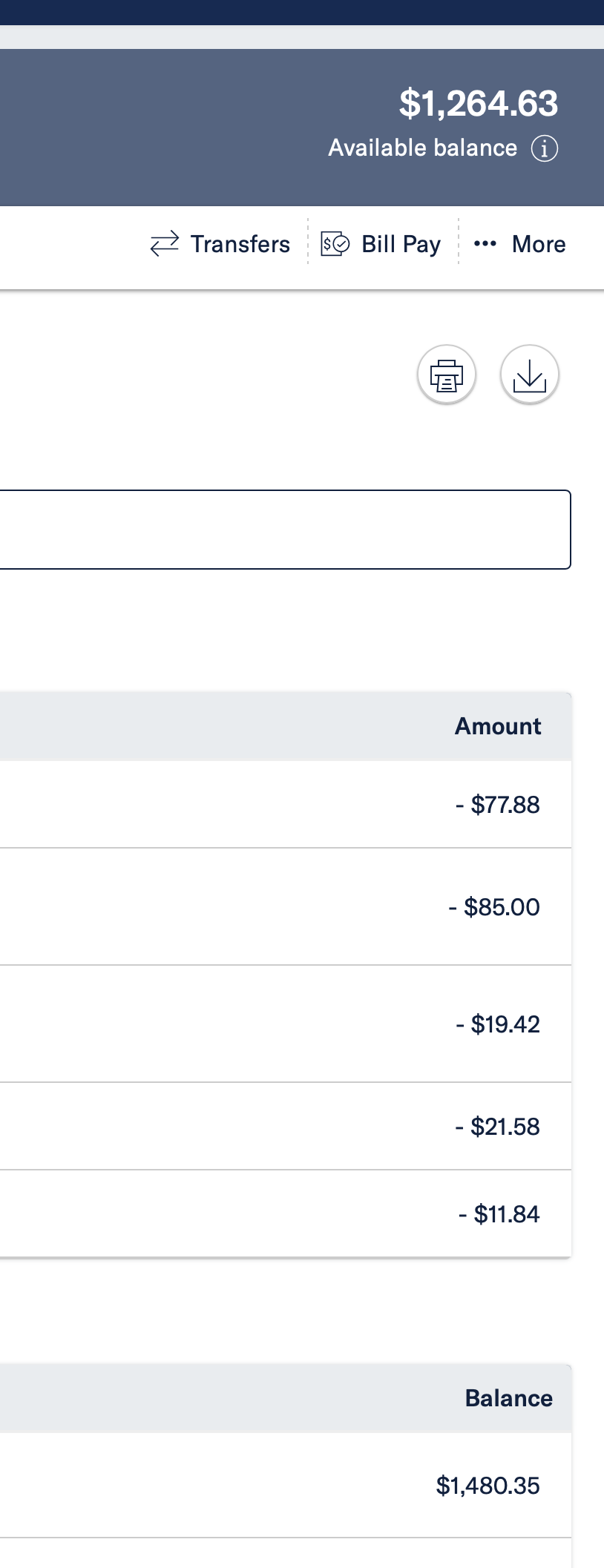

[Edited-Readability/Screenshot Size]
0 -
@blue68qkn The problem is that different financial institutions show balances differently. Some show the balance only including posted transactions, while separately showing and available balance (credit limit minus current balance ) which includes pending transactions. Quicken is at the mercy of what each financial institution reports, whether they encode pending transactions as such when they download, and whether the balance they report to Quicken does or does not include pending transactions. (If you previously saw pending transactions included in your online balance and now you don't, it's likely because your financial institution changed what they send to Quicken.)
Quicken Mac Subscription • Quicken user since 19930 -
Well if that is the case, and I believe so, then why cant Quicken change its coding to reflect where it is now? When I talk to customer support they just say Windows does it Mac dose not. Cant get it across to them or to the correct person to get it corrected.
-1 -
Voting for this idea & posting here is how you get it corrected.
Personally I don't want pending transactions to download.
1 -
I don't know why Quicken Mac doesn't have a pending transactions feature, but I know the rollout of pending transactions in Quicken Windows was started, then removed, then added back as they negotiated various problems; I don't know whether it works flawlessly now, but I know I was happy when hearing about the original problems with the Quicken Windows implementation that Quicken Mac hadn't gone down that road. 😂
Quicken Mac Subscription • Quicken user since 19930 -
@Jon said: Personally I don't want pending transactions to download.
I agree, because some of them are pre-authorizations or pre-final amounts.
But I think the issue is that if pending transactions aren't imported, then in some cases people can't reconcile to their reported online balance. It seems to me Quicken has to have a way to get the pending transactions and adjust the online balance by that amount so the register and online balance can be in sync.
Quicken Mac Subscription • Quicken user since 19930 -
If your bank is providing a balance that includes pending transactions, then this is a bug that should be reported. Choose Help:Report a problem and submit your file/logs so Quicken can present this to their data provider. As noted, it will be difficult to reconcile with an amount that includes pending.
As for the ability to download pending transx-that is a personal preference. (I don't want it-but I get why some people would.) The former is fine, assuming it works and is a preference option.
0 -
If implemented the way it is in Quicken Windows (which I think it the right way) this will not solve these people's problem.
The pending transactions aren't including in the reconcile. They are shown sort of like if they were future scheduled reminders. It is possible to enter them into the register, but then they would be just like if you entered the transactions in manually. As in uncleared. You would have to mark them cleared to get them in the reconcile. Which would probably be a bad idea, since eventually the posted transaction will come down and need to be matched to that entered transaction that you just reconciled.
The pending transactions feature is meant as a "heads up"/help prevent over drafting, it isn't meant to fix the financial institution sending the wrong online balance.
As for "are the bugs all worked out?"
It is hard to say. When such features come out and have problem after problem, most people just give up on the feature and the complaints stop. That is true for me.
0 -
Let me reiterate what I would like to see. I can care less if it downloads pending transactions or not. Just make a setting to turn this function on or off. I want to see in Quicken, show in its top right corner, View Online Balance, the balance that the bank calculates taking into consideration pending transactions. Once again, it use to.
0 -
I want to see in Quicken, show in its top right corner, View Online Balance, the balance that the bank calculates taking into consideration pending transactions. Once again, it use to.
As I mentioned in a post above, different financial institutions handle pending transactions differently — some include them in their online balance but don't download the transactions, while others do download the pending transactions to Quicken. And this can vary from one bank to another, and can change over time at any particular bank if they update their online systems.
But you're complaint/wish isn't really about asking Quicken to download and show pending transactions at all; it's about having Quicken's "Online Balance" match the financial institution's "Available Balance".
I don't typically look at Online Balance in Quicken; I use Today's Balance for both my registers and sidebar, so I'm typically unaware of discrepancies. But I switched to Online Balance and see that my bank is operating exactly as you're asking for: the "Online Balance" in Quicken matches what the bank shows on its website as my "Available Balance". That's true even though a direct deposit today shows in my transaction list on the bank site, but has not yet been downloaded to Quicken. So my "Online Balance" and "Today's Balance" in Quicken are understandably different values, as the former includes today's deposit and the latter does not. But the Online Balance reflects what the bank tells Quicken the balance is, so Quicken's Online Balance should match the bank's Available Balance.
That is clearly not the case in the two screenshots you posted above. So I believe it's an issue with your bank which needs to be reported to Quicken Support to escalate to their connectivity provider, Intuit, to in turn reach out to the bank to note the discrepancy and ask them to fix the data they are providing to Quicken.
Quicken Mac Subscription • Quicken user since 19930 -
The Online Balance comes directly from the financial institution and should NEVER have the pending transactions included in it. To get this fixed you have to report the problem to Quicken Support and they have to talk to Intuit which Quicken Inc pays for connection services and dealing with the financial institutions.
And note, that "what is on the financial institution's website" is immaterial.
The Online Balance's real purpose is for reconciling to that balance. Pending transactions should never be included for the simple fact that they might not post and there isn't anything that would allow for your already reconciled pending transaction to be "removed from the reconcile" after the transaction didn't go through.
0 -
The Online Balance comes directly from the financial institution, and should NEVER have the pending transactions included in it.
@Chris_QPW I agree… but there are such discrepancies. Here's what I found as I was testing a few things today:
Today, I had a $10,000 direct deposit from a brokerage account into my checking account. When I look on the bank website, the deposit is there, and it is reflected in the balance shown on the website. This transaction does not show as pending. When I do an update in Quicken, this deposit transaction has not yet downloaded to Quicken. But if I look at the "Online Balance" in Quicken, that deposit is reflected in the balance, because the bank is sending Quicken the online balance including the deposit. So if I were trying to reconcile to the online balance in Quicken, I have a $10k discrepancy in the amount of the deposit.
So why is this? The connection shows it is FDP/OAuth (Quicken Connect on my Mac, EWC+ on Windows.) So to explore further, I downloaded a QFX file from the bank website to look at it, and the deposit transaction is right there, there first transaction:
<STMTTRN>
<TRNTYPE>DIRECTDEP
<DTPOSTED>20260127120000
<TRNAMT>10000.00
<FITID>61055763271202601270080000
<NAME>SCHWAB BROKERAG
<MEMO>Direct Deposit
</STMTTRN>Well, that looks like a normal transaction to me — e.g. no apparent coding to denote this as a pending transaction — but somehow Quicken is not adding this transaction to my register. Why? I'm guessing that it is not in the QFX data Quicken is pulling down online and wondering: is it possible that Quicken's online connection isn't pulling in transactions in real-time on demand (like Direct Connect would), and is limited to what a Quicken server downloaded last night? That would account for this transaction not yet downloading to my desktop, while the online balance is up-to-date. And if so, I don't know how Quicken can ever resolve such mismatches unless every download connects directly to the financial institution server and pulls down up-to-date transactions.
Quicken Mac Subscription • Quicken user since 19930 -
Does Quicken Mac have a "cloud sync" log? Express Web Connect + on Quicken Windows is logged in the cloud sync log.
You really can't compare QFX files to FDP/EWC+. And even the cloud sync log might not be "proof".
This why all of this such mess.
Direct Connect, the OFX standard protocol (with Quicken's minor change to add the financial institution information and call it QFX). As the name suggests Quicken directly connects to an OFX server at the financial institution and sends a request for the transactions information and gets that information as back as a result. In Quicken Windows this interaction is logged in the OFX log. This is very "transparent". The online balance is just one field in this response.
A QFX file is simply what would have been the response to the Direct Connect result. Whether this actually exactly the same requested data between the two depends on the time range selected and how the financial institution creates both of them, but usually they are identical (within the same time range).
When we talk about FDP/EWC+ it gets a lot more murky.
Quicken (the program) talks to the Quicken Server and basically uses the same system as "Sync to Mobile/Web" to get the data through the Quicken Cloud dataset/server (this is reflected in the fact that in Quicken Windows the log is the cloud sync log). That server in turn talks to the Intuit server, which in turn talks to the financial institution's website. Conversation between the Intuit server and the financial institution uses a protocol called FDX. From what I can tell it is very similar to OFX, but it definitely isn't the same one.
Note that the same organization is now also maintaining the OFX standard.
But the key here is that there isn't any "website scrapping", there are set fields for the financial institution to send the information.
We have no way of knowing what kinds of translations are being done in between Intuit's servers and Quicken's and in the "sync to Desktop". But I would certainly imagine that it wouldn't "drop transactions".
0 -
Does Quicken Mac have a "cloud sync" log? Express Web Connect + on Quicken Windows is logged in the cloud sync log.
@Chris_QPW In Quicken Mac, there is a local OFXLog.txt file, but nothing like a "cloud sync" file that I'm aware of. (I have Quicken Cloud sync turned Off, for what that's worth.) I've never really looked at the OFXLog.txt file before, and it's got a lot of stuff that I can't decipher as easily as a downloaded QFX/OFX file. There's stuff in there going back to 2021, including info for investments even though I don't think I have ever connected an investment account in this data file; (maybe I did in testing years ago?). But searching the file by date and by amount, I can't even find any of the recent transactions which downloaded to my checking account today or in the past week, so I'm pretty confused what I'm seeing. I'd need to create a new, clean data file, connect it to my bank, download once, and see what's in this file to try to make heads or tails of it (and I don't have time to do that tonight).
My question was whether Quicken (Intuit) logs into sites to download transactions once a night, process them, and stored them until a user comes along and downloads to their desktop — from the transactions stored on Quicken's server, rather than reaching out to the FI in real-time. I know that used to be the case in the screen-scraping days, but I don't know if the once-a-day downloads are now completely gone. Otherwise, I can't explain how my deposit transaction today still hasn't downloaded to Quicken, but likely will do so tomorrow.
Quicken Mac Subscription • Quicken user since 19930 -
As for the "logging in once a night". For sure when a user downloads these days the connection is "mostly real time". I said "mostly", because Quicken Windows "cache results" on the first download and doesn't pass through a query every time. It isn't clear exactly how it waits before it will allow another download to really go through. And the other thing is that people have reported that they have seen nightly activity when they haven't downloaded, so that part of it doesn't seem like it is completely gone.
EDIT: my term "real time" shouldn't be taken as that you will get transactions in real time. That is entirely up to the financial institution. "real time" in this case is that query gets to the financial institution, and isn't "shortcut" by either the Quicken or Intuit server.
Also, I should mention that many people have reported missing transactions and other problems with EWC+. Fidelity has had some of the worst problems. And that is something to note, that there is a difference in the amount of problems when a given financial institution changes over from Direct Connect to EWC+, some do it better than others and I think it also has to do with how complicated the data is. For sure investment data is much harder to do right than bank data.
0 -
Yesterday I turned on pending transaction to see how it is working, but it doesn't show pending transactions until the next day, so I now have a look at it, and it looks like have part of how it possible to use it wrong.
Here is an example.

There are options for showing the pending it the running balance or not (doesn't affect what is in the reconcile). Note the pending transactions are greyed out. They aren't "entered" into the register yet.
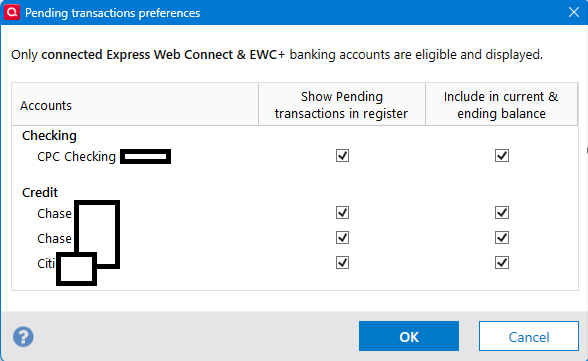
With that option off:

And here is the part I missed:
One can select the I icon by the Online Balance and get this:
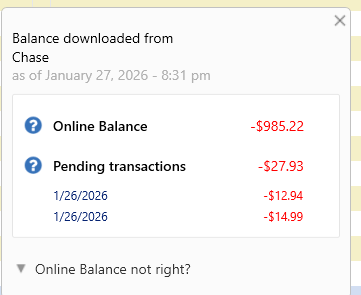
Selecting "Online Balance not right" gets:
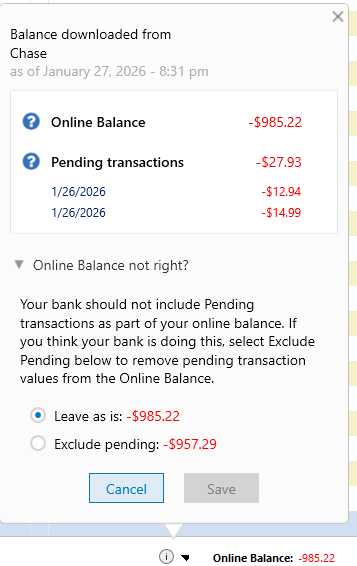
So, in fact you can get Quicken Windows to use the pending transactions to fix the fact that the financial institution is including the pending transactions in the Online Balance when they shouldn't.
1 -
I have contacted Quicken support twice and unable to get them to understand. All I get is macOS doesnt support pending downloads. I know that!!! How can I get to someone that can actually understand and escalate it to Intuit that that Quicken "On Line Balance" does not match the banks "On Line Balance"?
0 -
@blue68qkn I don't know how you can get Quicken to look into this other than contacting Quicken Support again and hoping you get a more responsive represenative. I would suggest not mentioning pending downloads, and simply saying you are having a problem because the displayed Quicken "Online Balance" does not match the balance shown on your bank's website, when those two values should be the same. Ask if they can do a screen share with you (I don't know if you've done this in your prior efforts) so you can show them how your bank's website and the Quicken Online Balance are different, making it impossible to reconciled to the Online Balance in Quicken.
@Chris_QPW A quick follow-up to two things we were discussing yesterday…
(1) I reported that I had a direct deposit in my checking account yesterday, and Quicken Mac reflected the amount of that deposit in the "Online Balance" but the transaction itself did not download into the register. Thus the Quicken Online Balance agreed with the bank websites balance, but internally in Quicken, the Online Balance did not agree with the register running balance. As I expected, this morning the deposit transaction downloaded into Quicken. My conclusion is that Quicken apparently does a real-time query of the FI to fetch the online balance, but only downloads transactions once a day. This may or may not be the same for different financial institutions. And this is a different than what @blue68qkn is showing where his Quicken Online Balance does not match his bank website's balance.
(2) We talked about a transaction log, and I said that Quicken Mac has a OFXLog.txt file which records some information about download sessions. I'm unclear about what is and isn't logged here upon a closer look today. I did not find the deposit which downloaded today, or any recent transaction, in the file. It seems to have lots of transaction from 2021 through mid-2024, but nothing past July 2024. (So at least I know that it wasn't the this bank's change from EWC to EWC+ in late 2025 which altered what is recorded in the file.) The only change in the file after this morning's download is a few lines at the end of the file with a timestamped "Start Update All" and timestamped "End Update". So I'm not sure if there's a local file with a log of the actual transactions downloaded any more.
Quicken Mac Subscription • Quicken user since 19930 -
One thing I will say about the Online Balance from my own personal experience and some from the posts that people have made on this forum in the Windows section. And this is even before talking about the possibility that EWC+ has the possibility of new problems. Even with Direct Connect consistency between the transactions downloaded and the Online Balance has never been 100%.
Different financial institutions have different "behaviors". I have had some that are rock solid. I have had some that the transactions are posted in the middle of the day, but the online balance isn't updated until late at night. And others like your case have reported the reverse. And the "pending transactions included in the online balance" is very common.
In general, what I do is never trust a "failed reconcile" on the first day, and in some cases never on a weekend. I just cancel it and wait till the next day or after the weekend before I look for a problem. 99.99% of the time for my financial institutions that works. But note that if you have a lot of pending transactions and that is the problem you might never find a stable situation.
A lot of the Quicken Windows SuperUsers take a different approach; they don't reconcile to the online balance. They reconcile to a balance that they input.
With the rollout of FDP/EWC+ I wouldn't say there are more of these kinds of problems, but I would say that which financial institution are affected has changed somewhat. One has to realize that at the backend at the financial institution they are doing a different procedure, and as such they can have different results than in the past.
0 -
In general, what I do is never trust a "failed reconcile" on the first day, and in some cases never on a weekend. I just cancel it and wait till the next day or after the weekend before I look for a problem. 99.99% of the time for my financial institutions that works. But note that if you have a lot of pending transactions and that is the problem you might never find a stable situation.
Or simply switch to doing monthly reconciliations to the bank/credit card statement. No pending transactions. No mismatch between what's counted in one place and not in another. It's a straightforward and 100% accurate matching of posted transactions at the financial solution to transactions in Quicken. I never have any issues reconciling this way. 😀
Quicken Mac Subscription • Quicken user since 19930 -
Yep. I think that is what those other SuperUsers were suggesting, when going to manual reconciling.
But just for the record, even this isn't 100%, I have seen reports (VERY RARE) where some financial institution actually messes up, and the posting date of some transactions are after the closing date for the statement even though they are included in that statement. I don't know about Quicken Mac, but Quicken Windows doesn't include transactions with a posting date after the ending date (entered or from the online balance information).
0 -
I have seen reports (VERY RARE) where some financial institution actually messes up, and the posting date of some transactions are after the closing date for the statement even though they are included in that statement. I don't know about Quicken Mac, but Quicken Windows doesn't include transactions with a posting date after the ending date (entered or from the online balance information).
Should that happen — which I agree is very rare — in Quicken Mac all you need to do is change the reconciliation date forward by a day or two so the reconciliation screen will include the transaction posted a day later than the statement date. No adjustments, no problems. 😀
Quicken Mac Subscription • Quicken user since 19930 -
Yes, that is what is suggested when it happens in Quicken Windows too. The one gotcha is that it might include transactions that shouldn't be in the reconcile and you have to temporarily unclear them.
0



