Midfirst downloads written checks as deposits

On December 17th, my MidFirst account was reconnected to Quicken after 6 months of not being able to download transactions. Now, Quicken is showing downloaded payment checks as deposits (these are handwritten checks I have given out as payments).
For my initial download after reconnecting MidFirst and Quicken, I had already cleared/reconciled all the transactions manually, so I ignored the first download that showed a check as a deposit. This was a payment check transaction that cleared approximately two days before the reconnection of MidFirst and Quicken. I had already manually handled that transaction, so I just deleted the downloaded transaction that was incorrectly labelled a deposit.
Now, I am seeing a new transaction I have downloaded that is also a handwritten payment check being listed as a deposit by Quicken.
I do not write a lot of checks, so I do have a lot of downloaded transactions that are handwritten checks.
The downloaded transactions are correctly labeled by Quicken under payee as a "Check / CHECK", whereas an actual deposit is labeled "Deposit/DEPOSIT". In the picture below, the payment check is marked in RED - it is a handwritten payment check that has been downloaded by Quicken and listed as a deposit. The transaction marked in GREEN is downloaded correctly as a deposit.
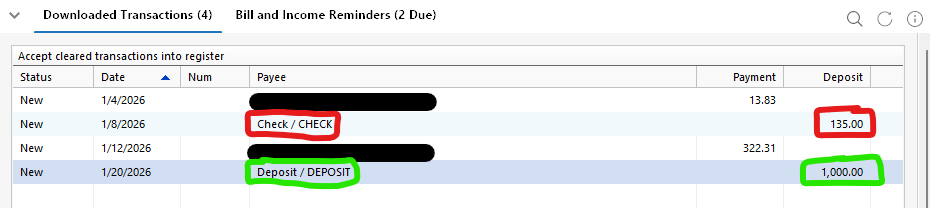
I have verified on MidFirst.com that the transaction appears as a check, not a deposit, and that I do not have any other transactions for that amount for over a month, so I am not confusing a different transaction.
I have not tried anything to replicate, as I do not write that many checks.
The issue started on December 17th, when my MidFirst account was finally reconnected after 6 months.
Quicken Classic PREMIER version R65.29 Build 27.1.65.29
Windows 11 25H2 Build 26200.7462
Bank is MidFirst Bank - no errors are reported during Quicken One Step Update.
Comments
-
If you haven't done so already, I'd say it's time to contact Quicken Support on the phone during posted hours of operation and report this as an Online Banking issue. Let them do a screen share session with you to review the situation onyour computer, to determine the nature of the problem and to figure out how to fix it. This may have to be escalated to Intuit Inc as the service provider.
1 -
Just an update on this. I did call Quicken Support. The support rep I spoke to is adding this issue to the existing issues list for MidFirst. If anyone else finds this thread and is having this issue with MidFirst checks or ATM withdrawals being categorized as deposits by Quicken, please comment here and then call Quicken Support. Thanks!
0 -
I, too, have had these types of issues since July 2025. When I call Quicken, they blamed Midfirst. Midfirst blamed themselves for a few months, then by December 2025 they started blaming Quicken. I kinda have given up on both of these companies to work together.
1
