TD Bank Online Banking

One Step Update
I continually receive a TD Bank Online Banking error when updating
"TD Bank Online Banking is reporting connection issues
The associated accounts can't upgrade right now. We are investigating the issue."
How do I eliminate this error, the account does update despite what the error message states
Answers
-
Hello @WL3,
Thanks for reporting this!
Does the error you're seeing look like the one displayed in the screenshot below:
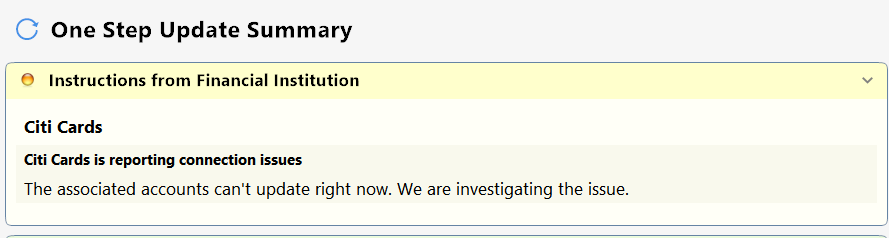
If so—Some users in the past have reported that the steps below have resolved this error for them:
- Run One Step Update (OSU) first to see if the issue resolves.
- If the issue persists, close Quicken
- Using Windows File Manager to rename the runtime.dat file located at:
C:\ProgramData\Quicken\Inet\FILENAME\ where FILENAME is the name of your current Quicken data file, e.g. My Quicken Data 2024 as seen in the image below. There usually is an \Inet\… subfolder for each Quicken data file in existence.- (For example, add a 1 at the beginning of the file name so it reads 1runtime.dat.)

- (For example, add a 1 at the beginning of the file name so it reads 1runtime.dat.)
- Start Quicken and run One Step Update again to check if the problem is resolved.
- Close and restart Quicken to ensure changes take effect.
📌 Note: The ProgramData folder is hidden by default. If you need help accessing it, Microsoft's support site has instructions on how to unhide folders.
Hope this helps!
-Quicken Anja
Make sure to sign up for the email digest to see a round up of your top posts.0 -
Same problem…. this worked.
0 -
Hello @kayakor,
Appreciate you chiming in and confirming! Glad to hear that worked for you.
Thank you!
-Quicken Anja
Make sure to sign up for the email digest to see a round up of your top posts.0
