Importing a downloaded .QFX file into the account in my Windows Classic is not working.

Just got Quicken and set it up. But the bank only allowed about 90 days worth of transactions to be downloaded. Now I am trying to import older ones. I went to my bank site and downloaded both .csv and .qfx file types - which go back about 2 years (yay). BUt using the File > import function did not work. (I gave up on the csv file as it is apparently not in the corerct format and I cannot move all those columns around..). Nothing seemed to happen at all when I tried to import the qfx file inot the Quicken account. Even after setting the opening balance to be prior to any of these older entries.
I found a discussion in this community from years back. I saw that it may have created a new account - which I found under hidden account and deleted. That naswer said to 'deactive' (deconnect) the Quicken account from the bank and try to import again Still nothing happens, (though it did not create an extra account this time).
Nuts - I do NOT want to have to enter all these by hand!
Answers
-
Hello @lakeside339,
Thank you for letting us know you're encountering this issue. Based on your description of the problem, I suspect that it imported as a new account because it saw the account you wanted to update was already connected to the financial institution.
If this is a regular banking account, you should be able to bulk select and cut/paste the transactions from the newly created import account into the correct account.
If this is an investment account, you should be able to click the gear icon near the upper right in the transaction register and select Move Transactions.
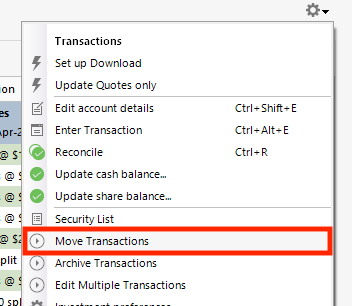
That should allow you to move the transactions from the newly created import account into the correct account.
I hope this helps!
Quicken Kristina
Make sure to sign up for the email digest to see a round up of your top posts.
0 -
These are 2 checking accounts. (I am trying to get this figured out first on the least important one in case I just make a mess).
Yes - I understood from the post I had previously found that the new accounts were created because the quicken account was already connected to the bank. So I diconnected it (on the Quicken side, though it is showing up still in the bank as connected).
I understand what you are saying about bulk selecting and copying into the correct account. Unfortunately, I have already deleted the extra account it created.
The earlier post had said that by disconnecting, it would them give the option the 'link' when I tried to import the .qfx file. It did give me that option, which I chose. I did just do another .qfx export from my bank to try with a fresh file. This time it neither imported into the correct Quicken file, nor made a new one!
Can I just delete these 2 checking accounts altogether and start over? I would start by saying I wanted to manually download transactions so I could get the older ones in the first time, then updating to webconnect.
Would that work?
I may try the 'cut and paste with one transaction into my more important account to see what happens. (I do still have that extra account in Quicken).
Thanks for your help
[Edited - Readability]
0 -
Thank you for your reply,
How much history is in the accounts? If it's all history you're able to recover by importing a QFX file, then yes, you can delete the accounts and start over. It's a good idea to backup your file prior to deleting an account. For information on deleting an account, please review this article: .
Thank you!
Quicken Kristina
Make sure to sign up for the email digest to see a round up of your top posts.
0 -
Hello @lakeside339,
We haven't heard back from you in a while. Do you still need assistance?
Check back and let us know! Thank you.
Quicken Kristina
Make sure to sign up for the email digest to see a round up of your top posts.
0 -
Hello again,
Checking in once more before this thread is closed.
Let us know if you still need assistance.Thank you!
Quicken Kristina
Make sure to sign up for the email digest to see a round up of your top posts.
0 -
Hello again,
Due to the lack of response, I went ahead and closed this post.
If you still require assistance, please feel free to start a new post.
Thank you!
Quicken Kristina
Make sure to sign up for the email digest to see a round up of your top posts.
0
