Transactions not downloading - Barclays (QMac)

This discussion was created from comments split from:
1/29 -Transactions not downloading - Barclays
.
Comments
-
Same problem and it started for me on the same date, 1/26/26. No error code being returned. Deactivated account and reactivated. Logged out of Quicken and logged back in. The transactions are not pending, they are posted on the website. Has there been any solution to this?
0 -
Just adding my name as having the same issue. Connection is made, no errors are shown, but transactions have not been downloading and Quicken is yelling at me that the online balance doesn't reflect the reconciled local Quicken balance. From that result, we know that Quicken can read the total balance from Barclays, but won't download the actual transactions.
Updating the connection does nothing.
0 -
Adding my name to this list. Same issue. Just Barclay's Mastercard and just started on 1/26/26.
0 -
I contacted Barclays and they said its a security issue and you can no longer download transactions directly
0 -
you can download it as an excel document but then how do you import that into quicken?
https://community.quicken.com/discussion/comment/20535284#0 -
Hello All,
This issue has been forwarded to the proper channels for further investigation and resolution. So that our teams can investigate this issue, please provide the following information:
- Navigate to Help>Report a Problem and send a problem report with log files attached.
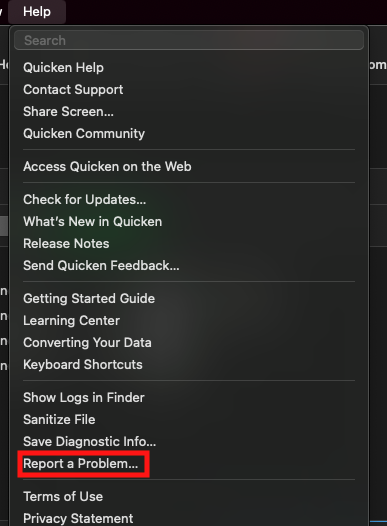
- Include at least 3 sample transactions (date/payee/amount) which are posted on the financial institution side, but are not in your Quicken at all, not even manually entered.
- Include screenshots; 1 of the transactions posted on the financial institution website and 1 showing that the transactions are not in Quicken.
Note - Problem reports allow a maximum of 10 attachments. If you need to send more than 10, you can unselect any log file with OLD in the filename, or you can send a second problem report with the additional attachments.
While you will not receive a response through this submission, these reports will help our teams in further investigating the issue. The more problem reports we receive, the better.
We apologize for any inconvenience!
Thank you.
(CTP-16163)
Quicken Kristina
Make sure to sign up for the email digest to see a round up of your top posts.
0 - Navigate to Help>Report a Problem and send a problem report with log files attached.
-
Hello All,
We've received reports that transactions are downloading again. If you haven't already done so, please try to update your accounts and let us know if the issue is resolved or not.
Thank you!
Quicken Kristina
Make sure to sign up for the email digest to see a round up of your top posts.
0

