1/29 -Transactions not downloading - Barclays

Update not working for Barclays'. I have tried resetting the account. I know there are transactions that are not pending, but they are not downloading.
Comments
-
Same here. Barclays Mastercard. Two transactions posted on Jan 28 still have not downloaded as of Jan 30.
0 -
Same here, Barclays Mastercard
0 -
Hello @bmhanenkrat, @MICHAEL J LAWSON, and @PatJ,
Thank you for letting us know you're seeing this issue. Are you seeing any error messages/codes, or are transactions just failing to download?
If there are no errors, but transactions are failing to download, then please follow these steps from our article on missing transactions/transactions not downloading:
Be sure to follow these steps in order:
1. Go to Edit > Preferences > Downloaded Transactions. The option Automatically add to banking registers needs to be unchecked.
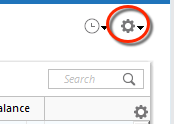
2. Refresh your online account information by clicking the Actions Gear Icon on the upper right of the register, and select Update Now. Follow the on-screen instructions to complete the update.
3. Confirm that the Sort Order in your account is by Date; just click the top of the Date column in your account register. It's possible the transactions are in your register, but not where you thought they'd be.

4. Click the Reset button at the top of the register. This will confirm that there's no filtering in your account register.
5. Try refreshing your login session: To do this, go to Help > Refresh Sign in. After completing the log-in process, trying running a One Step Update again.
6. Go to Actions (Gear Icon) > Register Columns > Check Downloaded Payee in the account register. This allows you to search by Payee to confirm the transactions haven't been renamed unexpectedly.
7. Go to Tools > Account List and check Show Hidden Accounts at the bottom left. Confirm the missing transactions haven't been added to a hidden account by clicking on the name of any account that appears with a check mark in the Hidden column.

Please let me know how it goes!
Quicken Kristina
Make sure to sign up for the email digest to see a round up of your top posts.
0 -
I tried all of these steps and no transactions were downloaded.
0 -
Thank you for your reply,
Since those troubleshooting steps did not resolve the issue, I recommend that you contact Quicken Support directly for further assistance, as they have access to tools we can't access on the Community and they're able to escalate the issue as needed. The Quicken Support phone number can be found through this link here. Phone support is available from 5:00 am PT to 5:00 pm PT, Monday through Friday.
I apologize that I could not be of more assistance!
Quicken Kristina
Make sure to sign up for the email digest to see a round up of your top posts.
0 -
I have the same problem. Barclays updates stopped working a couple days ago and have not worked since. Resetting and Deactivating/Activating the account does not solve the issue.
0 -
Same issue here, no transactions after 1/26/2026 are posting in Quicken with no error messages being generated. I deactivated and reactivated, no change. I tried manually setting up all 3 different Barclays bank credit card account types, no change. I even tried a manual download and import and they do not post in Quicken. I performed a manual download into Excel and the missing transactions appear in the CSV file. I opened the QFX file in Notepad, and all of the missing transactions are in the file. The transactions are actually downloading and are just not posting in Quicken.
0 -
Same thing with Barclay. I tried resetting, deleted and then added the process back and updated balance comes back but no transactions.
0 -
This really sounds like the register is not sorted by date. I am not experiencing any issues with transaction downloads from Barclays. If you're sure the register is sorted by date, have you checked the Pending Transactions? Have you tried validating and super validating your data file?
0 -
Same problem with 2 Barclay accounts. Have tried all of the same solutions mentioned. Only problem is I don't tend to see where the "reset" button as mentioned in step 4?
0 -
I can confirm it is not a sorting issue. If the transactions were there I would see that the Update Summary said that transaction were downloaded plus a visual clue next to the account name showing the red icon indicationg unaccepted transactions. I did try validating and none of the issues identified related to the Barcaly's account. But thanks for the suggestions anyway.
0 -
Next, I would try restoring a known-good backup from before you started experiencing this problem and see if it downloads transactions.
0 -
Per Quicken Kristina's suggestion I contacted Quicken Support. Since the phone line is not manned on the weekend I used the Chat Bot. Chat Bot told me it was my responsibility to contact Barclays and resolved the issue - even though I told it multiple users reported the same issue. I will call on Monday and report any progress talking to a human.
3 -
Same issue. I am a "super-user" and tried all the self-help steps I could. Quicken needs to address this issue.
0 -
Same here. After updating the one step update says it updated ok but no transactions are downloaded. also downloading the file from the Barclays website does not work either.
1 -
I tried downloading the QFX file from Barclays and importing that into Quicken, however the Barclays generated Web Connect (QFX) file fails with OL-221-A (syntax error in the QFX file)
0 -
I want to join the club for Barclays not downloading my credit card transactions. I got a lowlevel Barclay's agent who also said it is a Quicken problem. Speak with them.
0 -
Hello All,
This issue has been forwarded to the proper channels for further investigation and resolution. So that our teams can investigate this issue, please provide the following information:
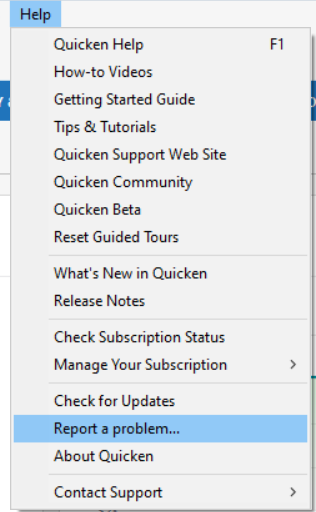
- Navigate to Help>Report a Problem and send a problem report with log files attached.
- Include at least 3 sample transactions (date/payee/amount) which are posted on the financial institution side, but are not in your Quicken at all, not even manually entered.
- Include screenshots; 1 of the transactions posted on the financial institution website and 1 showing that the transactions are not in Quicken.
Note - Problem reports allow a maximum of 10 attachments. If you need to send more than 10, you can unselect any log file with OLD in the filename, or you can send a second problem report with the additional attachments.
While you will not receive a response through this submission, these reports will help our teams in further investigating the issue. The more problem reports we receive, the better.
We apologize for any inconvenience!
Thank you.
(CTP-16163)
Quicken Kristina
Make sure to sign up for the email digest to see a round up of your top posts.
0 - Navigate to Help>Report a Problem and send a problem report with log files attached.
-
Actually, despite my previous posts, I can confirm that Barclays Mastercard is not downloading transactions that are posted on the Barclays Mastercard website. Resetting does not resolve the issue.
1 -
Quicken Kristina: Problem reported per your request.
1 -
Same issue here Barclay MC not update in Quicken since 1/28. QFX file has transactions but won't update.
0 -
Hello @RalphC & @brennan1093,
Thank you for letting us know you're also encountering this issue. To help our teams investigate this issue, please provide the information requested in my earlier post.
Thank you!
Quicken Kristina
Make sure to sign up for the email digest to see a round up of your top posts.
0 -
As of this morning (2/2) transactions are being downloaded into Quicken on my end. Hope this is working for everyone else as well.
0 -
Mine have downloaded as well. Since I recently restored my file from a back-up, I initially got a cc-800 error. Using the Fix-it/add Account process it restored my Barclays account and all Posted transactions that had not downloaded did so.
0 -
Mine have also downloaded successfully this morning.
0 -
Mine have also
0 -
I can confirm that transaction downloads have resumed.
0 -
Downloads fixed, but not!
My transaction downloads resumed, but now my register balance is wrong and went up by about $5.1K. My register was balanced and then I downloaded and reconciled the new transactions and I come up with an unaccounted differenced of $5.1K.0 -
My transaction from Barclay MC from 1/27 to current are now downloading with one step update.
Issue seems to be resolved.
0 -
Hello @Mike Lawrence & @brennan1093,
I'm glad to hear it's downloading again!
To troubleshoot the register balance suddenly being incorrect, first, check for any missing or duplicated transactions. If the transactions are correct, then the most likely culprit is the opening balance changing. If you're not certain whether the opening balance changed, please follow these instructions from our article on the issue:
You can view a backup file to confirm these balances:
- Back up your Quicken file.
- Restore a file from before the problem started to another location (like the Desktop), selecting the Just looking... option when prompted.
- Scroll to the top of each account where the balance is wrong and make note of the opening balance, date, and amount.
- Return to your current Quicken file. For instructions on switching back to your file, please click here.
- Examine each problem account and correct any opening balances as needed.
I hope this helps!
Quicken Kristina
Make sure to sign up for the email digest to see a round up of your top posts.
0

