Quicken Mac: Error Code 16503 When Connecting to UBS

Once again I am getting Error Code 16503 when attempting to connect to UBS Financial Services Inc. (brokerage accounts). UBS tends to be the culprit but always blames Quicken. Anyone else having this issue?
Comments
-
Hello @OldSchoolExec,
Thank you for letting us know you're encountering this issue. There is currently a known issue connecting with UBS. There error code is different, but it's possible that it's related to the issue you're seeing. For more information, please see the Community Alert linked below:
To troubleshoot the 16503 error, please follow these steps from our article on 16503 errors:
If you have not yet signed up for the bill payment service provided by your financial institution, but have enabled that service in Quicken, you will get this error. Make sure that your account settings in Quicken match the services currently provided by your financial institution. To do so:
- Open the register for the affected account.
- Click the Settings button in the bottom right corner.
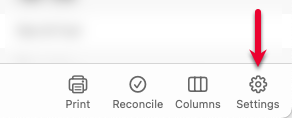
- In the Account Settings screen, click Bill Pay.

- In the Bill Pay tab, review if the Bank Bill Pay status is set to On. If you don't have Bill Pay enabled with your bank, but the status in Quicken is On, you will need to turn it off.
Please let me know how it goes!
Quicken Kristina
Make sure to sign up for the email digest to see a round up of your top posts.
0 -
I am not using Bill Pay and the Bill Pay Tab is not an option for the accounts in error.
0 -
I am also getting this error. The problem seemed to begin when I upgraded Quicken to version 8.4.2. Do you have any eta on a resolution? I am not using Bill Pay and the Bill Pay option is not available.
0 -
Thank you for your replies @OldSchoolExec & @Oskie,
Since the troubleshooting from the article did not correct the issue, the next step is to reach out to the financial institution directly for further assistance. If you reached out to them and they were unable to help, please let me know.
Thank you!
Quicken Kristina
Make sure to sign up for the email digest to see a round up of your top posts.
0 -
Hello All,
We have forwarded this issue to the proper channels to have this further investigated. In the meantime, we request that you please navigate to Help > Report a problem and submit a problem report with log files attached in order to contribute to the investigation.
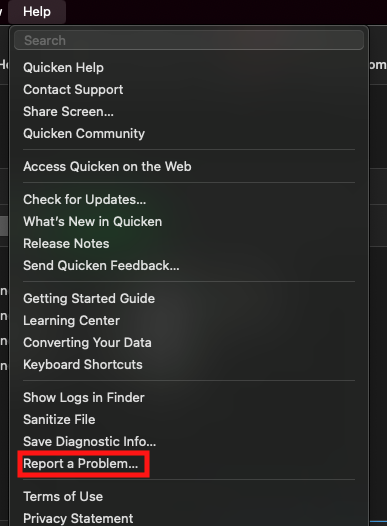
While you will not receive a response through this submission, these reports will help our teams in further investigating the issue. The more problem reports we receive, the better.
We apologize for any inconvenience!
Thank you.
(CTP-16212)
Quicken Kristina
Make sure to sign up for the email digest to see a round up of your top posts.
0
