LendingClub transactions not downloading (QMac)

Comments
-
Yes, I'm also seeing this from quicken on mac.
0 -
Hello @dogsarecool,
Thank you for letting us know you're also encountering this issue. I can see that you already reached out to Quicken Support and did troubleshooting with them. They recommended that you contact LendingClub directly for assistance. Was LendingClub able to help?
I look forward to your reply!
Quicken Kristina
Make sure to sign up for the email digest to see a round up of your top posts.
0 -
Unfortunately, not really. LendingClub told me to contact Intuit for this problem. I told them that there have been multiple reports of this issue and they said they would "relay your concern to our Operations team"
0 -
Thank you for your reply,
Since the financial institution wasn't able to help, let's try some additional troubleshooting steps from our article on missing transactions/transactions not downloading:
Be sure to follow these steps in order:
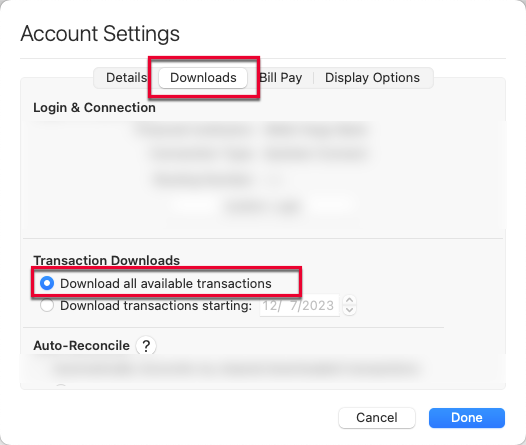
1. In the affected account, click the Settings icon in the bottom right corner of the screen. Go to the Downloads tab and, under Transaction Downloads, confirm Download all available transactions is enabled.
2. Refresh your online account information by clicking on the Update Icon, located on the upper left-hand side of Quicken. Follow any on-screen instructions to complete the account update.
3. Confirm that the Sort Order in your account is by Date; just click the top of the Date column in your account register. It's possible the transactions are in your register, but not where you thought they'd be.
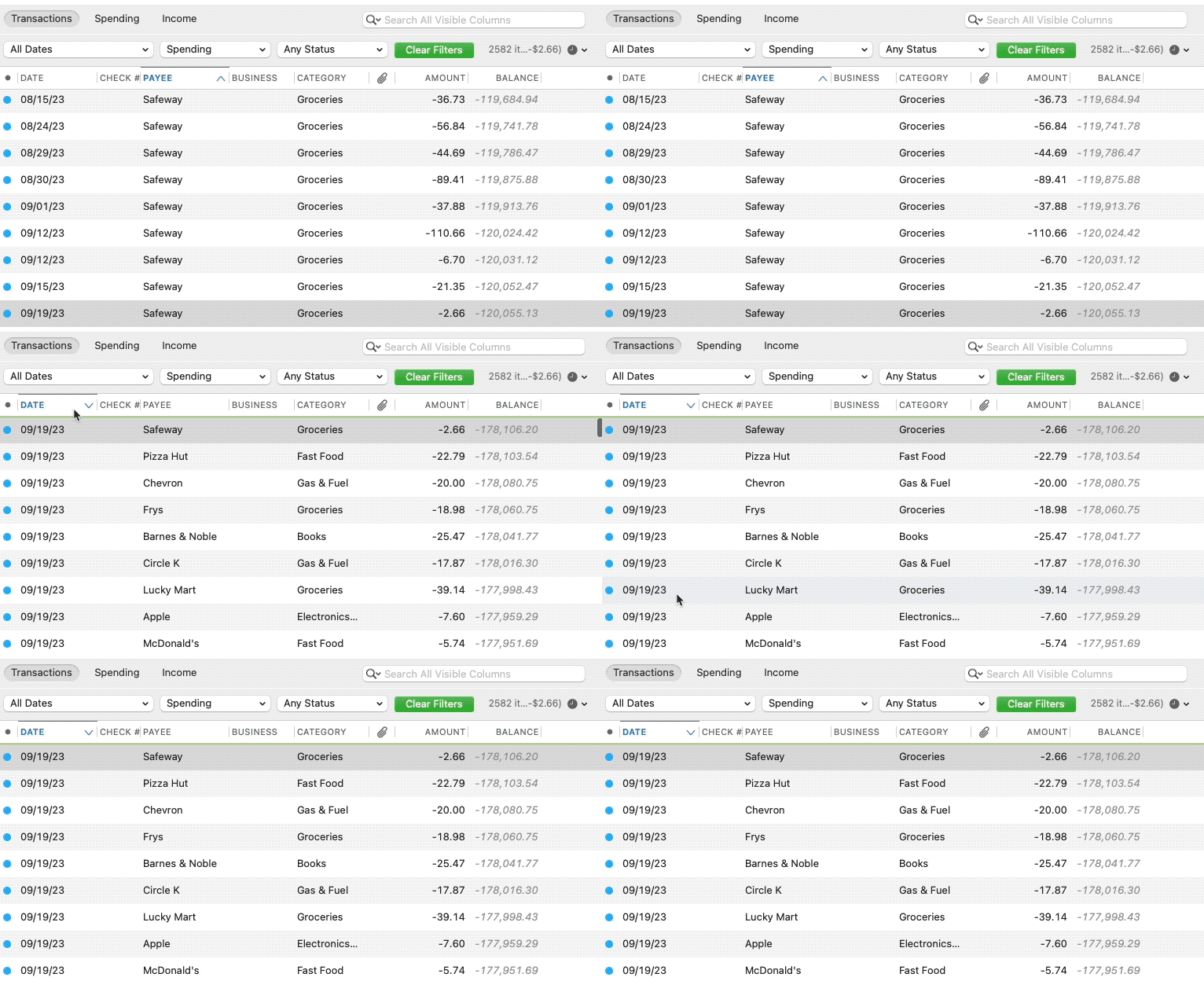
4. Click the Clear Filters button to the right of the account register’s filter dropdowns. This will confirm that there is no filtering in your account register.
5. Click Columns in the bottom right of the register, then check the Statement Payee box. This will allow you to search for the downloaded Payee name to confirm that a transaction was not renamed unexpectedly.
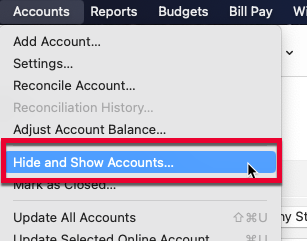
6. Go to Accounts > Hide and Show Accounts…. You can confirm if missing transactions have been downloaded into a hidden account by unchecking the Hide In Lists box next to the account that is marked as hidden.
Please let me know how it goes!
Quicken Kristina
Make sure to sign up for the email digest to see a round up of your top posts.
0 -
unfortunately, no luck with any of those.
0 -
Thank you for your reply,
I can see that you already contacted Support and they said it's a known issue. The issue was recently reported for Quicken Simplifi, and I'm working on getting Quicken Classic added to the ticket, since it's happening in Quicken for Mac and Quicken Windows also.
Thank you for sending a Problem Report with log files attached. While you will not receive a response through this submission, these reports will help our teams in further investigating the issue. The more problem reports we receive, the better.
Thank you!
(CBT-1018)
Quicken Kristina
Make sure to sign up for the email digest to see a round up of your top posts.
0 -
Following up on my previous post,
We now have a Community Alert for this issue. Please bookmark the alert to be notified of updates, once available, and to know when the issue is resolved.
Thank you!
(Ticket #12213512)
Quicken Kristina
Make sure to sign up for the email digest to see a round up of your top posts.
0 -
The issue appears to be resolved for me.
0 -
Thank you for the update,
I'm glad to hear the issue appears to be resolved!
If you need further assistance, please feel free to reach out!
Quicken Kristina
Make sure to sign up for the email digest to see a round up of your top posts.
0

