Care Code: invalid_grant

I've been trying to connect to Bank of America - Quicken for the past two days.
The authorization works, but then it ends with
Please try again later.
Care Code: invalid_grant
Details:
Re-authorization required by user for partnerUid: bofa_dda and intuitProperty: quicken
I've sent reports in, but I haven't seen it on the known issues.
Ian
Best Answer
-
I found the solution by chance. Instead of using Bank of America - Quicken, I tried Bank of America Credit Card. And, THAT WORKED!
Ian
1
Answers
-
Hello @iangoh99,
Thank you for reporting the issues you are seeing.
Sometimes the reauthorization process needs Quicken's access to your accounts to be completely revoked and reestablished. Please follow the steps below to go through the entire process.
1. Save a Backup. Steps can be found in this article if needed.
2. Disconnect ALL Bank of America accounts in Quicken. Here are the steps on how to do that.
3. Revoke Quickens Third-Party Access from the Bank of America website.
4. Add accounts back into Quicken.
To Reactivate Account(s)
- Select the account to open its register.
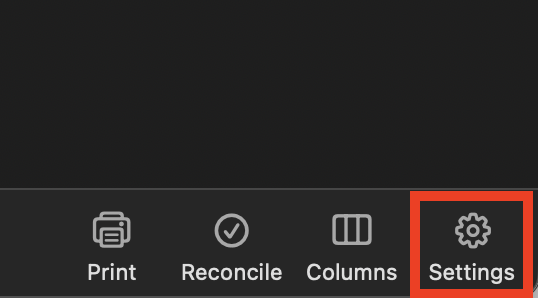
- Click the Settings gear in the lower right corner of the register.
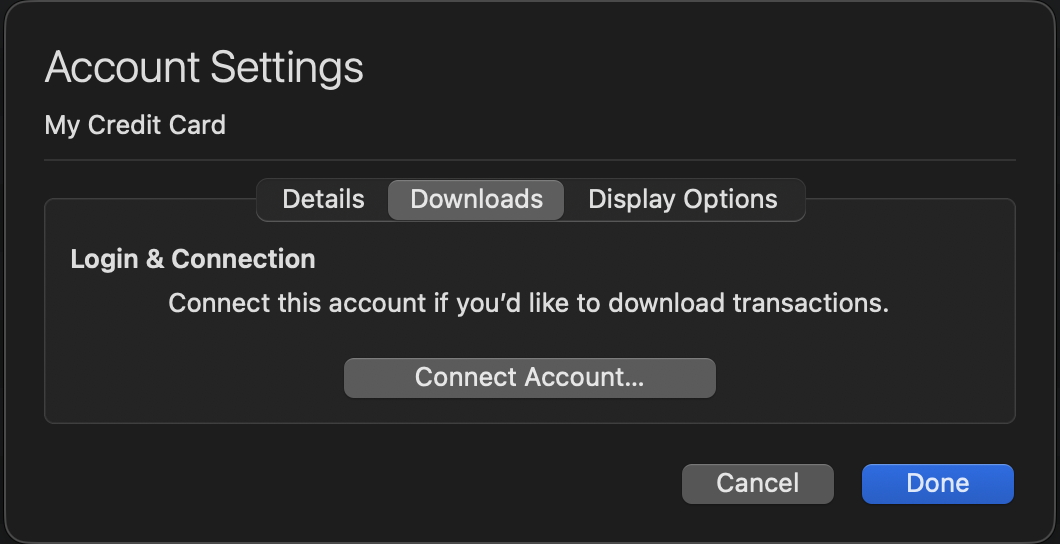
- Go to the Downloads tab.
- Click the Connect Account... button.
- Select the financial institution or type in the name to search for it.
- Click Continue and complete the flow.
- Choose LINK on the screen displayed after Quicken finds the available accounts at the financial institution for your login credentials, and carefully link to your existing Quicken account(s).
- Click Continue.
Once back in Quicken, you will want to make sure you choose the "LINK to existing" option for all accounts that are already in Quicken.
Let us know if this resolves the issue you are having.
Quicken Alyssa
Make sure to sign up for the email digest to see a round up of your top posts.
0 -
AFAIK, the security center says
You aren’t sharing info with third-party sites or apps
You haven’t consented to share your account information with any third-party sites or apps who use our secure data-sharing process.
0 -
Thank you for following up.
Interesting that your security center doesn't show your Quicken connection.
Were you able to go through the rest of the steps? The last connection attempt I can see was early this morning and resulted in an FDP-350 error internally. This message occurs when your security token has expired, and you need to re-enter your account credentials.
The steps I provided above should resolve this. In some cases, the financial institution limits connectivity to avoid excess traffic. This can lead to the reauthorization process not resolving the issue.
If the steps do not resolve the issue, please reach out to Bank of America to ask why the Quicken connection isn't showing from their end. If you are unable to get anywhere with the bank, go ahead and contact Quicken Support directly. They can investigate the issue further and process an escalation if needed.
Thank you!
Quicken Alyssa
Make sure to sign up for the email digest to see a round up of your top posts.
0 -
I found the solution by chance. Instead of using Bank of America - Quicken, I tried Bank of America Credit Card. And, THAT WORKED!
Ian
1 -
Thank you for following up and letting us know what worked for you!
This information may be helpful to others.
Thanks again!
Quicken Alyssa
Make sure to sign up for the email digest to see a round up of your top posts.
0
