cc-800 errors
Answers
-
[Removed-Rant/Speculation]
1 -
Happened AGAIN today. See post from January 28 for details. Really frustrating that Quicken can't fix this problem. ALL accounts get CC-800 error message except 1. We have 2 separate accounts and logins at that credit union - 1 of them got CC-800 and the other is the single account that didn't get the disconnect error message. Kinda proves that it's not their problem, but it's Quickens. Need resolution and date for correction.
DavidS
0 -
Well, its been an entire month i have been getting these errors. No end in sight. I have tried everything support and community members have suggested. I have done a complete unistall and reinstall on both of my computers. Before you ask, support, I do not share data between computers. I checked to see if this started after a windows update. I am trying to find the dates i updated my Chrome browser. I have always entered all banking, credit card transactions myself. I just use downloads to verify. If I can find a simple way to update investment info, I would have no real use for downloads, hence no use to renew my Quicken subscription. I turned off auto renewal I am not going to pay for something that doesn't work
0 -
Hello All,
Thank you for continuing to update this thread with your progress.
This issue has been escalated internally and is still being worked on. We do not have an ETA as to when it will be resolved.
If you have not already done so, and would like to contribute to the investigation of this issue, you can go to Help>Report a problem>Send to Quicken from within your Quicken software and send over your log files.
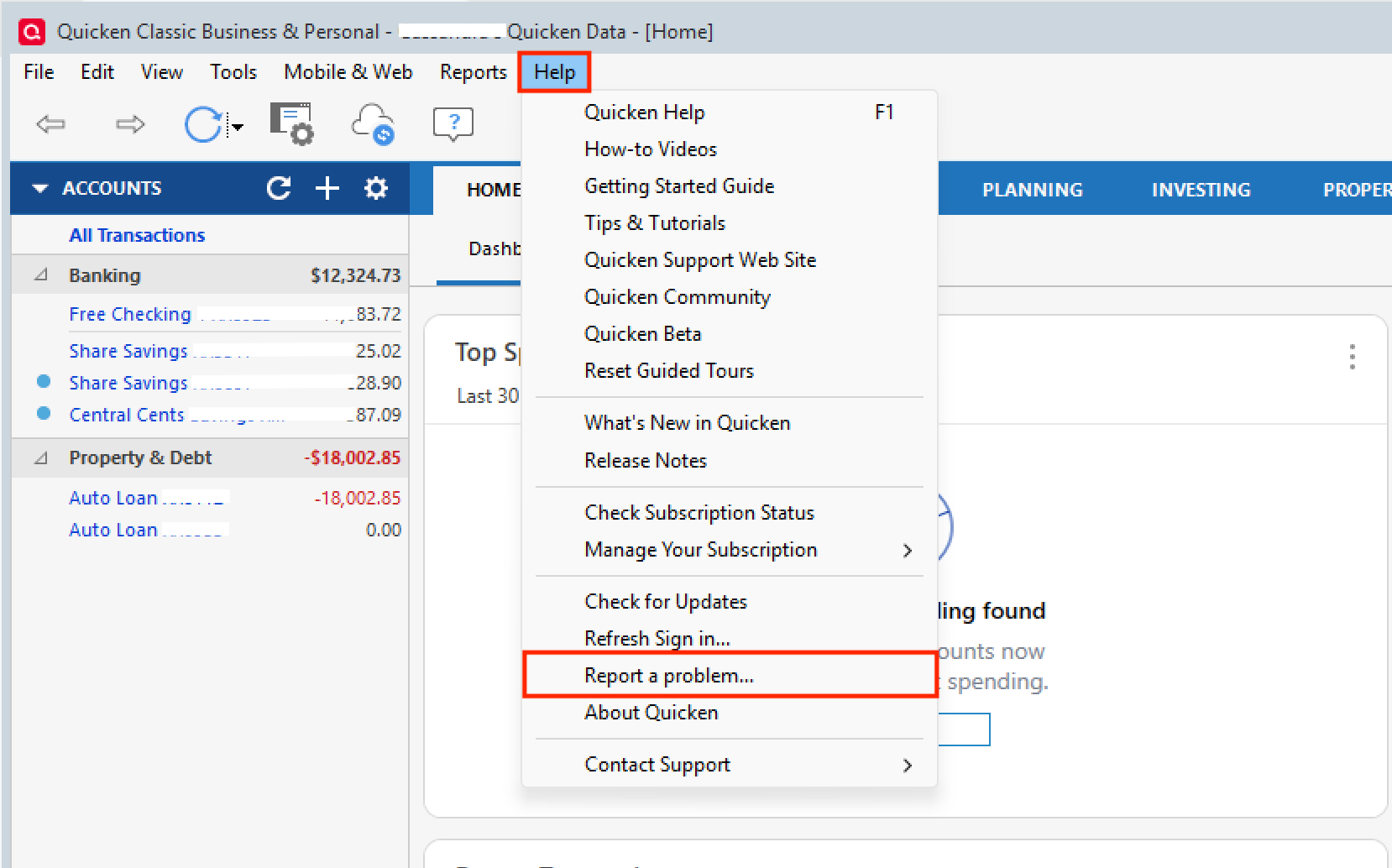
If you do send these over, let us know so we can get them added to the escalation ticket.
Thank you!
[CTP-16114]
Quicken Alyssa
Make sure to sign up for the email digest to see a round up of your top posts.
0 -
Looks like it needs to be escalated higher to get the proper experts assigned to the problem and get it corrected. Wasted more hours today to reconnect every account.
David
0 -
I have 9 bank accounts setup for online updates (all use Express Web Connect+). 8 of them are BofA. These continue to have errors after every One Step Update. Going through the "Reset" or "Deactivate" or "Fix it" options all lead to the same dialog process. The accounts in the update are displayed, but each time some show as "linked to existing", some as "add", etc. After specifying (or verifying) the linked accounts, I submit the update and think it is ok. However, my spouse and I have 2 credit cards with BofA under our own names (not joint). For this reason, I have to go through the process to relink under each user / login separately. When I do this, it fixes the one for the specified user / login, but then disables the other. Both user ID's / logins were originally specified in the Vault, but it now shows passwords are not required for this institution. I assume this is because of the new authentication protocols. This has become a vicious circle; I hope this piece of information might help the Development Team if there are any links that are being overlooked. I am one of the many who have "reported a problem" to Quicken.
Quicken user since 19931 -
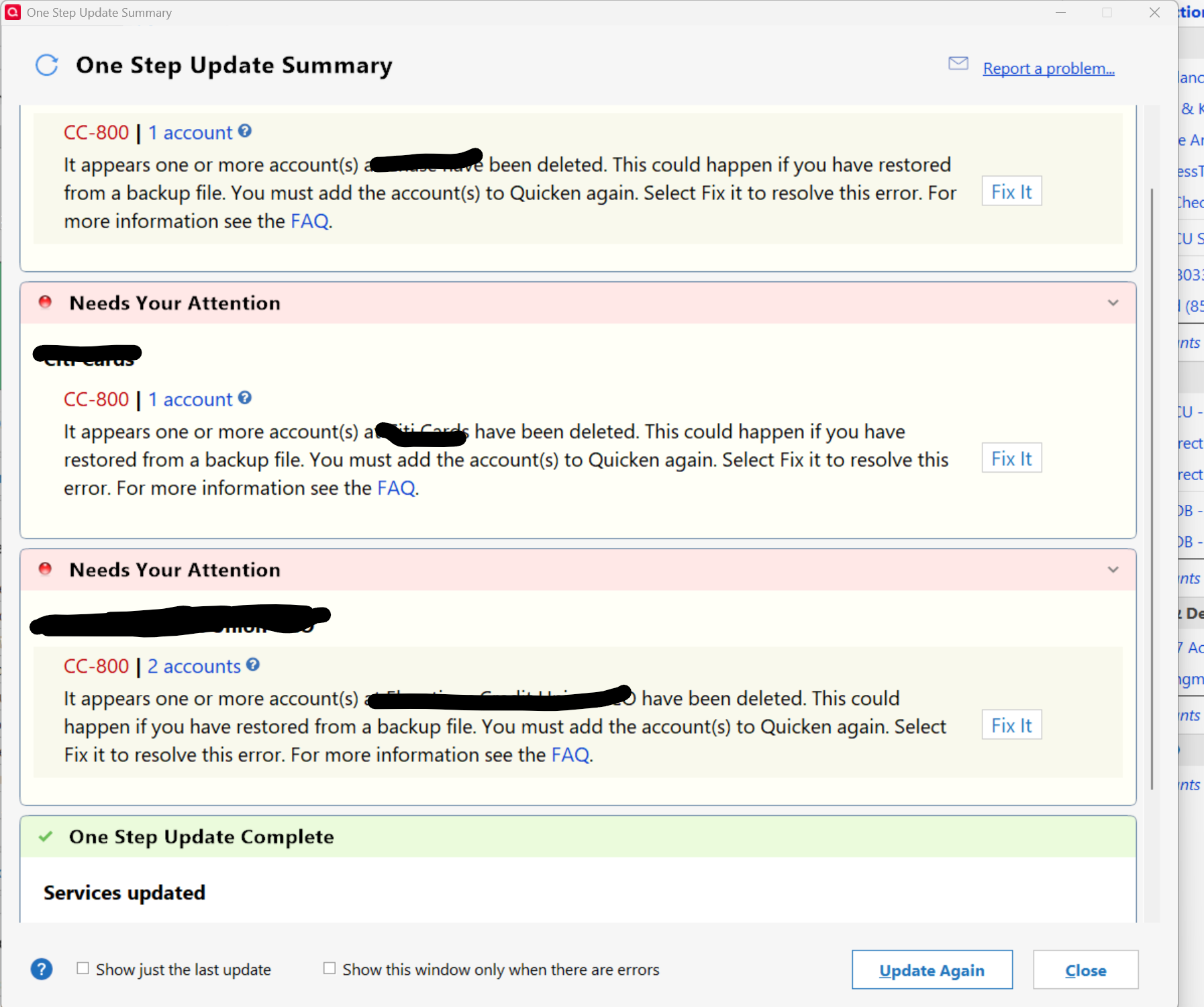
Here we go again and did a REPORT A PROBLEM. PLEASE GET THIS FIXED.
This has been good until adding my checking back into OSU this morning.
 0
0 -
I started having this problem on about Jan 29th with one credit union for One Step Update. This credit union uses Express Web Connect. I've run the validation and super-validation operations. No help. I've deactivated all accounts and reactivated. No help. I've deactivated all accounts and deleted the financial institution name and account number from the General tab of the account attributes thus forcing the re-authorization step. Each time the reactivation step proceeds correctly finding the accounts and activating them but a subsequent One Step Update still returns the CC-800 error.
I've looped in someone from the credit union's digital operations team about this problem too.
PS. I don't have this problem with any other institution including another credit union that also uses EWC. Also, all data files are local to my computer. None are on any cloud data services.
0 -
Just got the good news. I will not get cc-800 errors for my 3 Marcus by Goldman Sachs accounts anymore,
0 -
Hello All,
Thank you for adding to this discussion and keeping this thread active.
I have gathered the logs sent and added them to the escalation ticket.
Thanks again!
Quicken Alyssa
Make sure to sign up for the email digest to see a round up of your top posts.
0 -
It looks like some progress has been made. When I performed the one-step-update, after the reauthorization, it presented a different screen with all of my accounts, most with the proper links to the Quicken accounts. A few I had to 'add'. It took a couple of tries, including the need to use my spouse's logon to reauthorize their credit card, but otherwise, it appears to be updating as expected.
Quicken user since 19930 -
From my experience, the problem seems to be fixed. I have been able to successfully download all accounts for the last couple of days without any reauthorization requests or error messages. Hope this is true for everyone. Kudos to the Quicken team for getting this fixed.
[Edited-Readability]
Quicken user since 19930 -
Robert,
Maybe it is working to your computer, but it is not working on my 2 computers. I am going to withhold the kudos for now. Also, I am fairly certain that if Quicken support solved the problem, they would have surely sent an annuncement message. Did you or your computer make any changesin settings or whatever, that could have solved the problem ?
0 -
Hi Jim
No, I did not make any changes in my computer. I did notice in the "One Update Settings" screen that displays when you initiate OSU, that the bank accounts listed have new descriptions in parenthesis following the bank name. They have an 'XX' prefix, e.g. Bank of America (XX-Adv Plus Banking….). I have seen something similar in the past when there was a similar problem. It appears like some kind of new link / rename of the accounts in the back-end, like they established a new or temporary link to the financial institution. I agree with you that I assume Quicken would send out a broadcast message if it was truly fixed. Maybe some progress.
Quicken user since 19930 -
Jim,
One additional piece of info -
I reported a similar problem with error CC-506 a few days ago. Quicken_Alyssa mentioned that I should completely deactivate download for all of my accounts in OSU (not just reset, or follow the "continue with fix" options), and then revoke any authorizations at the financial institution (in my case, Merrill Lynch). I did that, and then re-enabled all of my accounts for download. When I did that, the initial screen came up with all of my accounts, and after the authorization screen, it had all but one setup and linked correctly. I did a second OSU, and the remaining account was linked and updated. Hope this helps.
Quicken user since 19930 -
Hello All,
Thank you for adding to this discussion. I am happy to hear that some are finding a resolution to this issue.
For those of you still experiencing this, the escalation ticket remains open. We do not have an ETA as to when it will be resolved, and we appreciate your patience.
Thanks again!
[CTP-16114]
Quicken Alyssa
Make sure to sign up for the email digest to see a round up of your top posts.
0 -
Finally, I am no longer getting the cc-800 errors on all accounts. I have been able to download transactions for four days in a row without a problem. The cc-800 errors seemed to go away the same time support fixed the cc-601 errors for Fidelity, I do not know if one fixed the other, or separate fixes It has been since the first of year for the cc-800 errors
0 -
Great to hear!
Quicken user since 19930 -
@Jim,
Thank you for coming back to let us know the CC-800 errors have been resolved for you.
If you need more help, you know where to find us!
Thanks again!
Quicken Alyssa
Make sure to sign up for the email digest to see a round up of your top posts.
0

