Fidelity Cash Management account not showing up

I already have two Fidelity accounts hooked up to Quicken Mac and they work great.
I added a new Cash Management account on the Fidelity website. I then went to Quicken, clicked (+) and told it to add a new Fidelity account. It then sent me to fidelity.com to authorize things.
I did so. I approved everything and checked off the approval to see the new account. But Quicken insists that there are only two accounts. It’s not seeing the third.
How do I get Quicken to see my new account?
Answers
-
Thank you for sharing a detailed description of your experience.
I have some follow-up questions for you.
- How new is this account?
- Are there transactions in this account?
Sometimes the reauthorization process needs Quicken's access to your accounts to be completely revoked and reestablished. Please follow the steps below to go through the entire process.
1. Save a Backup. Steps can be found in this article if needed.
2. Disconnect ALL Fidelity accounts in Quicken. Here are the steps on how to do that.
3. Revoke Quickens Third-Party Access from the Fidelity website.
4. Add accounts back into Quicken.
To Reactivate Account(s)
- Select the account to open its register.
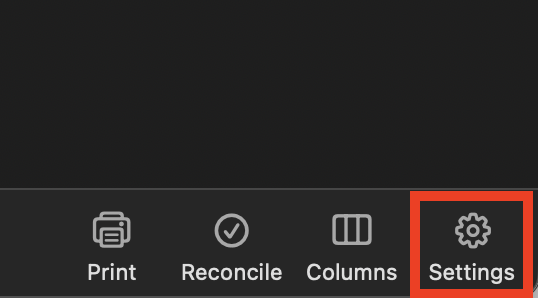
- Click the Settings gear in the lower right corner of the register.
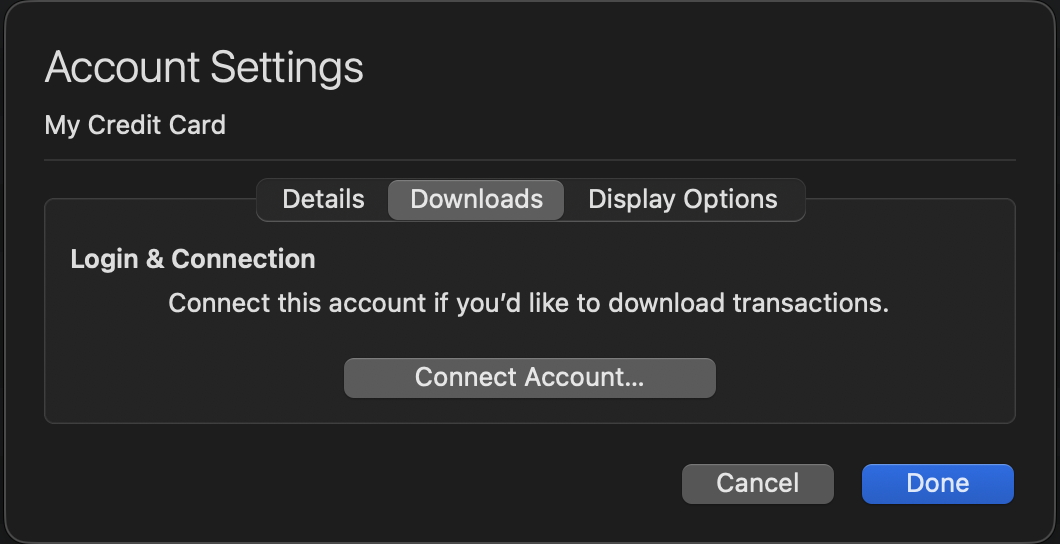
- Go to the Downloads tab.
- Click the Connect Account... button.
- Select the financial institution or type in the name to search for it.
- Click Continue and complete the flow.
- Choose LINK on the screen displayed after Quicken finds the available accounts at the financial institution for your login credentials, and carefully link to your existing Quicken account(s).
- Click Continue.
Once back in Quicken, you will want to make sure you choose the "LINK to existing" option for all accounts that are already in Quicken.
Let us know if this resolves the issue you are having.
Quicken Alyssa
Make sure to sign up for the email digest to see a round up of your top posts.
0 -
Thank you for the reply. It turns out that trying one more time today worked, even without disconnecting and reconnecting.
Shame that a Cash Management account can’t be classified as a Checking account in Quicken.
2 -
Hi Avi Dee, I am having the same problem. How long after opening the cash management account did it finally connect in Quicken. My account is still showing my initial deposit as not yet being “settled” so I’m wondering if this is what is causing the account not to download into Quicken?
0 -
I agree, I use my Fidelity Cash Management account as my main checking account. I'd like to be able to change the account type to checking. I don't hold investments in this account, it shouldn't be in the brokerage category.
0 -
if you go into account settings in Quicken and enable “show cash”, a second account will show in quicken that behaves as a checking account
0 -
By law, it MUST be in the brokerage category. Fidelity is a brokerage, not a bank, and by law they CAN'T offer a true checking account … but rather a MMF account that acts much like a checking account.
There are minute, very legalistic differences, but in extraordinary circumstances, the can matter.
BTW, QWin has a "Show cash in a checking account" option that removes all of the cash transactions from your taxable brokerage account and creates a pseudo-checking account that ACTS exactly like a bank account.
I believe that there might be a QMac feature request for that same option. You might search for it here.
Q user since February, 1990. DOS Version 4
Now running Quicken Windows Subscription, Business & Personal
Retired "Certified Information Systems Auditor" & Bank Audit VP1 -
I recently started using Fidelity Cash Account as my main checking account. I have two account entries in Quicken - one in the investing section for the account, but in the account settings, I selected "show cash in a checking account" which adds a checking account in Quicken. This is good.
However, I have not been able to get Quicken/Fidelity to download the transactions for this "pseudo-checking" account. Quicken shows the online balance correctly but never downloads any transactions. I've tried removing and re-adding the cash management account in the Fidelity / Quicken linkage … this makes no difference (the dialog box says that the account is linked to an existing account in Quicken, which looks correct).
Has anyone gotten this feature work? (i.e. getting downloads to this 'checking-like' account) ?
0

