How can the check register show my future scheduled deposit? (Q Mac)

I closed one bank account so am expecting a cashier's check in the mail. Allowing myself 5 days I added a future deposit of the check into my other bank account. Now it does not show up anywhere, even though I have the register set to show reminders for 14 days. I realized the amount was slightly off and wanted to correct it!
Answers
-
Hello @rupleys,
Thank you for sharing your experience.
Go to the Bills & Income tab.

Select Income.
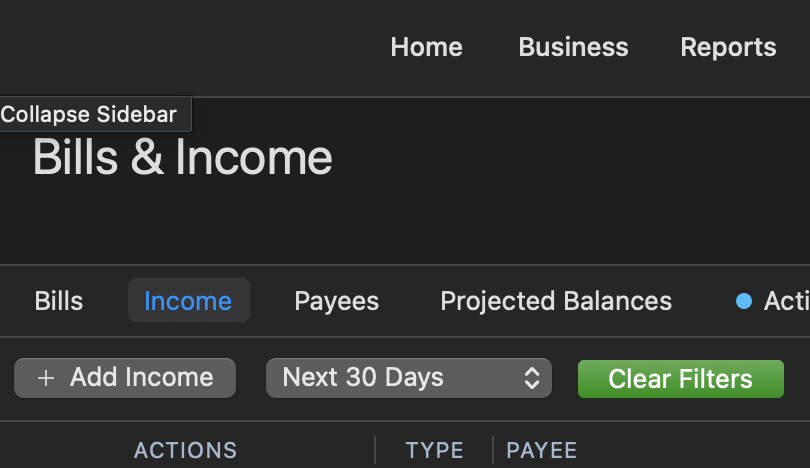
You should be able to see your deposit from here if it was a reminder that you set up. These are what show when you change the "show reminders" settings that you mentioned, in your register.
If this was not set up as a reminder, and you just entered a future transaction from the register, then it should be showing above or below a green line in the account register.
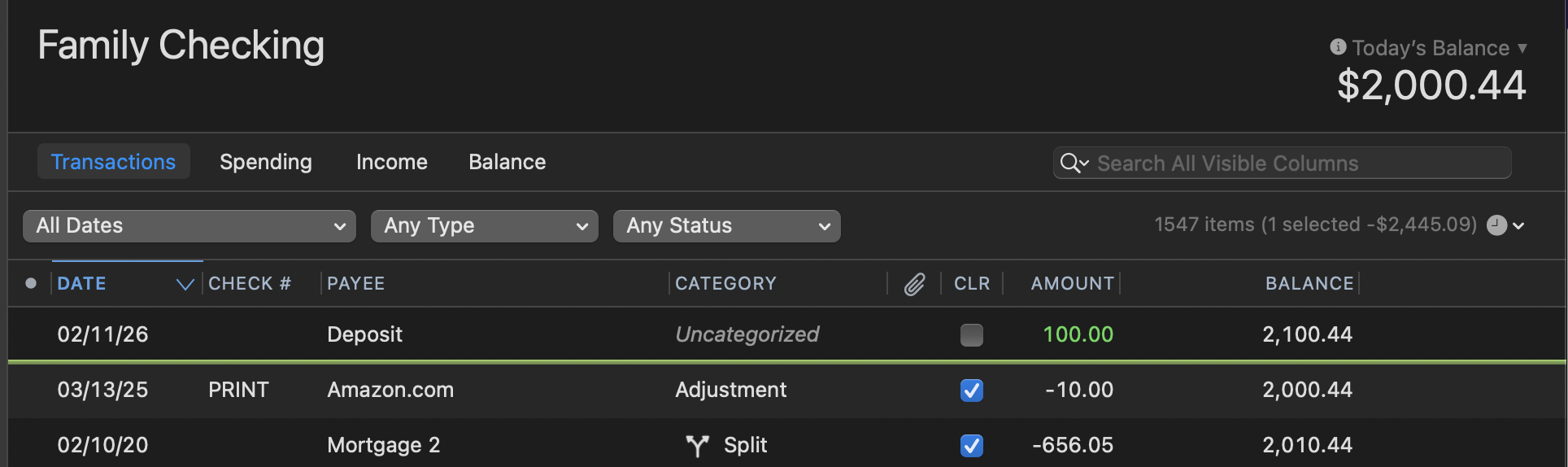
The green line separates current transactions and future transactions. Depending on the direction that the register is sorted, the transaction could be above or below the green line.
If you do not find the transaction there, there was most likely a mishap when manually entering it. Either a typo in the date, or it was entered into the wrong account register. You can try searching for it by amount, or Payee, or checking your other account registers.
Let us know what you find!
Quicken Alyssa
Make sure to sign up for the email digest to see a round up of your top posts.
0 -
Please do check that the Date Range Filter (the first filter in your account register view, see the Family Checking image above for an example) is set to All Dates and not one of the settings that excludes future dates.
Also make sure the register is correctly sorted by Date in either ascending or descending order. A triangle next to the Date column header, either "^" or "v", indicates that the register is sorted by Date. If there is no triangle, click the Date column header to sort the register by Date.
BTW, when closing the bank account, did the old bank not offer to electronically transfer the balance to your new bank account? All they would need for that is the Routing Number and Account Number from your new bank account's checkbook. Doing it that way you would have had your money within a day or two.
0 -
Also, around the start of a new year, it's easy to mistakenly enter a transaction in the wrong year; I entered a few transactions in January which "disappeared" until I realized I typed a month and day but not the year, and the year was defaulted to 2025 from the previous transaction — so I ended up creating a January 2025 transaction instead of January 2026 as intended.
Quicken Mac Subscription • Quicken user since 19930 -
Just checking in, we haven't heard back from you in a while.
Do you still need assistance?
Thank you!
Quicken Alyssa
Make sure to sign up for the email digest to see a round up of your top posts.
0 -
Hello again,
Checking in once more before this thread is closed.
Let us know if you still need assistance.
Thank you!
Quicken Alyssa
Make sure to sign up for the email digest to see a round up of your top posts.
0 -
Due to the lack of response, I went ahead and closed this post.
If you still require assistance, please feel free to start a new post.
Thank you!
Quicken Alyssa
Make sure to sign up for the email digest to see a round up of your top posts.
0


