Setting up on-line account access

I have been a Quicken user for a few years, i.e., since the mid-1990s. I run Quicken, version R64.30, build 27.1.64.30, on my Windows 7 PC. No, I will not ‘upgrade’ the OS version.
The problem is this: Adding an account for downloading does not work. I open the Add Account window, enter the Financial Institution, e.g., T. Rowe Price, click Next, and then absolutely nothing happens.
I am paying Quicken more than $80 per year (which pisses me off), but their software cannot do something basic it has done for decades. If there is any way to fix this, please point me to the instructions.
Answers
-
Please do HELP, About Quicken and tell us your "Subscription Valid thru" date.
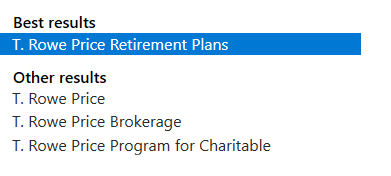
Also, TRP goes by several names in Q, which are you trying to use, and what type of account are you trying to connect?
Are you using a VPN or anything like that? Are you hard-wired to your modem? Where is your Q data file stored?
BTW, it's possible (but I'm not certain) that the age of your OS could be a contributing factor.
But I'll let someone else address that aspect.Q user since February, 1990. DOS Version 4
Now running Quicken Windows Subscription, Business & Personal
Retired "Certified Information Systems Auditor" & Bank Audit VP0 -
At first thought I figured it should work - perhaps try to reinstall the R64.30 patch and try again? That being said, according to Quicken support article, the system requirements are Windows 10 & 11 for the newer releases of Quicken. (to put that into perspective, many programs such as TurboTax no longer support Windows 10 !!!)
I recognize the disappointment but trying to get something to work on an unsupported platform is a temporary band-aid and you may experience further aggravations in the future. Given that these days one find significant discounts to purchase a Win11 license (~$20), I encourage you to consider that opportunity. Regards.
- Q Win Deluxe user since 2010, US Subscription
- I don't use Cloud Sync, Mobile & Web, Bill Pay0 -
NotACPA: Thanks for the questions.
Quicken shows that the subscription expired on January 09, 2026, but on the very date, Quicken withdrew $82.55 from my bank account. I am not on a VPN, I have a hard-wired fiber internet connection, and the file is stored on my computer.
I have tried several of the TRP listing and none have worked. I also tried to set up an account with a different firm and that also didn't work.
In terms of Quicken's only supporting the new versions of Windows - is it possible to get an older version and turn off updates?
0 -
In Quicken, click Help / About Quicken and tell us the Release number of your installed Quicken version. Also please tell us what Quicken knows about your expiration date.
It's quite possible that Quicken has not contacted the Quicken servers to download the latest expiration date from the servers. Typically, Quicken "calls home" when you run One Step Update or "Update Now" from a single account register.To refresh your Quicken ID sign in, please do this:
Go to Edit / Preferences / Quicken ID & Cloud Accounts
Click the "Sign in as a different user" link on the right side.
Sign out, then sign back in to your Quicken account using your existing Quicken ID.0 -
OK, let's start with that $82.55. Q Deluxe is $6.49/mo, which comes to $77.88. Was the remaining $4.67 sales tax?
Also, with that purchase, your version should have updated to current 65.29. Did it not? Have you done a download since that purchase? Making the payment isn't, by itself, sufficient to update your "Valid thru" info … you need to update the program itself.
SO, you might need to go to EDIT, Preferences, "Quicken ID and Cloud account" and "Sign in as different user" … but actually sign in using the same ID and pwd. The purpose being to refresh your credentials.
Q user since February, 1990. DOS Version 4
Now running Quicken Windows Subscription, Business & Personal
Retired "Certified Information Systems Auditor" & Bank Audit VP0 -
When I tried Help→Check for Updates, I got the error message 'The following files are in use', for DPIinfo.exe. I rebooted, etc., but that didn't work; so I installed the update manually. I am now running R65.29.
Weird: The Help→About Quicken indicates that my subscription expired on January 09, 2026; but Help→Check Subscription Services indicates that my subscription is up to date.
0 -
Weird: The Help→About Quicken indicates that my subscription expired on January 09, 2026; but Help→Check Subscription Services indicates that my subscription is up to date.
If you haven't done so already, do the Refresh Sign in from my earlier advice.
0 -
I feel like I am now totally hosed. As UKR suggested, I tried to "Sign in as a different user", but when it asked me if I wanted to sign out and I typed 'yes', I cannot sign back in. I have restarted Quicken and have logged in on line, but still, no access to my Quicken file. Also, the online account shows that my membership is good until next year.
0 -
I'd say it's time to contact Quicken Support on the phone during posted hours of operation and request help. Let them do a screen share session with you to review the situation on your computer, to determine the nature of the problem and to figure out how to fix it.
0 -
What a nightmare! To get things to work, I had to install some MS Edge something-or-other, then reinstall Quicken and reboot. Anyway, all appears to now be working.
0


