BrightDirections failing to connect on new 2FA step

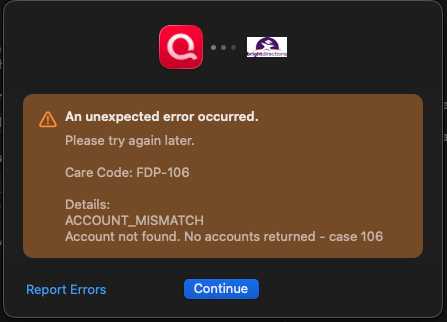
The connection fails with an ACCOUNT_MISMATCH error before it lets you enter the 2FA code they send. The account works fine and worked fine in Quicken prior to January 31.
Comments
-
Hello @ENS,
Thank you for providing the details. Based on the screenshot and internal review of your account, you're experiencing a FDP-106 error. This typically occurs when the bank has changed the account name on their website or switched to a new account (for example, due to lost or stolen accounts).
Please review this support article for FDP-106 for more information, and follow the troubleshooting instructions outlined below:
Step 1: Deactivate the account(s)
- Go to the Accounts menu and choose Hide and Show Accounts.
- Uncheck any accounts with this specific financial institution (FI) that are hidden in Lists.
- When complete, click on the account name for your account(s) in the Accounts toolbar in Quicken.
- Click the Settings icon in the bottom right corner of the screen.
- Select the Downloads tab.
- Click on Disconnect Account.
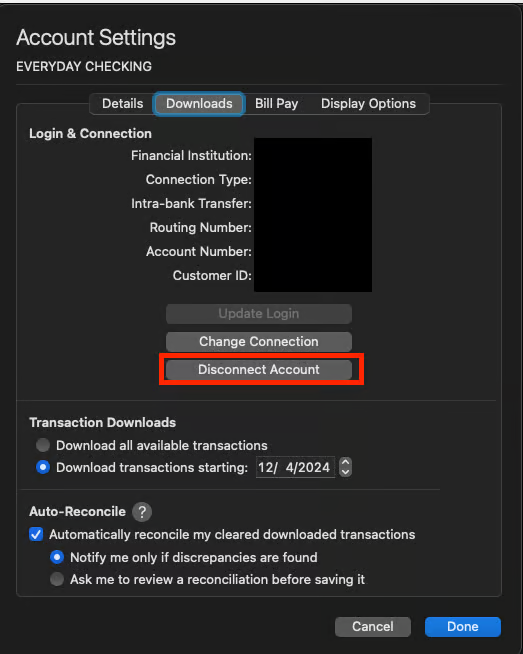
- Click Done. Do this on each account with this FI.
- Quit Quicken.
Step 2: Reactivate and link the account(s)
- Reopen Quicken.
- Go to Accounts > Add Account.
- Type the name of the financial institution, make the appropriate selection, then click Continue.
- Enter your login credentials and click Continue.
- When Quicken has returned all accounts discovered for this FI, very carefully LINK each of the found accounts to the appropriate account you already have set up in Quicken.
NOTE: This process will download 90 to 200 days of transactions, depending on your bank. If you find duplicate transactions in your account(s), you can delete these transactions from the account register.
If the issue persists after following these steps, please contact Quicken Support for further assistance.
Thank you!
-Quicken Anja
Make sure to sign up for the email digest to see a round up of your top posts.0 -
These are very similar instruction I receveived over 9 months ago regarding my Collegebound 529 account and nobody has been able to get me reconnected! You aren't providing me with solutions. I can log into the account using the same credentials from the web. I am not willing to disconnect another account so I can spend the next year in support hell getting no support again
https://community.quicken.com/messages/5402#Message_17033
0 -
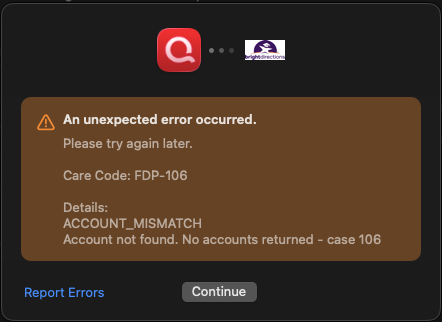
Great! Now the account won't reconnect! Just like I expected! Now the account can't connect anymore, but at least it won't complain on a daily basis anymore. Get me connected with support for a call.
 0
0 -
I deserve a refund for the year that the software hasn't been working and nobody has been able to solve it
0 -
@ENS I understand this has been such a frustrating experience.
Since the standard troubleshooting steps did not resolve the FDP-106 error and the account is now unable to reconnect, as mentioned previously, the next step will be for you to contact Quicken Support directly. At this point, Support will need to collect and review your connection logs and determine whether the issue needs to be escalated further.
If you still wish to request a refund, Quicken Support will be able to assist with that as well, as they have the necessary tools available in order to do so, which this channel does not.
You can review all available support options, including chat and phone support, in this support article.
Just as a heads-up:
- Chat support is available 7 days a week from 5:00 AM–5:00 PM PT
- Phone support is available Monday–Friday, 5:00 AM–5:00 PM PT (phone support will resume on Monday)
Thank you!
-Quicken Anja
Make sure to sign up for the email digest to see a round up of your top posts.0 -
I was able to reconnect BrightDirections today!
0 -
@ENS Thanks for the update! Glad to hear you were able to reconnect.
-Quicken Anja
Make sure to sign up for the email digest to see a round up of your top posts.0
