Can't Connect to US Bank and Wells Fargo

I recently purchased a new Windows 11 computer. I copied my data files from the old Windows 10 computer and installed Quicken Classic Business & Personal desktop, v. 65.29, Build 27.1.65.29. I got syncing error messages for most of my online checking, credit card, etc. accounts and was able to reset and use all but two. I cannot connect my two US Bank accounts and one Wells Fargo account. When I try, I get this Quicken error dialogue for both banks.
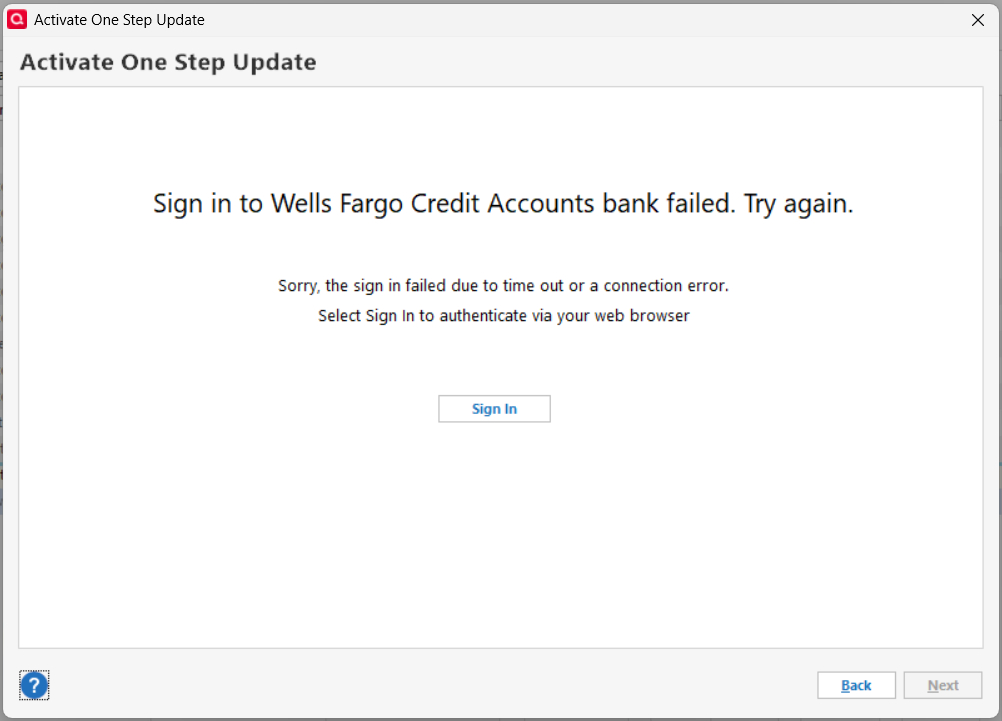
I tried connecting yesterday and got a different result. At US Bank I was able to log in, but the screen to authorize Quicken access to my bank accounts was blank; there was nothing to check or click. I called US Bank support and was told the problem is with Intuit. I have no access to Intuit support and have already called US Bank, so now I am here looking for help. I don't know if the failed logins and blank authorization screens are related or separate issues. Thanks for your help and advice.
Answers
-
You probably need to reauthorize with the financial institutions. As a first troubleshooting step, I'd try Resetting the accounts. If that fails, try deactivating and reactivating the accounts.
0 -
Ralph C — I have already done all that. The graphic in my original post is the result of every path I pursue, and it only happens with these two banks.
0 -
Hello @wrnoof,
Thank you for letting us know you're encountering this problem. Usually, errors like the one in your screenshot are caused by something interfering with the communication between the financial institution and Quicken. To troubleshoot this, please follow these steps:
- Backup your Quicken file.
- In your default web browser, check to see if you have any browser extensions/add-ons active.
- If you do have any active, especially ad blockers or pop up blockers, pause them while connecting your accounts.
- If that does not resolve the issue, temporarily set a different default web browser.
- Avoid using Brave or Duck Duck Go while authorizing your accounts, since they are known to cause this issue.
- If you use a VPN, please turn it off while authorizing your accounts.
- Some anti-virus programs have a safe banking feature that automatically pulls banking sessions into a custom browser. If you have an anti-virus with this feature, please pause that feature while authorizing your accounts.
I hope this helps!
Quicken Kristina
Make sure to sign up for the email digest to see a round up of your top posts.
0 -
Hello @wrnoof,
We haven't heard back from you in a while. Do you still need assistance?
Check back and let us know! Thank you.
Quicken Kristina
Make sure to sign up for the email digest to see a round up of your top posts.
0 -
I was able to solve the problem, but I can't recall the exact steps. I do recall "Reset Account" did not work. I think I had to go through the steps of creating a new online account and somewhere near the end of the process I was given the option of connecting to an existing Quicken account, which I did. If I recall correctly, that is what worked.
0 -
Thank you for the follow-up,
I'm glad to hear you were able to resolve the issue!
If you need further assistance, please feel free to reach out!
Quicken Kristina
Make sure to sign up for the email digest to see a round up of your top posts.
0


Categories
- All Categories
- 20 Product Ideas
- 34 Announcements
- 247 Alerts, Online Banking & Known Product Issues
- 19 Product Alerts
- 518 Welcome to the Community!
- 682 Before you Buy
- 1.5K Product Ideas
- 55.7K Quicken Classic for Windows
- 16.8K Quicken Classic for Mac
- 1K Quicken Mobile
- 834 Quicken on the Web
- 128 Quicken LifeHub