401k Reversal

Comments
-
I have a similar problem but cannot solve it that way. In my case, the end of year true up, resulted in Safe Harbor and employer matches being taken out. Fidelity shows those as Negative Contributions and Adjustments which don't seem to work when they auto downloaded to quicken. How should I enter those transactions and where do I show the cash going since it went back to the company not to me.
0 -
Hello @douglascherry,
Thank you for reaching out! To clarify, these are matching contributions from earlier that were taken back by the company/employer? How did the negative contributions and adjustments from Fidelity download into Quicken? Are there any tax implications which Quicken would need to correctly reflect?
I look forward to your reply!
Quicken Kristina
Make sure to sign up for the email digest to see a round up of your top posts.
0 -
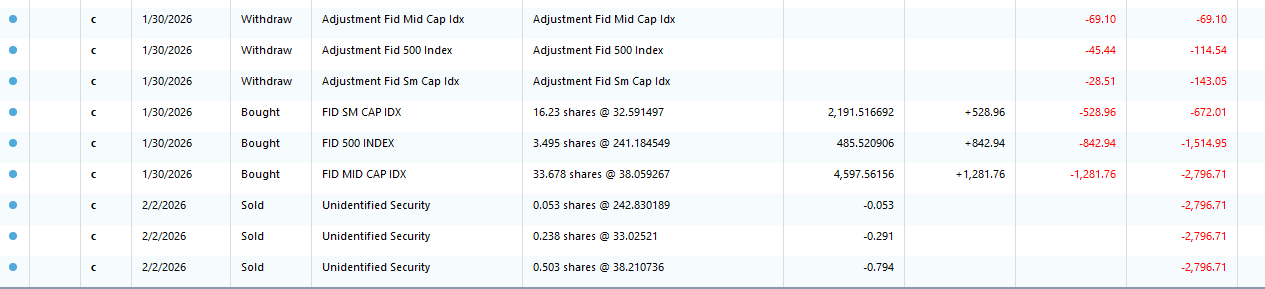
This first snip is how they came into Quicken:
This next snip is how they appear in Fidelity (copied into Excel first):
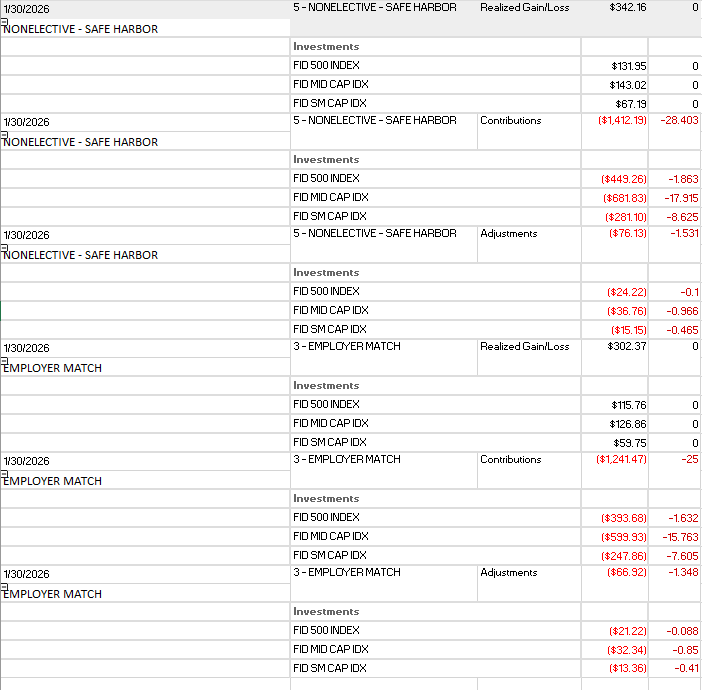
There are no tax implications because Safe Harbor and Employer Matches so the excess funds go back to the company and not to me.
Thank you
0 -
Thank you for your reply,
I notice your clip from Quicken shows the sell transactions downloaded as Unidentified Security. Is it possible that's what is causing the issue, or are those sell transactions unrelated?
The issue with "Unidentified Security" downloading into Fidelity 401k accounts is a known issue. You should be able to resolve it by following these steps from the Community Alert on the issue:
- Edit each affected transaction
- Open the register for the 401(k) account.
- For every transaction tied to Unidentified Security, edit the Security field to the actual security name shown on the bank website.
- Remove the placeholder
- After all affected transactions are corrected, delete the “Unidentified Security” from your Security List.
- Re-match holdings
- Go to Tools > Online Center and choose Fidelity Investments.
- Select the 401(k) account, then open the Holdings tab.
- Click Compare to Portfolio.
- When prompted, proceed with Compare to Portfolio and match to the correct security.
Ensure every transaction previously pointing to “Unidentified Security” is corrected before deleting it. If the correct security name isn’t obvious, then confirm it from your Fidelity website holdings page.
Please let me know how it goes!
Quicken Kristina
Make sure to sign up for the email digest to see a round up of your top posts.
0 - Edit each affected transaction
-
Hello @douglascherry,
We haven't heard back from you in a while. Do you still need assistance?
Check back and let us know! Thank you.
Quicken Kristina
Make sure to sign up for the email digest to see a round up of your top posts.
0 -
Hello again,
Checking in once more before this thread is closed.
Let us know if you still need assistance.Thank you!
Quicken Kristina
Make sure to sign up for the email digest to see a round up of your top posts.
0 -
Hello again,
Due to the lack of response, I went ahead and closed this post.
If you still require assistance, please feel free to start a new post.
Thank you!
Quicken Kristina
Make sure to sign up for the email digest to see a round up of your top posts.
0

