Issue Adding Account on New File. Though Original File Works

Hi Quicken,
I have been using Quicken for over a decade plus. I recently explored Simplifi. Good product but Quicken Classic Premier is my preference due to investment options.
Ever since I tried Simplifi, I have had nothing but issues with Classic Premier.
- I have verified I am using my login credentials for Quicken Classic and not Simplifi.
- I have tried completely new install and rolling back to previous version of Quicken Classic Premier.
My issues: Quicken Classic:
- In my original file, I can add accounts.
- I wanted to create new second file. This is where the problems began.
- I get nothing but errors while trying to add new accounts. Yet I can go back to my original file with no issues. I have trouble shooting with the two bullets above. No success.
- I can add some accounts, but some will just not connect.
- I even tried purging all store passwords and cache in the original browser and using new second browser. Still same results.
At this point, I am not sure how to resolve it. I plan to try on another computer, when possible, but this point, I am hit roadblock on adding new accounts.
Comments
-
Hello @BCWC2C,
Thank you for reaching out! To help troubleshoot, please provide more information:
- Which financial institutions are you encountering this difficulty with?
- What errors are you encountering?
- What specific error message/code are you seeing?
- Do you have those same accounts connected in multiple Quicken files?
- Are you unable to add accounts, or do the accounts add, but then throw errors when you try to update them?
- If the financial institution requires you to authorize through their website, are you encountering any issues when you're redirected to the website to authorize?
- If you are encountering issues, which web browser are you using?
- Do you have any browser extensions, like ad blockers and pop up blockers paused?
- Have you tried temporarily setting an alternate browser as your default?
- If you use a VPN, have you tried turning it off?
- If you are encountering issues, which web browser are you using?
I look forward to your reply!
Quicken Kristina
Make sure to sign up for the email digest to see a round up of your top posts.
0 -
Comments line up with reply
1. First Community Credit Union of Houston
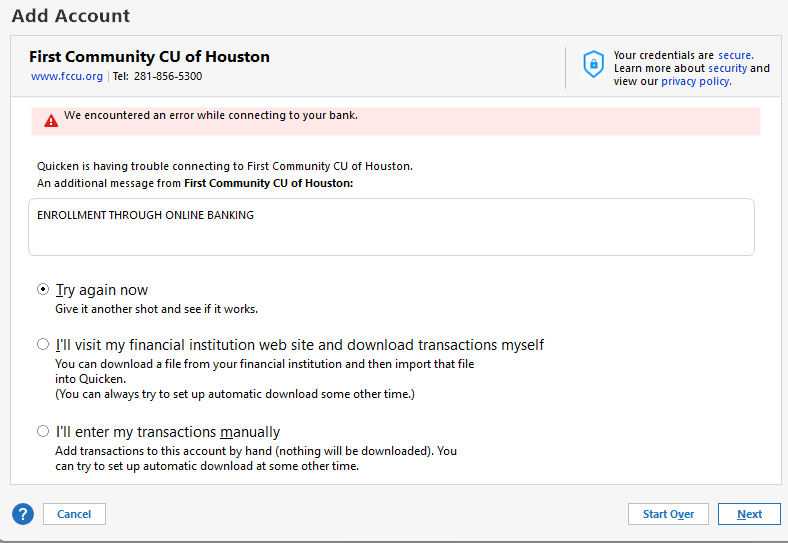
2. See Attachment
3. Yes. I was having issues on Classic. So, I thought, let me try Simplifi. No Issues with Simplifi. Its only Quicken Classic. Though the error I am getting was before I even had Simplifi account. I am hesitant to disconnect my Quicken Classic file since it will work sometimes. I tried to setup new quicken classic file before I disconnect current file for the fear I may not be able to reconnect. I can at least reset my old current file, but I have to reset almost weekly to keep it syncing.
4. I can add other institutions ie..credit cards, investments, etc… Its only this one intuition Classic version, not Simplifi which is strange.
5. Yes. I can log onto account in both Edge and Chrome browsers no issues.
5AI ) I just checked blocks and pops are not running in either Windows, Virus Software or browser. So just now, quicken let me add the account. Great!
Well. However, I get the same error when I try to add my spouse’s account which is a completely different login than mine.
5AII) Tried to separate browsers. Edge and Chrome.
5AIII) VPN is off.
 0
0 -
Thank you for your reply,
Since it works in Quicken Simplifi, but gives you trouble in Quicken Classic, I suspect what is happening is that you may be trying to connect via Direct connect in Quicken Classic. Based on your screenshot, Direct Connect requires you to do some form of enrollment through the financial institution before it will allow you to connect.
To correct this issue, you will either need to reach out to the financial institution to find out what enrollment is needed for Direct Connect, or you will need to connect the problem account using Express Web Connect.
If you choose to connect using Express Web Connect, please follow these steps:
- Backup your Quicken file.
- Navigate to Tools>Add Account.
- Search for First Community CU of Houston, and click the blue Advanced Options link.
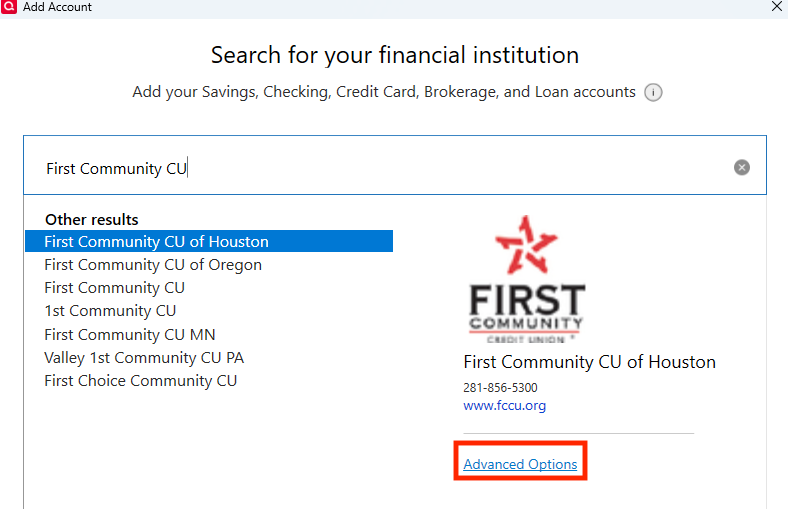
- Review the information screen, then click Continue.
- Make sure Express Web Connect is selected, then click Next.
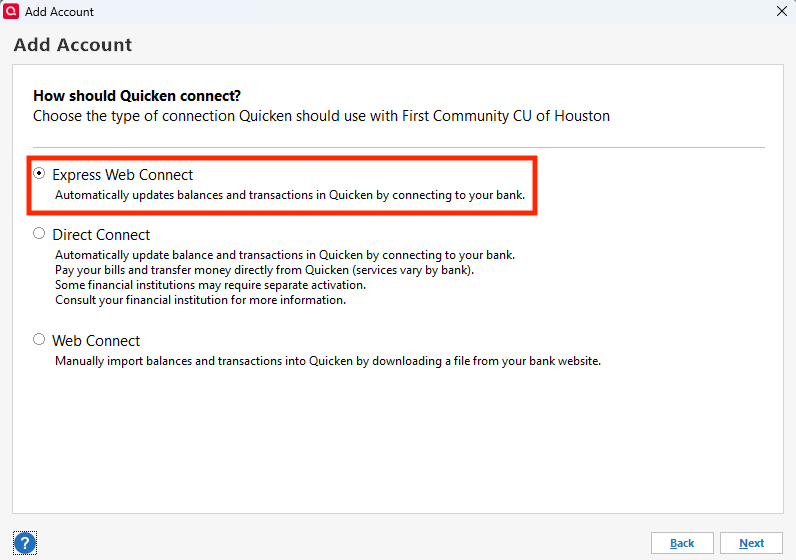
- Follow the prompts.
- Carefully link the account to the correct nickname in Quicken.
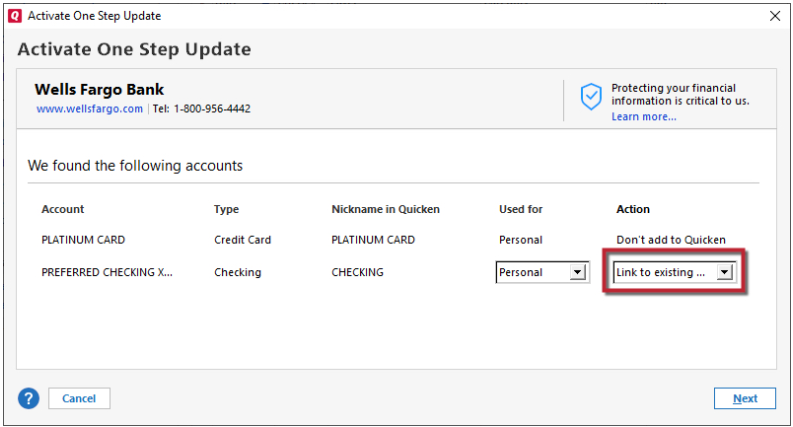
I hope this helps!
Quicken Kristina
Make sure to sign up for the email digest to see a round up of your top posts.
0 -
Hello @BCWC2C,
We haven't heard back from you in a while. Do you still need assistance?
Check back and let us know! Thank you.
Quicken Kristina
Make sure to sign up for the email digest to see a round up of your top posts.
0 -
Hello again,
Checking in once more before this thread is closed.
Let us know if you still need assistance.Thank you!
Quicken Kristina
Make sure to sign up for the email digest to see a round up of your top posts.
0
