Discover Card and Capital One.

Starting January '26, you will begin managing your Discover card account in the Capital One app and on the Capital One website. I'm assuming that we will need to download to Quicken through Capital1 when this change occurs. Has Quicken given any advice on how we should go about making this change in Quicken?
[Edited-Readability]
Comments
-
Hello @Gene Castorina,
Thank you for sharing this with us!
While we are aware there was a merger/acquisition, we have not yet been notified of the change you have mentioned taking place.
Did you receive some notice of this? If so, you can share it here, and I can pass it along to our teams internally.
I would also recommend reaching out to the financial institution to ask if they foresee a transition happening with their connection in Quicken. When changes like this happen, updates are only planned/made after the bank contacts Quicken to provide the information.
Let us know what you find!
Quicken Alyssa
Make sure to sign up for the email digest to see a round up of your top posts.
0 -
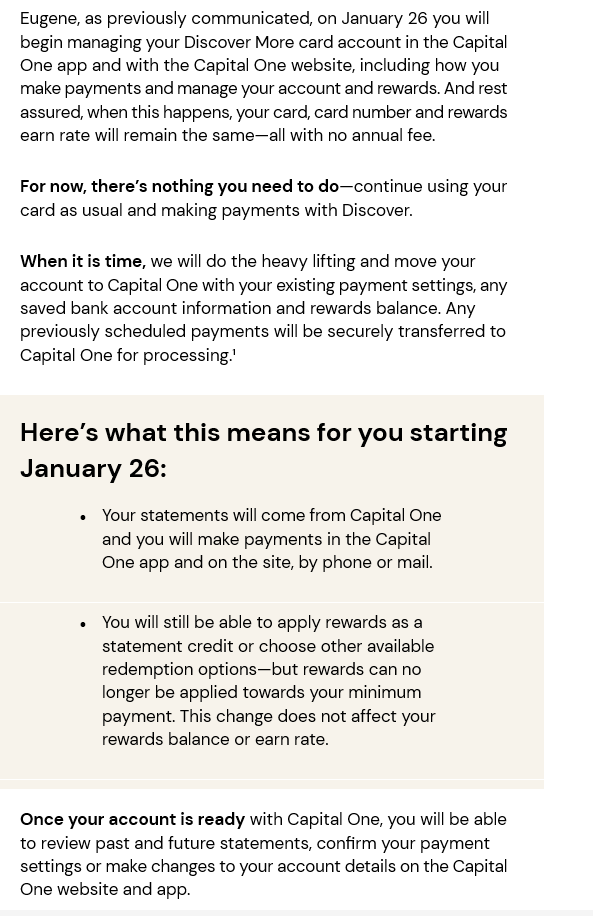
Attached is an email I have received from Discover. I have not seen anything from Capital One other than the new terms and conditions. There is nothing on there web site. In my account, it shows that Quicken is a linked app.
1 -
Thank you for following up and sharing that!
Unfortunately, I am unable to open the attachment. Could you possibly take a screenshot of the email?
If needed, please refer to this Community FAQ for instructions on how to attach a screenshot. Alternatively, you can also drag and drop screenshots to your response if you are not given the option to add attachments.
Thanks again!
Quicken Alyssa
Make sure to sign up for the email digest to see a round up of your top posts.
0 -
Here's the screen shot
 2
2 -
Thank you for sharing that!
I have passed this along internally to the appropriate teams. They will investigate the issue accordingly.
Thanks again!
Quicken Alyssa
Make sure to sign up for the email digest to see a round up of your top posts.
0 -
Capital One has now taken over Discover Credit Card, and I an unable to link my Quicken Discover Card account to the Capital One account. When I try to setup Online services, I'm prompted to use the bank hosted sign-in form. However, my only bank option is DiscoverBank. Capital 1 banking is not. How do I get around this obstacle?
0 -
I just selected "tools\add account" and selected Capital One card services. Authenticated my account and Quicken found the Discover account at Capital One and it was already defaulted to link it to my old discover account. It was pretty easy for me.
1 -
@Quicken Alyssa, The post at
says there are still open issues with the Discover migration. Can you or @Quicken Kristina update us about what issues are open? Quicken tells us that Discover is going to shut off their old connection method in 2 days. Thank you.
0 -
Hello All,
Thank you all for updating this thread.
The issues we have knowledge of are posted to that Alert. There are a small number of people who may fall under this Alert as well.
I would save a backup and try switching over. If anything goes wrong, you can restore the backup you saved.
Back up in Quicken for Windows
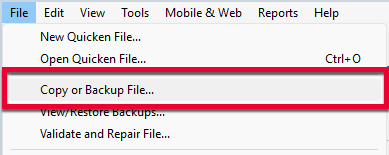
1. Select File > Copy or Backup File...
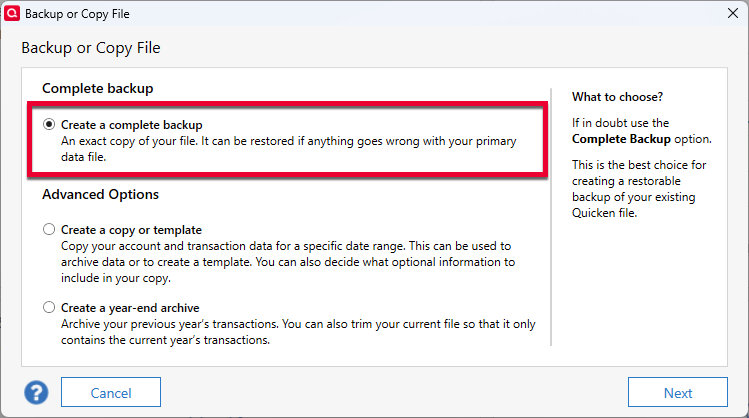
2. Select Create a complete backup and click Next.
3. To make it easier to identify your latest backup, you can put a check next to Add date to backup file name.
4. Quicken will show you the location where your backup will be saved, along with the name of the backup file (this is typically your Quicken file name followed by .QDF-backup).
- The default save location for backup files is C:\Users\[your name]\Documents\Quicken\BACKUP, and we recommend leaving this unchanged.
- If you need to change this location, click Change... then select a folder to save the backup to. After making your selection, click Save.
5. Click Create Backup.
Thank you for letting us know what worked for you. Glad to hear it went smoothly!
Were you able to get your accounts successfully migrated? Let us know if you still need help!
Thanks again!
Quicken Alyssa
Make sure to sign up for the email digest to see a round up of your top posts.
0 -
Just checking in, we haven't heard back from you in a while.
Do you still need assistance?
Thank you!
Quicken Alyssa
Make sure to sign up for the email digest to see a round up of your top posts.
0 -
I tried to update my Discover credit card transactions this morning. The process asked me to login in using the Discover site - again. I had previously successfully done this step. Anyway this morning it only downloaded my transactions for my MC credit card account. When I tried to do the update again, I the Discover credit card is no longer on the list of accounts to update. What to do now????
0 -
Hello @sms29785,
Thank you for adding to this discussion.
Please try the following steps below and see if it resolves the issue:
- Create a backup of your Quicken file first.
- Deactivate all Discover accounts in Quicken.
- Select the Tools menu and select Account List....
- In the Account List, select the account you want to deactivate, and then click Edit.
- In the Account Details window, click the Online Services tab.
- Click Deactivate next to the service you want to disable.

- Click Yes to the message confirming if you want to disable this service. Note: If you do not receive this message, additional information is available below.
- Click OK to the confirmation message.
- If you have an investment account that is linked to a cash account, you need to deactivate the online services from the investment account, which will automatically deactivate the linked cash account.
- Important: If you are deactivating/reactivating an account to fix an issue, you'll need to deactivate all the accounts with the affected financial institution that you have activated in Quicken (including hidden ones). Once they're all deactivated, then you can follow the steps to reactivate.
- Revoke Quicken’s third-party access from the Discover website.
- Reactivate the accounts in Quicken.
- Go to Tools > Add Account.

- Select the bank for the deactivated account(s). If prompted, select the connection method.
- Enter your credentials and click Connect.
- When the list of located accounts appears, choose LINK next to each account you want to reactivate.
- Click Next, then Done on the last prompt.
- Go to Tools > Add Account.
If you receive an FDP-324 error, please follow the steps outlined in this Alert.
Let us know how it goes!
Quicken Alyssa
Make sure to sign up for the email digest to see a round up of your top posts.
0 -
@Quicken Alyssa Thanks for the followup. I'm good with Discover.
Crossing my fingers for the BofA migration, which I'll attempt next week.
Bob
1 -
Thanks! That worked and I was able to download the appropriate transactions!
1 -
It is March 3, 2026 and I am still downloading my Discover transactions daily for the credit card and for my Discover Bank savings account. I received notice of the Capitol One takeover at some point but my daily activity has not changed at all nor have any of the brand identifications or icons changed to Capitol One. I guess they are not going to mess with what works until they have to.
I have been using Quicken for 30 years or so and while there have been glitches in these situations, they have always been solved successfully if not always quickly. Don't worry.
User since 1994. 36 current active accounts.
Quicken Classic Deluxe for Windows R62.16. Windows10 Pro (although "About" says Enterprise??)
1 -
Hello All,
Thank you all for following up!
I am happy to hear you are all downloading transactions successfully. If that changes, please let us know.
Thank you!
Quicken Alyssa
Make sure to sign up for the email digest to see a round up of your top posts.
0

