Quicken Shows the Wrong Paycheck Amount in Bill and Income Reminders

I set up my paycheck in Quicken using the paycheck wizard using the gross amount with deductions method. All of my payroll taxes, pre-tax deductions, and 401(k) contributions are set up in the reminder, and the Net Pay amount shows correctly in the "Track Paycheck" section.
However, in the Bill and Income Reminders widget on the Home screen, the amount field is always wrong when I open Quicken. Rather than showing a deposit as the net total of the income reminder, it actually shows my 401(k) contribution (Employee contribution + Employer match) as a negative value on the reminder. If I go to "Edit this and all future instances", change absolutely nothing, and hit "Done", then the reminders update to show the correct amount as an income for the deposit (my net pay) until I close Quicken. The next time I open Quicken, it reverts to the incorrect negative values.
I have tried validating and super-validating my data file and that doesn't fix the problem. I have also tried deleting and re-creating my paycheck reminder, and that also doesn't fix the problem.
I'm using Quicken for Windows R65.29. I've been having this problem for about 5-6 months, right about the same time as Quicken started to use the new bill pay system (I don't use bill pay at all).
Comments
-
Hello @tkecanuck341,
Thank you for letting us know you're seeing this issue. To help troubleshoot, please provide more information:
- If you have more than one paycheck reminder in your Quicken, does this happen with all of them, or just one?
- Is the reminder set to automatically enter, or to remind you to manually enter it?
- Do you keep your Quicken file directly on your local hard drive?
- Is it synced with any cloud service, such as OneDrive, iCloud, or Dropbox?
- Do you have Sync turned on in your Quicken file?
- You can check this by navigating to Edit>Preferences>Mobile & Web.
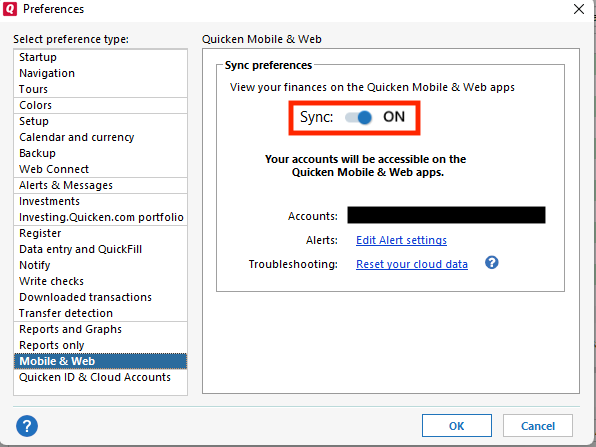
- If Sync is turned on, do you have your file set to Sync during One Step Update and/or when you exit Quicken?
- You can check this by navigating to Edit>Preferences>Mobile & Web.
I look forward to your response!
Quicken Kristina
Make sure to sign up for the email digest to see a round up of your top posts.
0 -
- Hello @Quicken Kristina,
- 1. I have dozens of monthly reminders (bills and income), but this is the only paycheck. This only happens with the paycheck (weekly), and it happens with every paycheck (the upcoming and all future). The reminder amount mostly sets to the 401k amount, but occasionally it shows $0.
- 2. It's a reminder. I manually enter it on payday. When I go into the "Edit Current Paycheck and Enter into Register" screen, all amounts are correct, including net pay. Only the reminder amount is incorrect.
- 3. Yes, my Quicken account is saved on a local hard drive.
- 4. No, it is not synced to a cloud location.
- 5. No, sync is not turned on.
0 -
Thank you for your reply,
I notice you put weekly in parentheses. Is your paycheck reminder set to a weekly interval?
Thank you!
Quicken Kristina
Make sure to sign up for the email digest to see a round up of your top posts.
0 -
Yes, I get paid weekly. The paycheck is set to repeat weekly on Thursdays.
0 -
Thank you for your reply,
Since I'm not able to replicate the issue in my Quicken, I suspect it's file-specific. If possible, please try restoring a backup from before the issue started and verify if the issue is resolved in the newly restored file.
Thank you!
Quicken Kristina
Make sure to sign up for the email digest to see a round up of your top posts.
0 -
Restoring from a backup from April 2025 seems to have resolved the issue.
Thanks for your help.
0 -
Thank you for the follow-up,
I'm glad to hear the issue is resolved.
If you need further assistance, please feel free to reach out!
Quicken Kristina
Make sure to sign up for the email digest to see a round up of your top posts.
0

Categories
- All Categories
- 6 Product Ideas
- 34 Announcements
- 248 Alerts, Online Banking & Known Product Issues
- 19 Product Alerts
- 265 Welcome to the Community!
- 301 Before you Buy
- 1.5K Product Ideas
- 55.8K Quicken Classic for Windows
- 16.9K Quicken Classic for Mac
- 1K Quicken Mobile
- 834 Quicken on the Web
- 129 Quicken LifeHub