Fidelity Connection Issues

My previous post has been closed, so I am starting a new one with updated information. I have two Quicken Classic files residing on my OneDrive with multiple Fidelity accounts that I can no longer connect for automatic transaction downloads from Fidelity. These files worked fine until the Fidelity connection method changed late last year. Now all I get is this message when trying to reconnect these accounts:
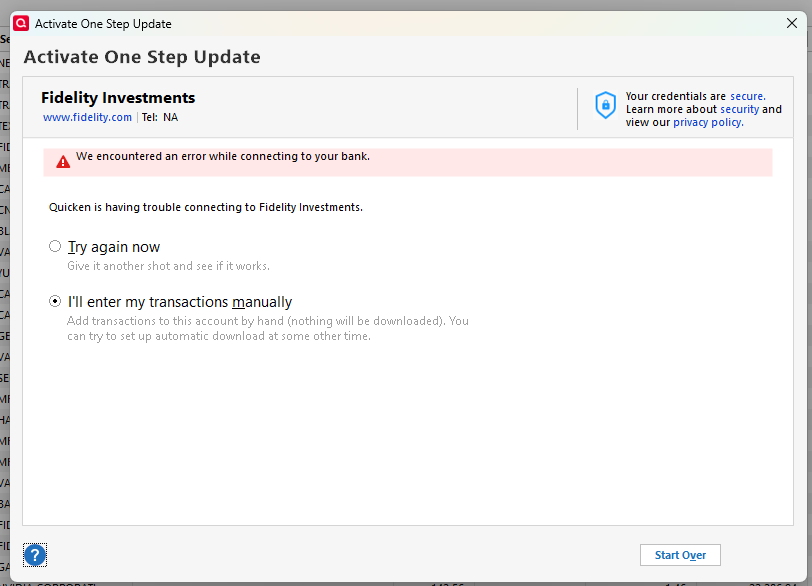
I am able to create an entirely new Quicken file, also on the OneDrive, add these Fidelity accounts, and successfully download transactions. What does this imply about why my original files can't communicate with Fidelity any longer?
As a workaround, I have been downloading transactions in the new file, exporting them to a QID file, then importing the QID file into my original files. This is not sustainable.
If I can't make my original files work again, what is the best way to copy all of my decades of account information (both Fidelity and non-Fidelity) into the new file?
Comments
-
As an update, I just created a full copy of my Quicken file. I tried to reconnect one of the Fidelity accounts and this time it worked! Hope this helps others that have been having the same problem.
0 -
Hello @Kim Roffman,
Thank you for sharing the problem you encountered and how you resolved it! Hopefully, it will help others encountering similar issues.
Thank you!
Quicken Kristina
Make sure to sign up for the email digest to see a round up of your top posts.
0

Categories
- All Categories
- 24 Product Ideas
- 34 Announcements
- 248 Alerts, Online Banking & Known Product Issues
- 19 Product Alerts
- 265 Welcome to the Community!
- 301 Before you Buy
- 1.5K Product Ideas
- 55.8K Quicken Classic for Windows
- 16.9K Quicken Classic for Mac
- 1K Quicken Mobile
- 834 Quicken on the Web
- 129 Quicken LifeHub