Data Not Being Saved

Over the last week or so, I have been having issues with data being saved. I will enter transactions, save the data, only to be missing that data when I load the program the next time. I have saved the data as a backup file and that works sometimes, but not all of the time. I am getting tired entering transactions over and over.
Comments
-
Hi @David1963,
I'm sorry to hear that you are experiencing this issue. I'll be happy to help you.
You mentioned that when you saved the data as a backup file that your transactions and data do not save, but not all of the time. When do you see the issue occurring? Have you noticed a pattern?
Sometimes, the location where the file is saved affects how it works. We recommend saving the file locally. You can check the file location by following these steps:
- Go to File (at the top left)
- Click on “Show this file on my computer” (it will open the file explorer where you can check the file location).
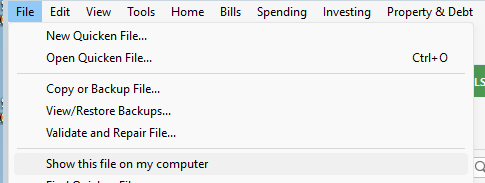
If the file is saved on the internal hard drive, you can check if it is being synchronized with any cloud service (OneDrive, DropBox, etc.) and disable synchronization.
Steps to check if the file is being synchronized with OneDrive:
Taskbar Icon:
- Click the OneDrive cloud icon (bottom-right) to view recent activity, file names currently uploading, and whether it says "Processing changes" or "Up to date".
Steps to check if the file is being synchronized with DropBox:
- File Explorer Icons: Open your Dropbox folder in File Explorer.
- Blue Circular Arrows: The file is currently syncing.
- Green Checkmark: The file is synced and up to date.
- Red "X": The file failed to sync.
Please let me know how that goes!
Quicken Laura
Make sure to sign up for the email digest to see a round up of your top posts.
0 -
@David1963 Because OneDrive/etc interfere with Q's management of it's own data file, it's STRONGLY advised to not store your Q data file in a folder managed by them.
Instead, direct your Backup files to a OneDrive managed folder.
Q user since February, 1990. DOS Version 4
Now running Quicken Windows Subscription, Business & Personal
Retired "Certified Information Systems Auditor" & Bank Audit VP0 -
Hi @David1963,
I just wanted to follow up since I haven’t heard back from you. I’m checking in to see if you still need assistance.
Quicken Laura
Make sure to sign up for the email digest to see a round up of your top posts.
0


Categories
- All Categories
- 6 Product Ideas
- 34 Announcements
- 248 Alerts, Online Banking & Known Product Issues
- 19 Product Alerts
- 265 Welcome to the Community!
- 301 Before you Buy
- 1.5K Product Ideas
- 55.8K Quicken Classic for Windows
- 16.9K Quicken Classic for Mac
- 1K Quicken Mobile
- 834 Quicken on the Web
- 129 Quicken LifeHub