You got to be kidding - still NO fix after 4 months ???

The recent update FAILED to fix this problem that you claimed was in the process of fixing. Try again !!
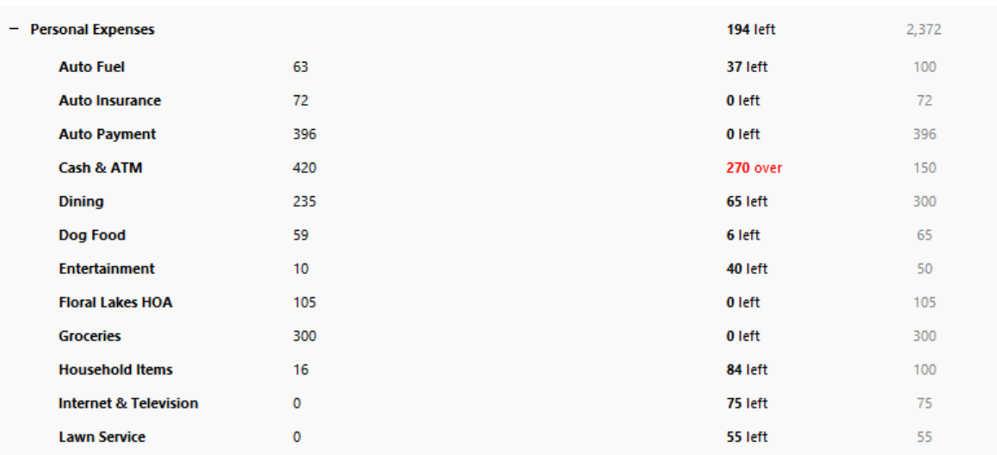
There were green or red bars for each item tracking that showed the progress of budget spent items. Thank you in advance for investigating this problem.
Comments
-
Hello @galahad,
Thanks for checking in!
The issue you’re describing is still being actively worked on by our team under ticket CTP-15435.
A release date has not yet been determined. The ticket (CTP-15435) is still actively being worked on by our team, and development and testing are ongoing to ensure a proper resolution.
We do not provide an ETA because the fix requires thorough validation before release to ensure it resolves the issue permanently. We appreciate your patience while this is being addressed.
Thank you!
-Quicken Anja
Make sure to sign up for the email digest to see a round up of your top posts.3 -
[Removed - Speculation]
0 -
I'm suspecting this to be a possible screen refresh issue.
Have you checked to see if your display and graphics drivers are up-to-date? The drivers installed with your original Windows installation may not be current.IIRC, there's a workaround (switch to a different Quicken window and return to the Budgets view). Does this solve the problem, temporarily?
0


Categories
- All Categories
- 6 Product Ideas
- 34 Announcements
- 250 Alerts, Online Banking & Known Product Issues
- 19 Product Alerts
- 265 Welcome to the Community!
- 301 Before you Buy
- 1.5K Product Ideas
- 55.8K Quicken Classic for Windows
- 16.9K Quicken Classic for Mac
- 1K Quicken Mobile
- 834 Quicken on the Web
- 129 Quicken LifeHub