Missing downloaded transactions Jan 31 - Feb 4 multiple institutions

During the time period 1/31-2/4 I have missing transactions from:
Avidia Bank, Bank of America, Capital One, and Citibank
There is just a hole in the transaction records, because I have transactions from after that time period for these accounts, and my online balances (in Quicken) appear to be correct.
I saw at least one announcement for missing transactions for a different institution, but since this appears to be affecting multiple institutions I would have expected to see something..
Comments
-
Hello @kdescoteaux,
Thank you for letting us know you're seeing this issue. To troubleshoot this gap in transactions, please follow these steps from our article on missing transactions:
Be sure to follow these steps in order:
1. Go to Edit > Preferences > Downloaded Transactions. The option Automatically add to banking registers needs to be unchecked.
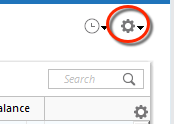
2. Refresh your online account information by clicking the Actions Gear Icon on the upper right of the register, and select Update Now. Follow the on-screen instructions to complete the update.
3. Confirm that the Sort Order in your account is by Date; just click the top of the Date column in your account register. It's possible the transactions are in your register, but not where you thought they'd be.

4. Click the Reset button at the top of the register. This will confirm that there's no filtering in your account register.
5. Try refreshing your login session: To do this, go to Help > Refresh Sign in. After completing the log-in process, trying running a One Step Update again.
6. Go to Actions (Gear Icon) > Register Columns > Check Downloaded Payee in the account register. This allows you to search by Payee to confirm the transactions haven't been renamed unexpectedly.
7. Go to Tools > Account List and check Show Hidden Accounts at the bottom left. Confirm the missing transactions haven't been added to a hidden account by clicking on the name of any account that appears with a check mark in the Hidden column.

Please let me know how it goes!
Quicken Kristina
Make sure to sign up for the email digest to see a round up of your top posts.
-1 -
That was extremely unhelpful. I've been using Quicken for decades (although with the number of problems maybe it's time to seriously look at other options).
Transactions continue to download into my accounts. There's a hole in the middle with missing transactions. Transactions which are still missing two weeks after they posted to my bank / credit card.
Payments from my banks to my credit cards are missing from all four accounts. Accounts which nominally speaking are independently downloaded from different institutions. But both have Quicken servers in the middle.
0 -
Thank you for your reply,
If the troubleshooting steps above did not correct the issue, then there are a couple of options.
To fill a one-time gap, you can manually enter the missing transactions or, if the financial institutions make them available, import QFX/Web Connect files to fill in the information.
Alternatively, if you want to troubleshoot the issue further, you can contact Quicken Support directly for assistance, since they have access to tools we can't access in the Community and can escalate the issue as needed. The Quicken Support phone number can be found through this link here. Phone support is available from 5:00 am PT to 5:00 pm PT, Monday through Friday.
I apologize that I could not be of more assistance!
Quicken Kristina
Make sure to sign up for the email digest to see a round up of your top posts.
0
