Income reminder doesn't match paycheck

Today I opened Quicken and noticed it's displaying the wrong amount for the income reminder for my next paycheck on 1/29. It says $951.12, but the correct amount it should be displaying is $1007.84. Why did it change, and how do I fix it? I have included screenshots from the bill reminder and the paycheck.


Comments
-
Hello @vgburke85,
Thank you for reaching out! To help troubleshoot, please provide more information:
- Do you track just the net pay in your Quicken, or is the transaction a split transaction that details the gross pay and all the taxes/contributions?
- If it is a split transaction, is the information detailed in the split correct?
- Does viewing the split transaction cause the net pay to correct itself or does it still reflect incorrectly?
- Is your Quicken file synced to Mobile & Web?
- You can check this by navigating to Edit>Preferences>Mobile & Web. The slider will indicate whether Sync is on or off.
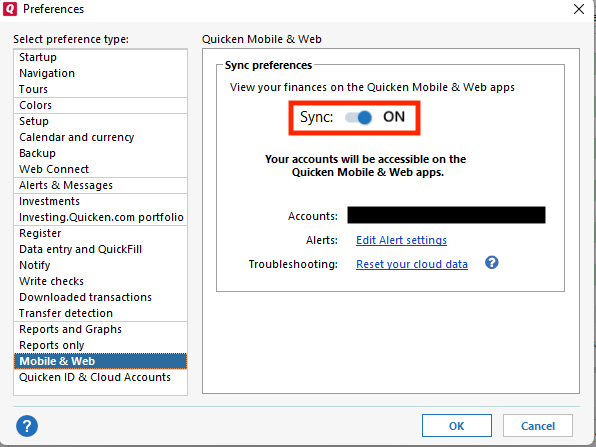
- You can check this by navigating to Edit>Preferences>Mobile & Web. The slider will indicate whether Sync is on or off.
I look forward to your response!
Quicken Kristina
Make sure to sign up for the email digest to see a round up of your top posts.
0 -
Quicken Kristina
Make sure to sign up for the email digest to see a round up of your top posts.
0 -
I track the whole paycheck (gross pay, taxes, etc.).
0 -
@Quicken Kristina I track the whole paycheck. Everything looks correct in the paycheck window.
0 -
Thank you for your reply,
To help troubleshoot, please answer these questions:
- Does viewing the split transaction cause the net pay to correct itself, or does it still reflect incorrectly?
- Is your Quicken file synced to Mobile & Web?
- You can check this by navigating to Edit>Preferences>Mobile & Web. The slider will indicate whether Sync is on or off.
- You can check this by navigating to Edit>Preferences>Mobile & Web. The slider will indicate whether Sync is on or off.
Thank you!
Quicken Kristina
Make sure to sign up for the email digest to see a round up of your top posts.
0 -
@Quicken Kristina yes my quicken file is synced to mobile and web. The income reminder and the net pay on the paycheck do not match. When I open Quicken now, the income reminder says $0. The paycheck has the correct amount.
Here's the income reminder

And the paycheck net pay
 0
0 -
Thank you for your reply,
To clarify, when you say the paycheck net pay is correct, but the reminder is wrong, where are you looking at the paycheck net pay? For example, are you looking at a posted transaction in your register? Is the reminder showing $0 until you open it to view the details?
If you manually correct the reminder, does it change again? If it does, is there anything which seems to trigger it, such as running One Step Update or syncing to the cloud?
Thank you!
Quicken Kristina
Make sure to sign up for the email digest to see a round up of your top posts.
0 -
Hello @vgburke85,
We haven't heard back from you in a while. Do you still need assistance?
Check back and let us know! Thank you.
Quicken Kristina
Make sure to sign up for the email digest to see a round up of your top posts.
0 -
Hello again,
Checking in once more before this thread is closed.
Let us know if you still need assistance.Thank you!
Quicken Kristina
Make sure to sign up for the email digest to see a round up of your top posts.
0 -
I am experiencing the same problem. It changes when I sync to mobile and web. If I turn off sync it works. I have to reset the paycheck amounts by just editing them and saving again as the amounts are correct. once sync is now off the amounts don't change
0 -
Hello @kmumford,
Thank you for reaching out! To clarify, when sync is on, do the amounts change after running One Step Update? If that is what you're seeing, then it's a known issue (QWIN-26501).
If that is not what you are seeing, then please provide more details on exactly what is happening in your Quicken file, and what seems to trigger the behavior.
I look forward to your response!
Quicken Kristina
Make sure to sign up for the email digest to see a round up of your top posts.
0 -
That is when it happens. When One Step update is run and sync is off, it doesn't occur
0 -
Thank you for following up and providing that additional context.
As stated previously, this is a known issue and has been escalated internally. Our teams are working to resolve it, but we do not have an ETA as to when it will be fully resolved.
We apologize for the inconvenience!
[QWIN-26501]
Quicken Alyssa
Make sure to sign up for the email digest to see a round up of your top posts.
0

