Bank OSU Fails Due to Email Verification Requirement [Edited]

Latest version of Quicken Classic home/business for Windows.
Direct Connect Regions Bank.
Created an email reporting a bill payment not yet received by the company via Quicken. OSU now fails with password not correct error. If I uncheck the "send message option," bank connects properly.
This issue can be solved by being able to delete the email (rather than unchecking the option every time). How do I delete the unsent email?
[Edited - Readability]
Comments
-
Hi @Lou Meyer,
Thank you for bringing this issue to our attention.
Could you please let us know when the problem first began? Additionally, to help us better understand the situation, could you please provide a screenshot of the error message you described receiving? If needed, please refer to this Community FAQ for instructions on how to attach a screenshot. Alternatively, you can also drag and drop screenshots to your response if you are not given the option to add attachments.
When you run One Step Update (OSU), are you prompted to enter your password and then see a “Send Message” option appear?
If this is the case, you may need to temporarily disable multi-factor authentication (MFA) on your bank’s website before attempting to update your accounts in Quicken. Once the update is complete, you can re-enable MFA for continued security.
Please let me know how it goes!
Quicken Laura
Make sure to sign up for the email digest to see a round up of your top posts.
0 -
This is the error

OSU Dialog
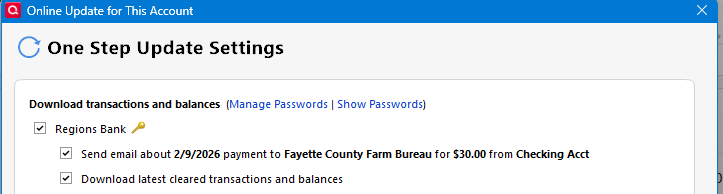
If I do not uncheck the "send mail…." option the OL-332-A erro occurs. If I uncheck it there is no error and any tranactions will download, but the email option remains on aanmy subsecquent OSU
0 -
The FAQ about OL-332 talks about invalid userid and/or password. We know that downloading transactions works normally … so, could it be that Regions Bank does not support Direct Connect emails?
Have you asked Regions Bank Support Center about this problem?And what can Quicken Support tell us about deleting Direct Connect emails from Quicken?
0 -
This has worked in the past when I've had an issue with a payment. I eally would like to know how to delete he email altogether.
0 -
Hi @Lou Meyer,
Thank you for sharing more details. I reached out internally to our teams for additional information and will follow up once I receive a response.
We appreciate your patience!
Quicken Laura
Make sure to sign up for the email digest to see a round up of your top posts.
0 -
I figured out how to delete the email
Tools»>On LIne Center
Select Institution and under Email Tab select email and chose Delete from menu
0 -
Hi @Lou Meyer,
Thank you for sharing your update. I’m glad to hear the issue has been resolved. Just to confirm, are you no longer receiving the error message after deleting the email?
Also, did you hear back from your bank about whether they support email via Direct Connect? Any details they can provide would help us better understand the situation.
Thanks again for keeping us informed. I look forward to your reply!
Quicken Laura
Make sure to sign up for the email digest to see a round up of your top posts.
0

