How to change print settings in QM 2007

I am still using Quicken Mac 2007 on an iMac running OS 10.13.6 (High Sierra). Please don't lecture me about updating - I have my reasons. I'm hoping someone in this community still knows enough about QM 2007 to help with a recent problem.
I've always been able to print reports in portrait format but recently, for no apparent reason, they have started to come out in landscape. This wastes paper for long reports and is, frankly, annoying.
Quicken Preferences-Reports says nothing about printing.
Quicken Preferences-Print checks has 4 options but they all come out in landscape.
My default printing format for everything I print is portrait and that is working for other print jobs. But when I actually try to print a Quicken report, my Print - Layout settings show only landscape format, with no way to change to portrait.
I need to print several reports for tax purposes but am dreading using all that paper. If someone can shed some light on this mysterious gremlin, I'll be very grateful.
Comments
-
Howdy, @MaryLRB
While I have used Quicken for Mac since version 1.5 (circa '89), my memory is getting hazier with 2007. I don't recall print issues such as you describe as being a known problem. I don't have any machines to test things on anymore.
My gut feeling is, while uncommon, to delete the .plist preference file and reinstall the app.
User @jacobs was a long proponent of that older version and perhaps he has other ideas. We will have to see what he has to say. Good luck!
1 -
Thanks for responding, John_in_NC. Since I've never had this problem before (in almost 20 years) I doubt that it is a "known issue". I'll try your .plist suggestion but I'm hesitant to reinstall for fear of really screwing things up.
I'm running Quicken Deluxe v. 6 concurrently as a back-up and can print from there, but that means cross-checking every report to make sure the totals are the same. It's the solution of last resort, and I'd rather get my reliable QM 2007 back to normal.
0 -
A quick test you can perform is to create a new blank file within 2007. Then, see how the printing behaves. Then you will know if the problem is file specific or with your setup of the 2007 app itself.
But, before you do that, what are you seeing in your File:Page Setup dialog? You mentioned not being able to choose Portrait, but I don't know if you are trying within Page Setup.
0 -
Thanks for tagging me, @John_in_NC. I'm sorry, I just don't remember exact details of print dialog boxes in Quicken 2007 enough to offer any specific thoughts.
Since the Mac operating system didn't change and the version of Quicken didn't change, I tend to agree with John that it could be a problem in the prefs file. With Quicken not running, you can move the prefs file to your desktop temporarily, then launch Quicken, and it will generate a new prefs file. Of course, some of your setting swill be lost by doing this, but you can quickly check to see if it fixes the printing problem. If not, quit Quicken and move your old prefs file from the desktop back to its original location. If yes, then figure out what settings need to be re-created to get back to normal.
Quicken Mac Subscription • Quicken user since 19930 -
@MaryLRB Sorry for this crude photo of the screen of my old MacBook I just powered up; it's still on Mojave with Quicken 2007 (but it didn't want to Airdrop to any other device, and it's too late for me to dig out a flash drive with proper USB adapters to transfer it. 😀)
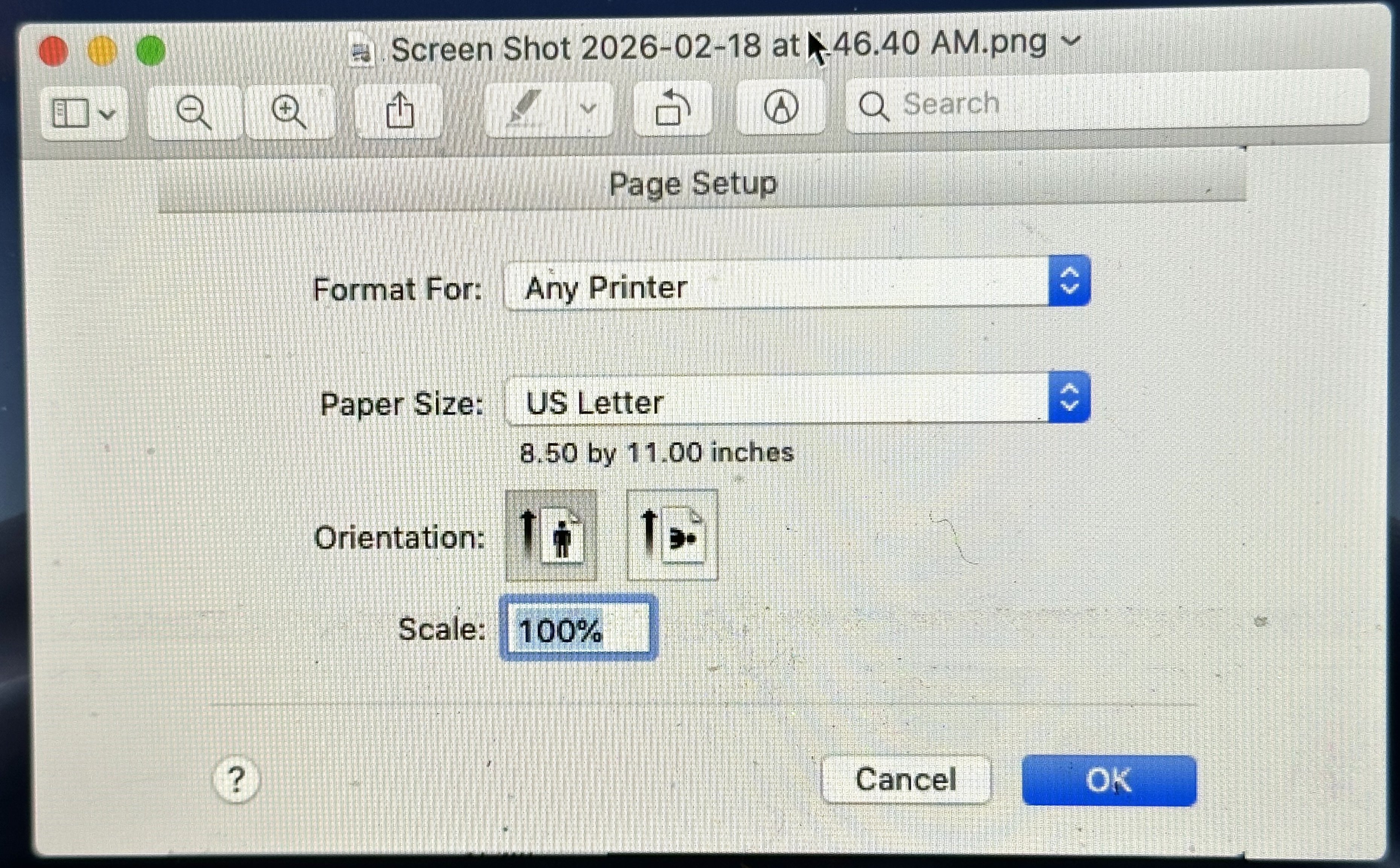
In Quicken 2007, if you select Page Setup, are you not seeing a screen like this? This is where you select vertical or horizontal page orientation. If you're not seeing this, can you post a screen shot of what you are seeing?
Quicken Mac Subscription • Quicken user since 19931 -
Aha!
For some reason I had missed that option under File. (I'm going to blame it on having just turned 78, though I'm pretty sharp otherwise 😁). I don't know how or why the setting got changed to landscape but I've changed it back and it's fine.
I'm so grateful to all of you for your answers. This community never fails me, even when I ask about the dark ages of QM. I hope you all are having a great weekend. If you're on the east coast, please stay safe and warm. ❤️
0 -
Thanks for letting us know you figured it out. I am glad it was something simple. :-)
And while I am nearer to the east coast, I am not worried about snow/cold right now. I washed my truck and contemplated mowing the grass to clean things up for the season.
0 -
@John_in_NC, if you feel like hopping in your shiny clean truck and heading north I will be needing help digging out from an expected foot of snow over the next 36 hours! 😂
@MaryLRB Glad that screenshot turned out to be the fix. there are fewer and fewer resources for dealing with Quicken 2007 troubleshooting nowadays. I hope it continues to serve you well enough until you can make the transition to the modern Quicken Mac.
Quicken Mac Subscription • Quicken user since 19931

