Need a report showing scheduled transactions that also includes Category, Tag, and Memo fields

There may already be a suggestion for this, but I periodically print out a report of scheduled transactions from the scheduled transaction window. This report would be more useful if the Category, Tag, and Memo fields were included also.
Comments
-
Hi @Chuck56,
Thanks for your question!
At this time, Quicken does not offer a built-in scheduled transactions report that includes the Category, Tag, and Memo fields together as you’re requesting. The Scheduled Transactions list (from the Bills & Income Reminders section) is separate from the Reports & Graphs Center and only shows basic fields by default. There is a product enhancement request for adding Category, Tag, and Memo to that list, but it hasn’t been implemented yet.
You’re welcome to add your vote to the enhancement request at the link below. The more votes it receives, the more visibility it gains with our product team.
In the meantime, you can use the following workaround to generate a printable view that includes the desired fields:
- Open the appropriate account register.
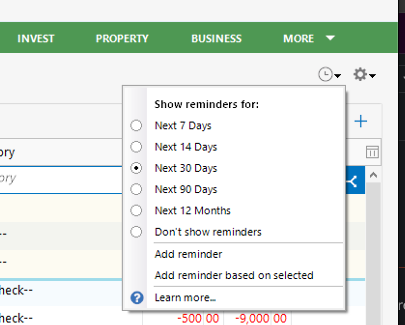
- Apply a filter for Reminders/Scheduled Transactions (upper-right corner of the register).
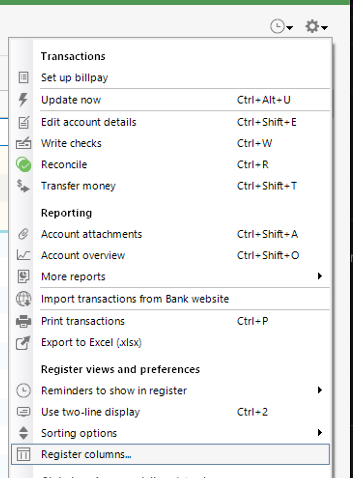
- Add the Category, Tag, and Memo columns to the register view.
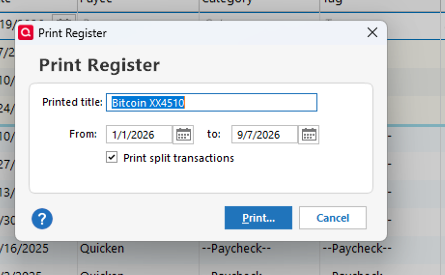
- Go to File > Print [Account Name].
- Customize the desired date range.
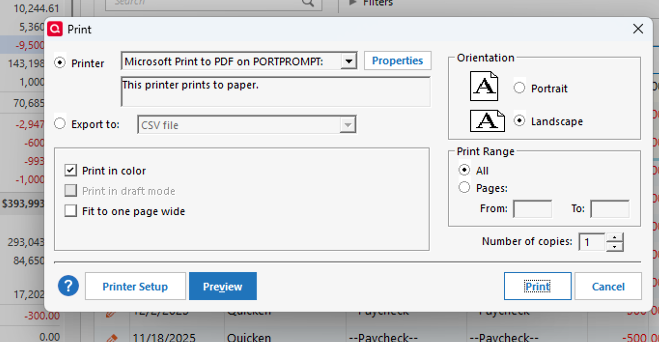
- Select Preview to review the report before printing.
This method allows you to view and print the additional fields that are not currently available in the Reminders list.
Please let me know if you have any questions or if I can assist further.
Quicken Laura
Make sure to sign up for the email digest to see a round up of your top posts.
0 -
Thanks for the work around. I should have been more specific with my suggestion. I meant to suggest these fields be added to the scheduled transaction list, not the reports section. Looking forward to this enhancement.
0 -
There is already at least one Idea post requesting what I think you are looking for. You can review, comment, and vote there.
QWin Premier subscription0 -
Thanks. Just added my vote
0 -
I just tried your suggestion, but when I got to file/print, the screen to select the date range came up and I selected the range. I then pressed print and then preview and nothing happened. Then tried to go straight to print and still nothing. As a test I went to the scheduled transaction list and it printed fine. Just an fyi.
0 -
Hi @Chuck56 ,
Thank you for the update. I’m sorry that option didn’t work out, but I’m glad you were able to find an alternative solution.
If you have any other questions or need further assistance, please don’t hesitate to let me know.
Quicken Laura
Make sure to sign up for the email digest to see a round up of your top posts.
0 -
As @Quicken Laura mentioned, voting helps. Did you cast your vote?
Quicken user since 1991
VP, Ops & Tech in the biometric space
0 -
Yes I did
0


