No longer getting normal display screen after 'One Step Update' runs under tools button

After updates complete, I get the usual page that shows all the accounts in my list and the # of transactions downloaded to the accounts……but when I hit the close button i am no longer getting the screen that has all of those accounts in my update list along with the Red dot identifying the accounts that were updated with transactions. Just had this occur in the past 2 weeks. I've tried to see if I'm up to date on Quicken updates…and from what I can tell, I am. Even installed a recent 'patch' I found.
Does anybody else have this problem?
help………. thx.
[Edited - Readability]
Answers
-
Hi @Dave Erickson,
Thank you for sharing your concern with us. I’m happy to assist you in troubleshooting this issue.
There are a few possible reasons why the red flag may no longer be appearing:
- Automatic entry is enabled
- No new transactions have been downloaded
- The data file may be experiencing corruption
First, let’s verify that Automatic Entry is turned off. Please follow the steps below:
To check the global preference:
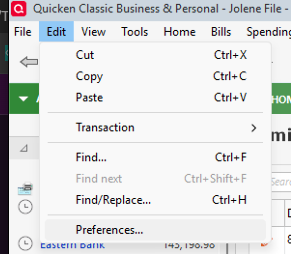
- Go to Edit
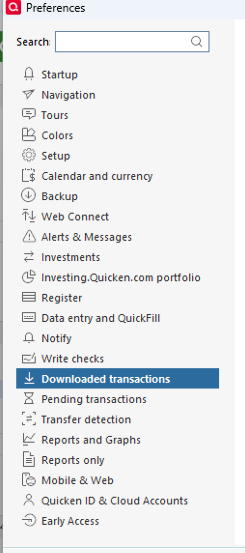
- Select Preferences
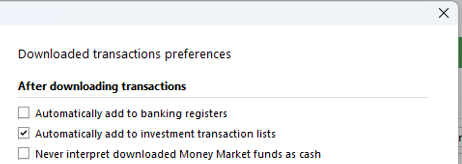
- Click on Downloaded Transactions
- Ensure that “Automatically add to banking registers” is unchecked
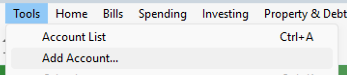
To verify the setting for the specific account:
- Go to Tools > Account List
- Select the account where the red flag is no longer appearing and click Edit

- In the Account Details window, select the Online Services tab
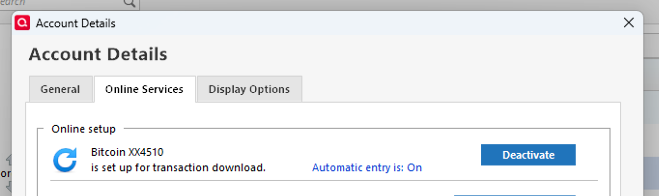
- Click on Automatic Entry
- Choose “Use the general account preference that applies to all Banking accounts”
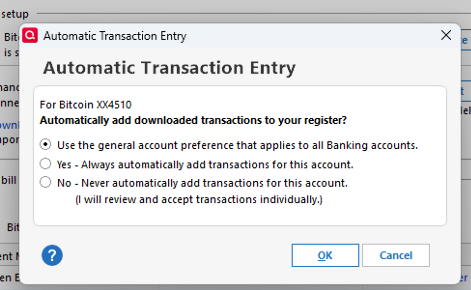
- Click OK
After completing these steps, close the Account Details window and update the account to see if the issue is resolved.
Please let me know how it goes!
Quicken Laura
Make sure to sign up for the email digest to see a round up of your top posts.
0 -
Seems all you suggested fixes were already in place. As mentioned in original post…everything appears to run as usual(i.e. all accounts during update show the running/processing and when completes shows the accounts that had transactions processed and the number of transactions for each of those accounts. BUT, when i close out of that screen which in the past took be back to the screen that had all my accts on it with the accts that had updates made to them highlighed with the red dot……….. that screen is no totally blank. NO accts listed, just a blank screen with the quicken tool bar across the top. HELP
0 -
Hi @Dave Erickson,
Thank you for confirming that your Quicken settings are correct.
To make sure we’re on the same page and better understand what you’re seeing, could you please share a screenshot of the blank screen that appears after the One Step Update runs? That will help us determine what may be happening.
If needed, please refer to this Community FAQ for instructions on how to attach a screenshot. You can also drag and drop the image directly into your response if the attachment option isn’t available.
Looking forward to your reply.
Quicken Laura
Make sure to sign up for the email digest to see a round up of your top posts.
0 -
Hi @Dave Erickson,
I just wanted to follow up since I haven’t heard back from you. I’m checking in to see if you still need assistance.
Quicken Laura
Make sure to sign up for the email digest to see a round up of your top posts.
0

Categories
- All Categories
- 6 Product Ideas
- 34 Announcements
- 248 Alerts, Online Banking & Known Product Issues
- 19 Product Alerts
- 265 Welcome to the Community!
- 301 Before you Buy
- 1.5K Product Ideas
- 55.8K Quicken Classic for Windows
- 16.9K Quicken Classic for Mac
- 1K Quicken Mobile
- 834 Quicken on the Web
- 129 Quicken LifeHub