CC-511 Golden 1 Credit Union

This discussion was created from comments split from:
Comments
-
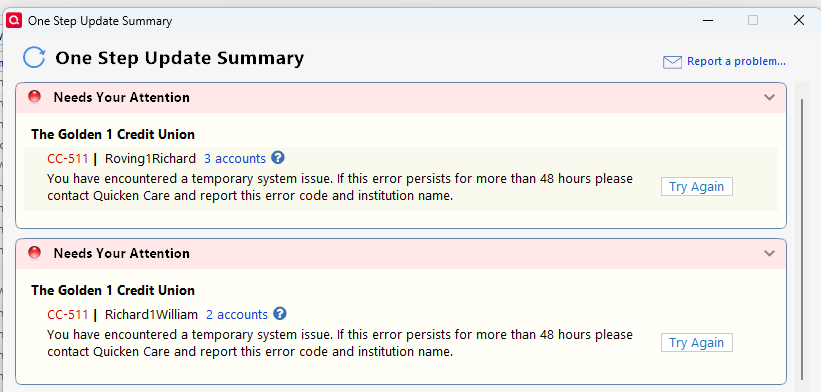
On trying to update Golden1 accounts is get CC-511 error. This started when Golden1 did a security update over the weekend.
 0
0 -
Hello @RichardOtten,
Thank you for reporting the issues you are seeing with Golden 1 Credit Union.
I have moved your comment into its own Windows thread, as the other one has only Mac users in it. Thank you for letting us know that Golden 1 did a security update this weekend that was likely the cause of this issue.
I see that you have submitted your log files. Thank you for that. I will get them added to the ticket that has been opened for this issue.
The CC-511 Support Article asks that we wait 24 hours and try again. Please let us know if you are still getting the error tomorrow, and if possible, submit log files again.
Thank you!
Quicken Alyssa
Make sure to sign up for the email digest to see a round up of your top posts.
0 -
I am getting the same error when trying to sync with my accounts using Quicken for Windows to our accounts at the Golden 1 Credit Union.
Information about the changes to their online banking system available at the following web page:
https://www.golden1.com/digital-banking?utm_source=sfmc&utm_medium=email&utm_campaign=DBR-full-launch&utm_term=112401&utm_content=digital-transition&sfmc_key=5356774645
0 -
Thank you for adding to this discussion and sharing that additional information!
I will add this to the ticket we have open for this issue. If you would like, you can also submit your log files to help with the investigation of this issue by going to Help>Report a problem>Send to Quicken.
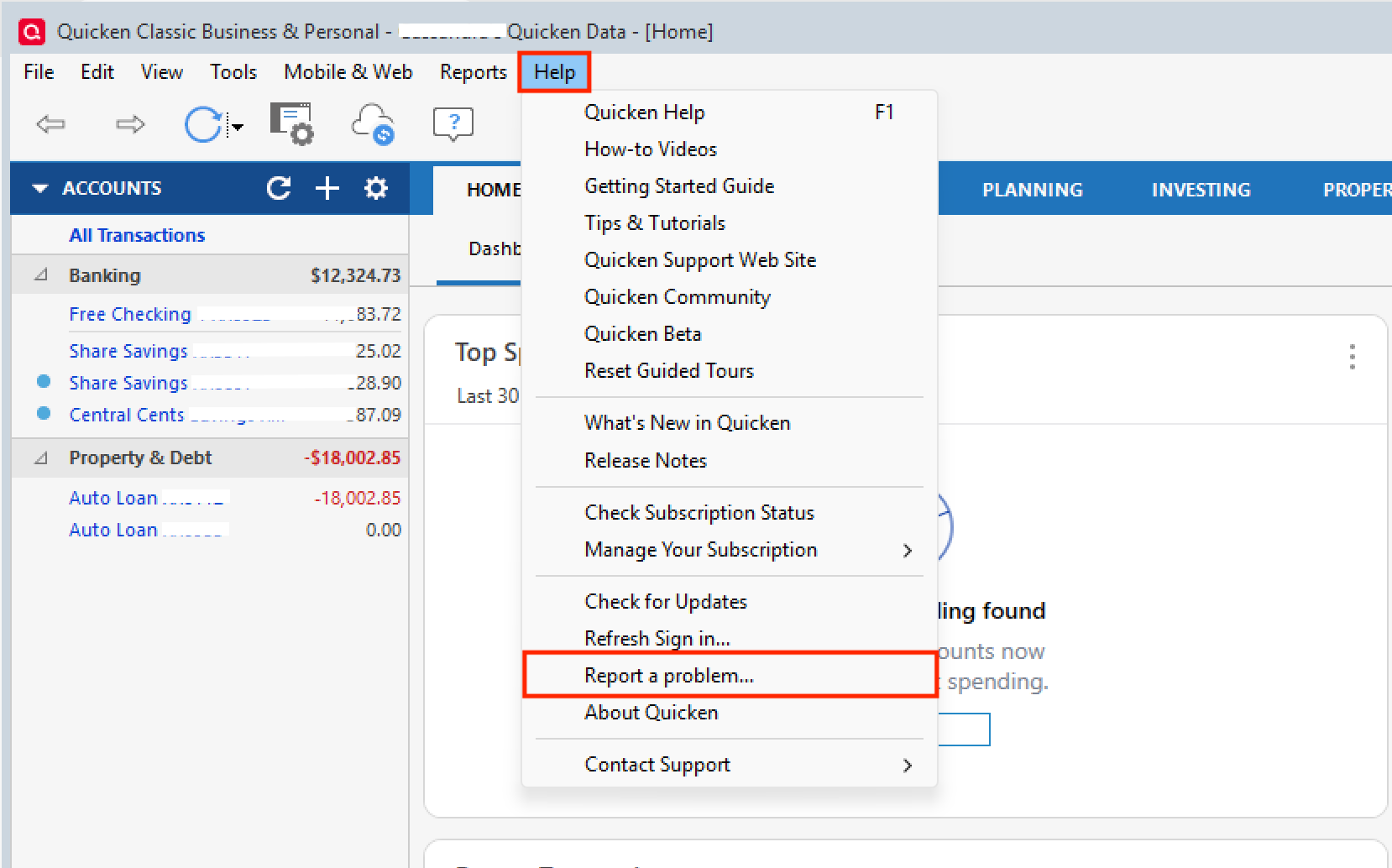
If you do this, let us know so we can add that as well!
Thanks again!
[CTP-16394]
Quicken Alyssa
Make sure to sign up for the email digest to see a round up of your top posts.
0 -
Hello All,
This is now a Known Issue.
This issue has been escalated and is under internal investigation. We do not have an ETA as to when it will be resolved. Please bookmark the alert that is linked above to stay updated on any progress/changes as they occur.
Thank you!
Quicken Alyssa
Make sure to sign up for the email digest to see a round up of your top posts.
0 -
Thank you for getting back to me Alyssa, I just submitted my log files from my Quicken for Windows program. I referenced the "CC-511 Golden 1 Credit Union" subject in the title of the error report. Hope this data helps resolve this issue.
1 -
Thank you for sending those in.
I have added them to the ticket. Yes, it will help us resolve the issue.
Thanks again!
Quicken Alyssa
Make sure to sign up for the email digest to see a round up of your top posts.
0 -
Just for grins I went ahead and updated my accounts by downloading the files directly from the Golden 1 website. This is of course a PITA, but at least I was able to update my checking and credit card accounts. Hopefully, this can be resolved soon. This seems to happen every time the Golden 1 updates their online access system
2 -
I have also sent my log files for this and look forward towards this being resolved.
1 -
What file format did you download and where did you go on their site to get that? Thinking I’ll have to do the same in the interim? Were you manually recording your transactions and matched the downloaded files with those?
0 -
It's a process, and if you're computer savvy it's not overly difficult but a bit convoluted. If you have further questions, I suggest you reach out to Quicken support so they can walk you through it. Be sure to create a full backup of your CURRENT Quicken file BEFORE you start this export process in case you make a mistake (just sayin')
0 -
Select an account to view on the Golden 1 website, and just above the list of transactions is a search window. All the way to the right of the search window is a cloud icon and you click that to initiate a download to your device. Just select the date range of interest and file format, in this case Quicken. If you then click on the file in your download folder Quicken will open it and import into that account. If you have multiple accounts at the Golden 1 — checking, savings, credit card, for example — you will need to do this for each account. It's a pain
1 -
Did that allow you to reconcile existing transactions that were already in Quicken or did it create new, reconciled ones in each of your account registers? Sorry for all the questions, but I don't want to trash or over-complicate my existing registers, especially at the beginning of the month as my regular bills start processing. Thank you!
0 -
It downloaded all transactions that occurred during the dates I selected — Feb 20 through Feb 24 — and matched any that I had already entered. Yes, it reconciled as normal
1 -
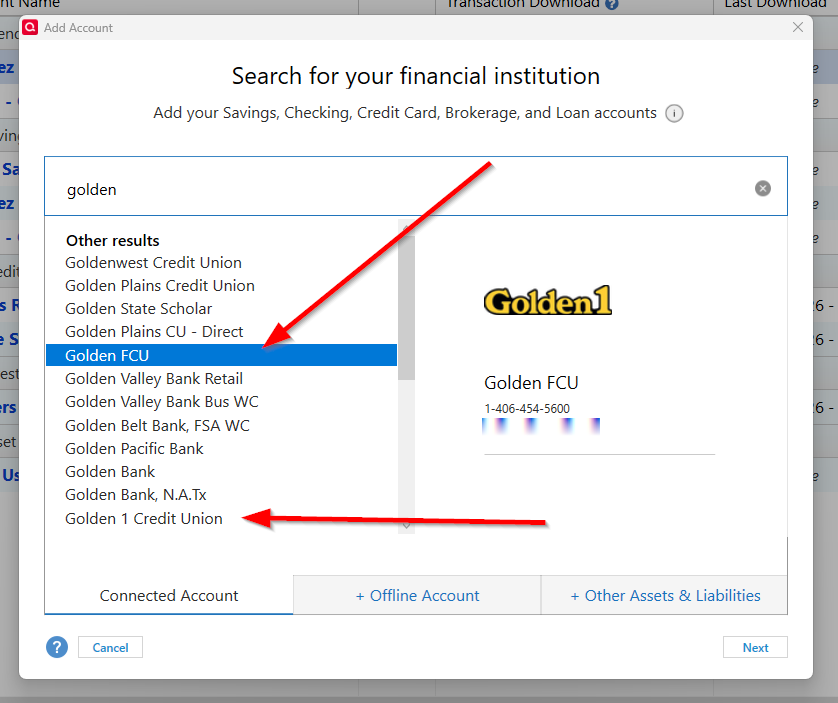
As part of the resolution, I'd also like to know which entry for the Golden 1 Credit Union we should use when setting up the web connection after this is resolved? I see two entries on the list as current possibilities:
 0
0 -
Supposedly, this issue has been marked as resolved, but I am still unable to setup my existing account for download. Quicken keeps asking me to create a new account, and then instructs me to log onto the Golden 1 website and manually download. Has anyone successfully re-linked one of their existing accounts to the Golden 1 for online updates?
0 -
Here's what I found after a Google search. I will try this
To Reactivate Account(s)
- Go to Tools > Add Account.
- Select the bank for the deactivated account(s). If prompted, select the connection method.
- Enter your credentials and click Connect.
- When the list of located accounts appears, choose LINK next to each account you want to reactivate.
- Click Next then Done on the last prompt.
0 -
Hello All,
Thank you for adding to this discussion.
The FDP-163/CC-511 Alert has been marked resolved. However, we do have an Open Alert for CC-505/FDP-105. The latest update we received is that the error is due to scheduled maintenance on the bank's side.
You will reconnect with the same instance you have been using. If they need users to start utilizing a different one, they will let us know. As of right now, this has not been mentioned.
Hope this clears up any confusion!
Quicken Alyssa
Make sure to sign up for the email digest to see a round up of your top posts.
0 -
FYI, this did not work. Nor did this procedure, which I also found after a Google search:
If you run into a problem with the Reactivate part of this process:
- Go to the account you are having trouble reactivating.
- Right-click on the account name and click Edit Account.
- In the dialog box, remove the financial institution name and click OK.
- NOTE: You can only do this if the account has been completely deactivated. If the account name is grayed out, there's still a service activated for that account.
- At the top of the Account Bar, click the + (plus sign) button.
- Enter the name of the financial institution you'd like to set up.
- Enter your credentials. Quicken will connect with your financial institution to set up the account.
- Choose LINK on the screen displayed after Quicken finds the available accounts at the financial institution for your login credentials and carefully link to your existing Quicken account(s).
0 -
Here's the latest I've received from the Golden 1:
Thank you for your response regarding Quicken and I am happy to assist you. After reviewing this matter with our back-office team as of this message, March 3, 2026, we do not have an estimated date as to when this matter will be resolved. We sincerely apologize for any inconvenience this matter has caused you. For additional questions or concerns, please reply to this email. You may also contact our Member Service Contact Center at 1-877-465-3361 and a representative will be happy to assist you. The Member Service Contact Center hours are Monday through Friday from 7:30 a.m. to 6:00 p.m. and Saturday from 9:00 a.m. to 5:00 p.m. Thank you for being a valued member and for putting your trust in Golden 1.
0 -
Were you ever able to restore online download for the Golden 1? I am still unable to link my accounts and download account records. This is very frustrating.
0 -
AFAIK, this is something that will take some time based on past performances from various financial institutions and their 3rd party software integration team(s). In the meantime, you -can- export your transactions for ALL your Golden 1 accounts at the same time. I wrote a post over in the Mac support forum that has screenshots and some tips on how to do this. Here is the link to that "How-to" conversation, which is actually taken from my WINDOWS PC and Quicken Classic Premier for Windows subscription: (You will need to scroll back through the topic to find the screenshots on how to EXPORT to a Windows .QFX Quicken data file.)
Golden 1 Credit Union Error FDP-163
It's a 'little' convoluted at first, but once you get comfortable, it's not that difficult to execute on a regular and even daily basis. Yes, it's NOT as convenient as it was BEFORE G1 broke things, but in the interim, you can (and should) keep your Quicken files current until it is ultimately resolved.
_____________________________________________________________________________________________________________________
Information in this post is without warranty and end-user assumes all risks of use. Always backup your Quicken file BEFORE making any changes or trying new procedures.
0 -
No change or improvement yet; still using the manual download process for now.
1 -
Hello All,
Thank you for continuing to update this discussion.
The Alert for this issue remains open. We do not have an ETA as to when it will be resolved. Please bookmark the linked alert to stay up-to-date on its progression.
Thanks again!
Quicken Alyssa
Make sure to sign up for the email digest to see a round up of your top posts.
0 -
Is there any updated information from The Golden 1 Credit Union about this problem?
0 -
I called the Golden 1 a couple of weeks ago and got nowhere. And the couple of times I've submitted message requests for info they keep telling me they are working on the issue but can offer no timeline for resolution
-1 -
This is completely frustrating…
1 -
Latest I have heard is that Golden 1 has a fix that is undergoing testing, and they project it will be available during April or May. Thinking positively, I am hopeful we might see this sooner rather than later.
Comments are without warranty - end user assumes all risks of use.
1 -
I really hope so; having to download the sync files and apply them manually is tiresome.
0


