Fidelity CC-505 Error on all accounts / Fidelity Reporting Connection Issue error
Comments
-
Try deactivating the account in Quicken and then reactivating it. Fidelity has some new user agreements that need to be agreed upon. This worked for me.
1 -
Thanks! I saw that potential fix elsewhere, too. I am planning to give it a try as soon as I have a little time.
0 -
Just be sure after re-activating that you choose the option to Link to existing account (and ensure it points to the right account). Good luck!
1 -
Will do. I have done some version of this dance a couple of times before.
Unfortunately for me, I need to wait until the end of the month to give this a shot. I cannot deactivate with unaccepted downloaded transactions, and I accept those transactions when I match them to the monthly account statement. (Is this unnecessarily anal? Perhaps, but it is true to my nature. I occasionally find both missing and duplicate transactions I have to clean-up from the downloads.)
Regardless, thanks for the pointers!0 -
Hello everyone,
We’ve received confirmation that this issue has now been marked as resolved, and we are seeing successful connection activity.
If you’re still experiencing these errors with Fidelity, please let us know so we can take a closer look. Otherwise, you should now be able to update successfully.
Thank you all for your patience while this was being addressed!
-Quicken Anja
Make sure to sign up for the email digest to see a round up of your top posts.0 -
0
-
Am still having this issue:
While One Step seemingly runs ok, only 1 (of 10) Fidelity accounts actually downloads activities, the rest don't, since the respective dates and times shown in the screenshot further below. Note that I have disconnected and reconnected all accounts several times without any luck since about 1st of February. By the way, the "9 new transactions" has been like that since about 1st of February even though I don't actually see any of said transactions.

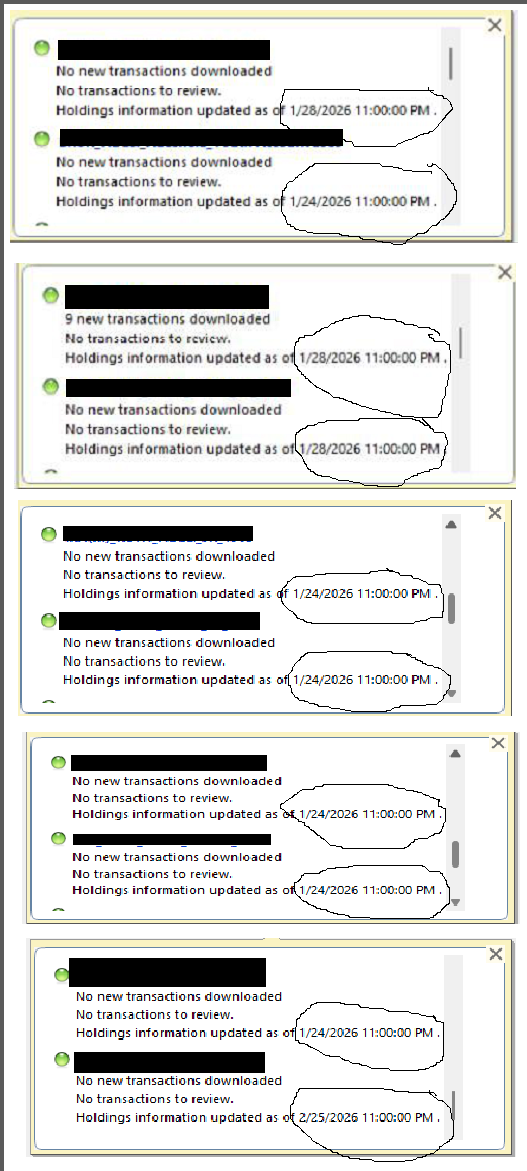
Thank you.
0 -
I was finally able to try this, but now I am getting the 601 errors (after reactivating) others have reported, so I am still stuck until Quicken figures out what is happening now.
0