Reactivation of Credit Card Keeps going to Other Cards at Capital One

So, I have, for some odd reason, three credit cards operated by Capital One. Two are tied to one login. One of them has a separate Cap One login and is not working for the One Step Update.
When I try to Reset the account and go through the Setup routine and select Sign in to attempt to login to that unique online account, after the 'Quicken wants to collect' page, it keeps bringing up the other two Capital One accounts at the 'Which accounts do you want to share data from?' page! I've tried numerous times. Is it perhaps because I had the Capital One page opened to those two accounts when I first tried it and now it's locked into those accounts?
EDIT: To be clear… It never gets to the actual Capital One sign in page.. it just skips that and goes to the other two accounts like I've already logged into Capital One, but the wrong account.
How do I get Quicken to forget about those and get me to login to Capital One for this third account?
Thanks in advance!
Comments
-
Hi @gt00tx,
Thank you for sharing the issue you’re experiencing. I’ll be happy to help you troubleshoot it.
To better understand the issue, I have a few questions:
- Are all the accounts under a single user login, or do you have separate logins for each account?
- Is the affected account a joint account?
- Are the other two accounts you don’t want to connect already connected in Quicken?
- What is your default browser?
Your answers will help determine the best route to address the issue. I look forward to your response!
Quicken Laura
Make sure to sign up for the email digest to see a round up of your top posts.
0 -
Thanks.
- As I said, two accounts are tied to one login. The 'problematic account' is a separate login.
- All the accounts are joint accounts. Has never made a difference, but I'd like to know why you ask.
- Yes and have been for years… just like the one that I'm having trouble with.
- Browser is Chrome.. just like it has been for many years.
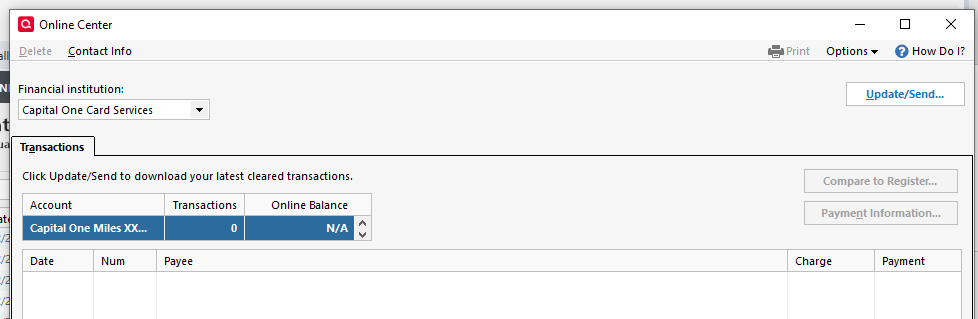
Yeah, maybe I need to clear some cookies and such. Your #4 question prompted me to go to Online Center under Tools, which I've never used. I selected Capital One accounts and it came up with the one problem account (Miles). I clicked Update/Send… and it started the process but only brought up the other two, plus another old account I guess… I didn't try to figure out that one.
Strange…
 0
0 -
Hi @gt00tx,
Thank you for answering those questions.
Sometimes joint accounts can present connection issues, so I wanted to rule that out as a possible cause. Based on what you’ve described, it doesn’t sound like that’s the case here. As you mentioned, clearing the browser cookies should allow you to successfully connect to the third account.
Steps to clear cookies:
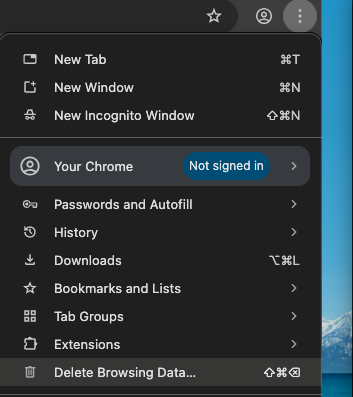
- Click the Three-dot menu to the right.
- Click on Delete Browsing Data.
- Mark Cookies and other site data.
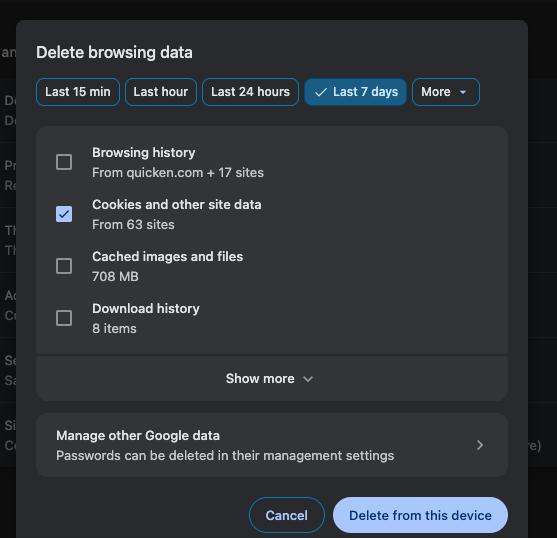
- Click on Delete from this device.
Steps to connect the account:
- Go to Tools > Add Account.
- Search for and select your financial institution.
- If prompted, choose the appropriate connection method.
- Follow the on-screen instructions.
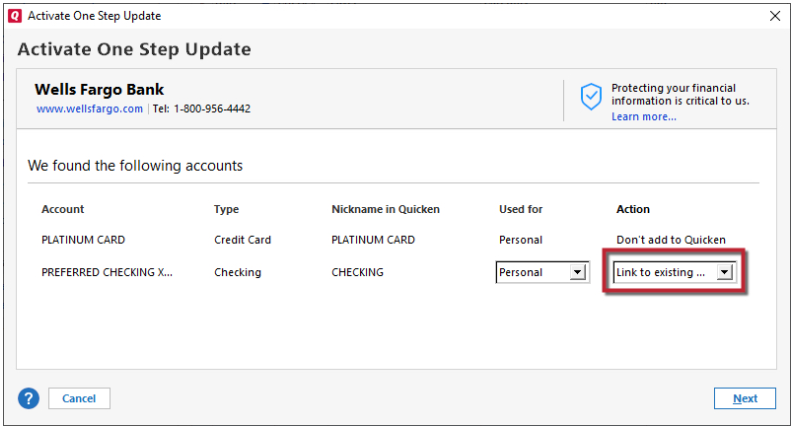
- When the list of found accounts appears, be sure to select Link to connect them to your existing accounts (do not add duplicates).
Please let me know how it goes!
Quicken Laura
Make sure to sign up for the email digest to see a round up of your top posts.
0 -
Thank you, Laura. I don't delete cookies often because I then have to reenter all my information for sites I visit regularly and it's a pain. I'll let you know.
0 -
OK, well… I didn't delete the cookies but I just tried Tools>Add Account>Capital One and it came up with the Cap One login screen! Wasn't doing that before. Unfortunately, I used a saved login id (correct one) and password (wrong one) and accidentally hit enter/go and of course it went to lala land. I canceled it. The next time I tried it, it went straight to lala land. I closed Quicken and well, eventually at some point, the Cap One login came up agian, I entered the credentials for the problematic account and bingo! It all went as it should. Thanks for your help. The next thing I was going to try instead of deleting cookies, was to deactivate the other two accounts and see if I could get where I needed, but it went there anyway.
0 -
Hi @gt00tx,
That’s great news! I’m glad the issue has been resolved.
Please feel free to reach out if you have additional questions. We’re always happy to help!
Quicken Laura
Make sure to sign up for the email digest to see a round up of your top posts.
0
