Set up Mortgage Loan with bank autopay- Quicken Classic Deluxe MAC (relase

How do I set up a new mortgage within Quicken when the payment is autopay from a separate bank checking account (BofA)? The bank account is linked to my bank for online updates. The monthly Mortgage payments include T&I. The Quicken Help instructions seem to assume that the mortgage is paid directly to the lending institution instead of through a banking autopay.
Answers
-
Hello @DMCINAZ,
Thank you for reaching out with this question! To clarify, does the autopay you have set up send the payment directly to the lender? You mentioned that T & I are included in the payment. Is it correct to assume that is taxes and insurance, which are held in an escrow account by the lender?
Are you adding the mortgage account as a manual account or a connected account? If you're adding it as a manual account, then you should be able to set it up by filling out the information in the setup wizard. Taxes and interest aren't included by default, but you can click the + sign to add them in the Add extra principal, insurance, tax, etc. section.
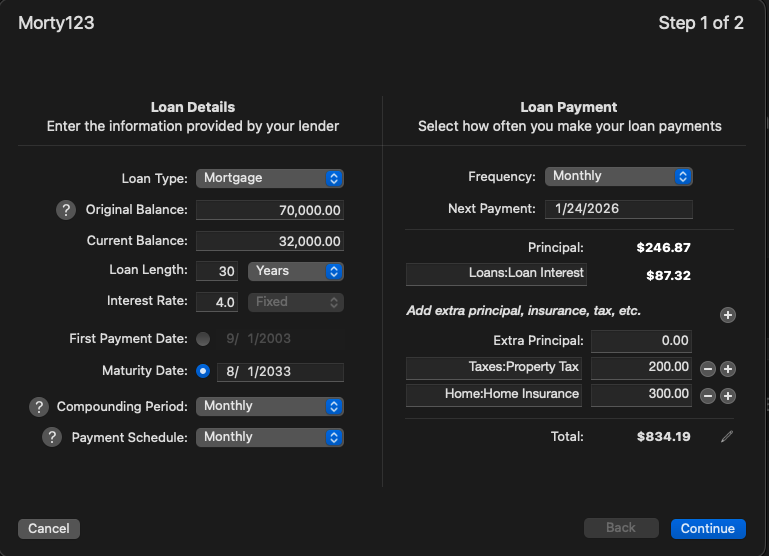
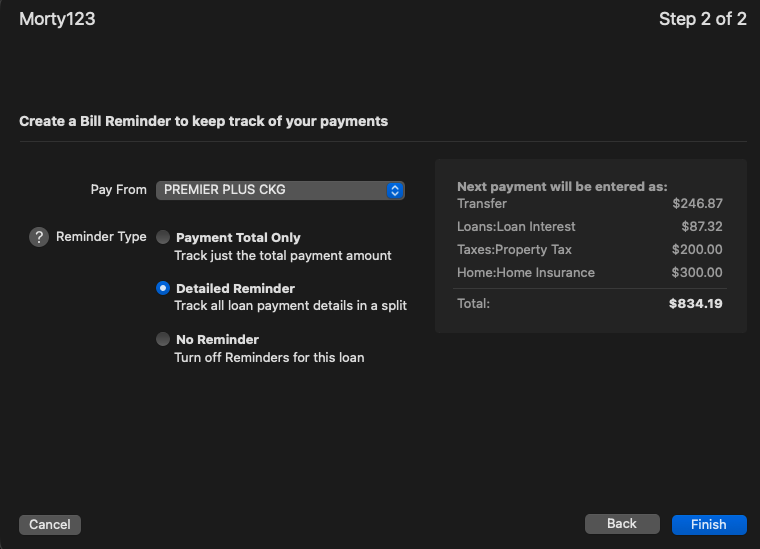
Once you've filled out the information as appropriate and click Continue, you will have the option to set up a reminder and designate the account the funds will be paid from.
I hope this helps!
Quicken Kristina
Make sure to sign up for the email digest to see a round up of your top posts.
0 -
Quicken Kristina
Make sure to sign up for the email digest to see a round up of your top posts.
0 -
Hello again,
Checking in once more before this thread is closed.
Let us know if you still need assistance.Thank you!
Quicken Kristina
Make sure to sign up for the email digest to see a round up of your top posts.
0 -
Hello again,
Due to the lack of response, I went ahead and closed this post.
If you still require assistance, please feel free to start a new post.
Thank you!
Quicken Kristina
Make sure to sign up for the email digest to see a round up of your top posts.
0
