Shaded rows on register (Q Mac)

crandbr
Quicken Mac 2017 Member
Is there a way to edit my register so every other row is shaded? Much easier to read.
0
Answers
-
Go to Edit > Preferences > Register > Colors…
and set up the color you want for the rows in the register which should alternate between white and your selected color.
-1 -
I failed to say I'm using Mac and don't see what you are referring too.
0 -
In Quicken Mac, alternate rows are already shaded, but the shading is very subtle:
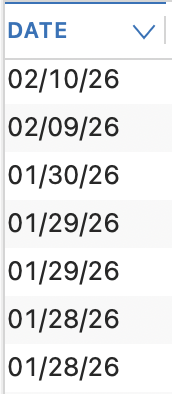
There is no user control over the darkness or color of the shading.
But there is a longstanding user request for control of such functionality, and the Idea topic for it is marked as "Planned" by the developers:
Quicken Mac Subscription • Quicken user since 19930

This discussion has been closed.