CC-503 Error - credentials correct

I am setting up my new Quick Classi and get a cc-503 error even though my credentials are correct. I use the same credentials online and enter my account. I've tried so many times that I am now inthe "you have to wait" status.
I talked with my bank and they cannot find anything ontheir side that is causing the error.
Any suggetions?
Answers
-
Hello @Kurzhaar2000,
Thanks for reaching out!
To better assist, could you please confirm the name of the financial institution you’re trying to connect to? We’d like to check internally to see if there are any known issues reported with that bank.
In the meantime, please review the information below regarding CC-503 errors, which includes additional details and troubleshooting guidance that may help resolve the issue:
Step One: Verify your bank login information- Type your password/PIN into a text application, such as Notepad, WordPad, or other text/word application.
- Note: This is a way of confirming you don't have typographical errors in this field.
- Highlight the "confirmed" password and then copy it (Ctrl + C) and paste it (Ctrl + V) into the appropriate fields in Quicken.
Step Two: Verify your bank login at the bank's website
- Go to your bank's website and confirm that you're able to log in with the expected username and password.
- Once you are logged in, review your account at the website for notifications (such as pending messages in a mailbox or message center) to confirm if further action is required to grant Quicken access.
- Some banks will require a separate login, password, or both to access accounts on third-party software. Also note, you may need to go to your settings at the website to access these prompts for new credentials.
New passwords: If you are required to make a new password, be aware that some special characters may cause errors in Quicken. These special characters are the ampersand (&), left carat (<), right carat (>), backslash (\), and forward slash (/). Additionally, while Quicken does not have a character limit, your bank may have one.
Step Three: Update your password(s) in Quicken
- Launch Quicken and go to Tools > Password Vault > Add/Edit Passwords.
- Click on the account in the Password Vault.
- Choose Delete Password for the account.
- Complete a One Step Update, you will be prompted to enter the password manually.
- Type in the password (the same one used on the bank's website) and check in the box marked Save next to the password field.
- Click Update Now.
If there is no option to delete and update the password, or if the login ID/username also needs to be changed:
- Choose Tools > Account List.
- Click the Edit button next to the account you want to change the login ID for.
- In the Account Details window, click the Online Services tab.
- Click Reset Account.
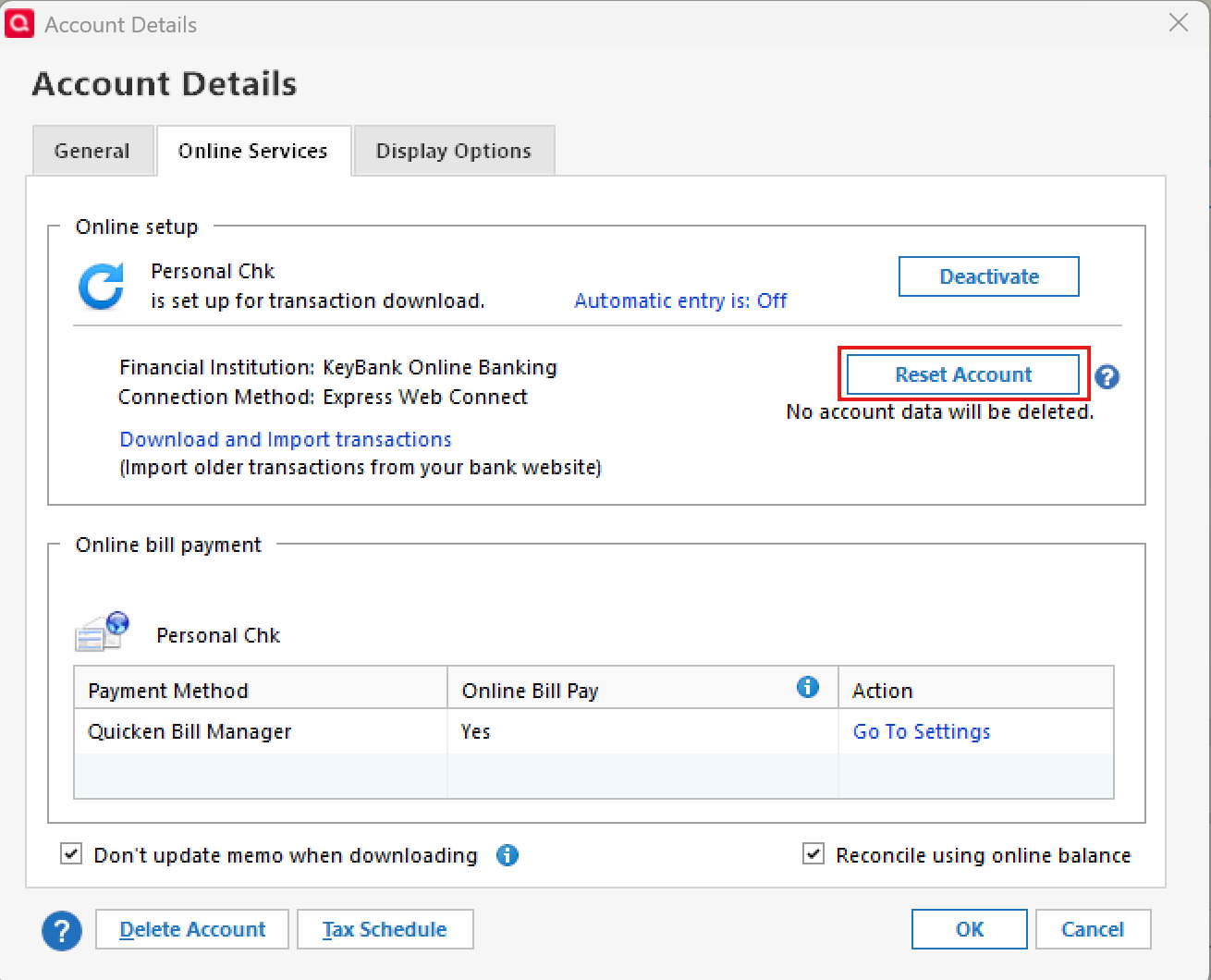
- Enter the correct login ID and follow the on-screen prompts to complete the reset.
- If prompted, carefully LINK the accounts found to the existing accounts in Quicken.
After the reset process is complete, attempt your online session again.
If the issue persists
Try Deactivating and Reactivating the affected accounts:
- Choose Tools > Account List.
- Click the Edit button next to the account you want to change the login ID for.
- In the Account Details window, click the Online Services tab.
- Click Deactivate, and then click Yes to deactivate online services.
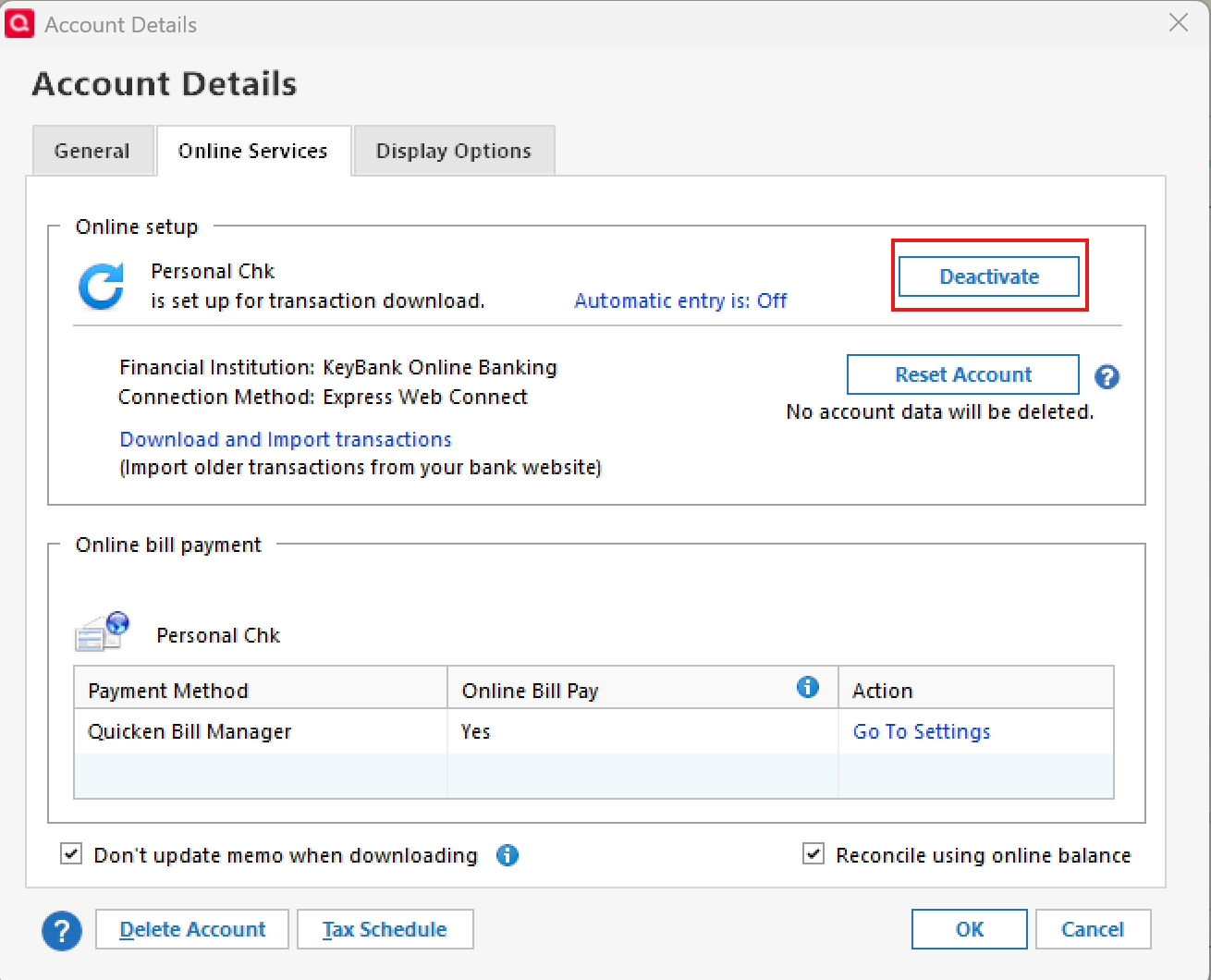
- Click Yes again, if necessary, to confirm your choice.
- Repeat these steps to deactivate all accounts at this same bank.
- Return to the Online Services tab and click Set up Now for each account you've deactivated.
- Enter the correct login ID and follow the on-screen prompts to activate your account.
If the problem continues after following the guidance above, then we recommend contacting Quicken Support so they can review your logs and connection attempts in more detail.
Thank you!
-Quicken Anja
Make sure to sign up for the email digest to see a round up of your top posts.0 - Type your password/PIN into a text application, such as Notepad, WordPad, or other text/word application.
-
Hello again,
We haven't heard back from you in a while. Do you still need assistance?
Were you able to try the guidance above, or contact support?Thank you!
-Quicken Anja
Make sure to sign up for the email digest to see a round up of your top posts.0 -
Hello again,
Checking in once more before this thread is closed.
Let us know if you still need assistance.Thank you!
-Quicken Anja
Make sure to sign up for the email digest to see a round up of your top posts.0 -
Hello again,
Due to the lack of response, I went ahead and closed this post.
If you still require assistance, please feel free to start a new post.
Thank you!
-Quicken Anja
Make sure to sign up for the email digest to see a round up of your top posts.0
