Fidelity NetBenefits Downloading Incorrect Prices Outside Trading Hours

Since approximately update R66.18 Build 27.1.66.18, Fidelity NetBenefits appears to download incorrect pricing data when I sync outside of trading hours. I am not completely certain the issue began with that release, but the timing seems to align.
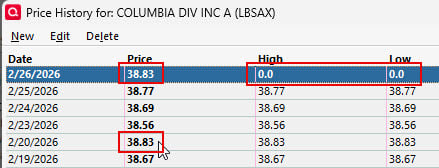
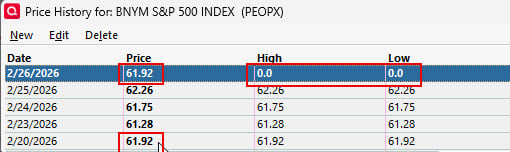
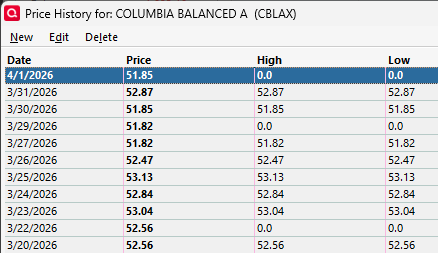
I have 10 funds in my NetBenefits 401(k). When I sync early in the morning before the market opens or on weekends, Quicken imports a price from a prior trading day instead of the most recent close. Sometimes it pulls the previous day, sometimes several days earlier. In every case, the imported price shows a High and Low of 0.00.
For example, on 2/26/2026 at 8:00 AM, the sync imported prices dated 2/20/2026 for multiple funds. I have included examples for two of the ten funds below.
To correct the issue, I must:
- Open each affected investment
- Edit the price history
- Delete the erroneous price entry
- Disable automatic price updates
- Wait until the market opens before syncing again
If I forget to disable automatic price updates, the problem automatically repeats on the next out of hours sync.
This is happening consistently across all 10 funds. It is more than just an inconvenience. It can cause my 401(k) balance to be overstated or understated by thousands of dollars on any given day.
Is anyone else experiencing this issue, and is there a fix planned?
LBSAX:
PEOPX
Comments
-
You can tell Quicken to ignore quotes that come from your broker and to rely exclusively on data from the quote provider.
To select this option, go to the Security Detail view for each affected security and click on Edit Details then Other info to display the Additional Security Information dialog. Check the "Ignore prices from broker download" box. That should block the erroneous prices from downloading.
Please let us know if that fixes it for you.
Because the quote feed only includes publicly traded securities, you should not enable that option for bonds or private funds, such as those often held in 401(k) accounts. See this discussion for more information
QWin Premier subscription0 -
Than you for the suggestion. Unfortunately, that didn't work.
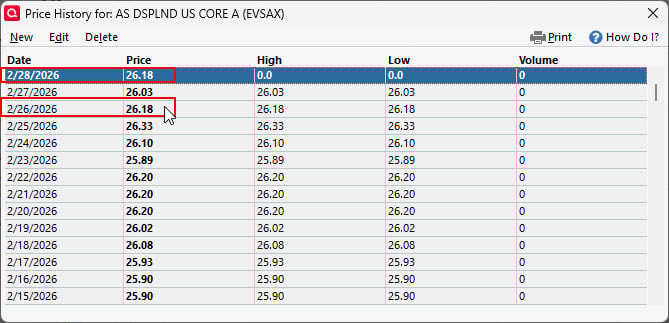
I changed the option to "Ignore prices from broker download" on Thrusday, 2/26. Friday's prices were correct because I disabled those mutual funds in my auto update and waited until the market opened. I just downloaded Sat, 2/28 prices, and it used the price from 2/26. I would think Saturday's price should be the same as Friday's price.
The High and Low are always 0.0 when this happens. Again, this is happening to all 10 of the mutual funds making my balance off by thousands of dollars until I edit each price history 1-by-1 and delete the wrong price.
 0
0 -
That sure looks like a price from your broker. Try this:
Delete the price for today then go to the account where you hold this.security, click on the gear, and select Update transactions. If the price reappears, it came from the broker.
Try this with the Ignore prices from broker download option selected and not selected.
Please let us know what you find.
QWin Premier subscription0 -
ces were set, and then zeroed out in Fidelity NetBenefits. In other words, just just after download, it looked like there may have been price values for the NetBenefits funds, but were gone when the screen refreshed after One Step Update.
All securities in this account are set to "Ignore prices from broker download". However, today, (3/18) after download, it grabbed the price from 3/16 for all 10 funds. When this happens, the High and Low are always 0.
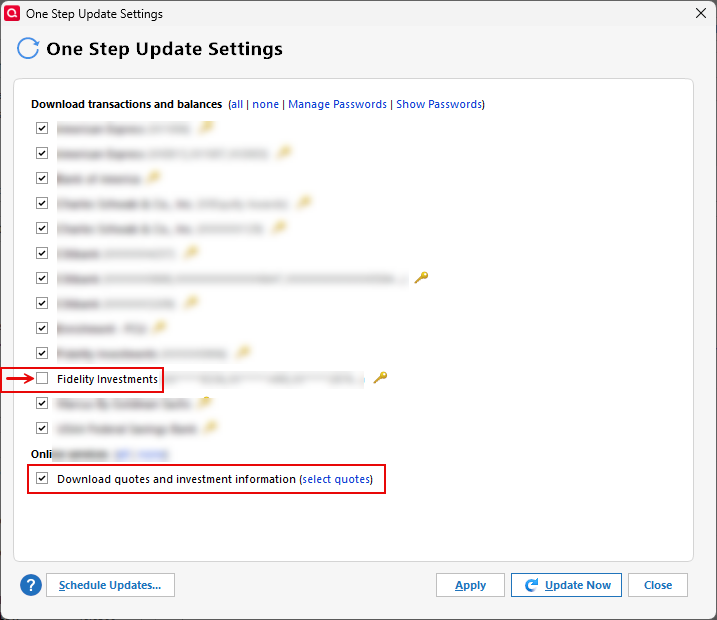
Fidelity is excluded from my daily One Sttep Update. However, "Download quoates and investment information" is selected, and the funds in question are selected for download.
 0
0 -
It looks like the first part of comment was truncated, and I don't see a way to edit my post. It was supposed to say "Everything was working fine for a while, though it almost looked like after the download the prices were set, and then zeroed out in Fidelity NetBenefits. In other words, just after download, it looked like there may have been price values for the NetBenefits funds, but were gone when the screen refreshed after One Step Update." [and goes on to say it's back to getting prices from a prior date w/ High/Low always set to zero.
0 -
This is SO FRUSTRATING! I downloaded transactions this morning, and ONCE AGAIN, I need to go manually edit the price history for 10 mutual funds because it loaded the prices from a previous day with a "0.0" High and Low!
I remember when Quicken just worked. Now, this has been my experience with every issue I've had with Quicken in the past 5 years. Great suggestions from users. ZERO resolution.
 0
0
