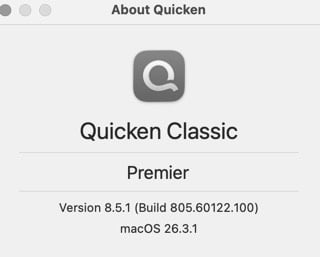
Quicken Classic Mac 8.5 has been released!

We have started rolling out Quicken Classic for Mac 8.5 into a stage release.
You can get the latest Quicken build by clicking "Check for Updates" under the Quicken menu.
Thank you for your help and support.
Best Regards,
The Quicken for Mac Team
Please take a moment to review the summary and try the new features in the product.
Investments
- NEW Added Portfolio Value and Portfolio Value & Cost Basis reports
- IMPROVED You’ll now be alerted when manually entered or edited investment transactions affect placeholder transactions
- NEW You can now open Security Detail from the Securities list
- FIXED Improved performance calculations (IRR/ROI) for short positions so gains and losses are reflected correctly
Bills & Payments
- NEW You can use a custom date in Bills & Income > Projected Balances
- IMPROVED Scheduled Transactions now support variable amount options (Fixed, Average of Last N, Last Year Prior)
- IMPROVED The Bills tab eBill column now shows additional amounts, such as Minimum Due and Balance
- NEW Added an Edit and Mark as Paid option to the Scheduled Transaction status icon in registers
Dashboard & Registers
- IMPROVED Added a Pay Online action to the in-register scheduled transaction editor
- IMPROVED Updated the visual appearance of the register transaction mini-toolbar displayed when editing a scheduled transaction
- IMPROVED The Learning Center now includes new slides covering date field shortcuts and matching downloaded transactions with manual or scheduled transactions
- IMPROVED You can now view details for matched downloaded transactions by clicking the matched status icon
- IMPROVED Updated the transaction status icon for manually matched transactions to display an orange pencil with a blue dot for clearer distinction between manual entry and downloaded match status
Business & Invoicing
- IMPROVED View item prices and descriptions directly in the Products & Services menu when creating an invoice
- NEW Mileage tracking data is now included in QXF exports for transferring data between Quicken Mac files
Connectivity & Imports
- NEW Added a sample CSV to the Import Security Prices from a CSV File window as a reference template
- FIXED Resolved an issue that could cause an account sync error to appear on every sync
Other
- NEW Added a Quicken LifeHub toolbar icon for quick access, including the option to View LifeHub and Send File Summary (subscription required)
Future macOS System Requirements
- ANNOUNCEMENT Quicken Mac version 8.5 is the final version that supports macOS 12
Quicken Bree
Comments
-
@Quicken Bree Linking ebills seems to be broken in 8.5 - when I try to connect my American Express card as an ebill it goes through the process and seems to think it has successfully completed but afterwards it is still not linked.
Edit: I tried completely disconnecting the account and reconnecting it, and while I was able to reconnect the account I still was unable to get the ebill linked.
1 -
I am seeing the same thing.
1 -
Thank you so much for your quick feedback! We are working on fixing this issue.
-victoria
0 -
I also had problems with E-Bill
2 -
I am having issues linking bills too. It's been a problem ever since Quicken changed the company that handles this for them, even before the 8.5 release. It was not an issue before the vendor/company change in August 2025. It seems to me that bills that I already have linked to our BofA account to be auto paid are the ones that won't link to Quicken. My credit cards have linked fine but they insisted on being auto paid from the credit card site. It seems you can't have two different destinations for the ebill now?? It's very inconvenient and should be fixed.
0 -
I can't link any ebills for credit cards - Amex, Chase, BofA, etc. Linking for me worked before 8.5 - although there were problems with BofA not updating the amount of the eBill in the transaction register for a while. Otherwise they worked fine pre-8.5
0 -
I have to say that in the Bills & Income tab the ability to see the the ebill info by clicking on the "i" under ebill column is very helpful & informative without having to open up the entire bill. Good Job, new company!
0 -
add option to compare two dates, two period in the new Portfolio Value report (QM)
1 -
Amazing. The #1 broken issues in Quicken seem to be Online Bills yet once again released with new issues in billers. Not thoroughly tested, it appears, yet again.
And I am not reading about an added feature that has been missing to have a VISUAL Indication that a new eBill has arrived. Cannot understand the oversight on that. It is NOT difficult to bold, change color, add a bullet. ANYTHING. Yet repeated requests are ignored.
Seems sizzle instead of the steak. I wish ALL new feature development would just stop until the basics are fixed. But Quicken does not seem to share that philosophy.
So I shall hopefully avoid update until someone here says the NEW Onlne eBills issue has been fixed.0 -
THANK YOU! I was part of Beta testing and have been watching Mac development ever since hoping for more support for investing analysis. The new Portfolio reports are wonderful starts. Looking forward to what's to come.
1 -
It’s kind of ridiculous that access to the new Portfolio Value and Portfolio Value & Cost Basis reports requires a Premier membership. These are basic reports not “advanced investment reports” as the nag window states. There’s only minimal processing required to produce these reports so it makes no sense to require an uncharge to produce them.
3 -
I agree. In my case it says I have to upgrade to the Business and Personal version, when I try to do that it doesn't even allow me to do that. If I can't run the reports, don't show them in my version.
1 -
Not sure how I didn't notice this before, but the text of one button in the mini toolbar says "Edit Schedule". Clicking this button to the Edit Details pane of the transaction. You can edit both Details and Schedule using this button, so the wording should probably be "Edit Series".
Quicken Mac Subscription; Quicken Mac user since the early 90s0 -
Using Quicken Mac Canada. Portfolio Value and Cost reports are only available to Quicken Home and Business users according to the message when I click them. Quicken Home and Business are not available for Mac. Is this a bug??
0 -
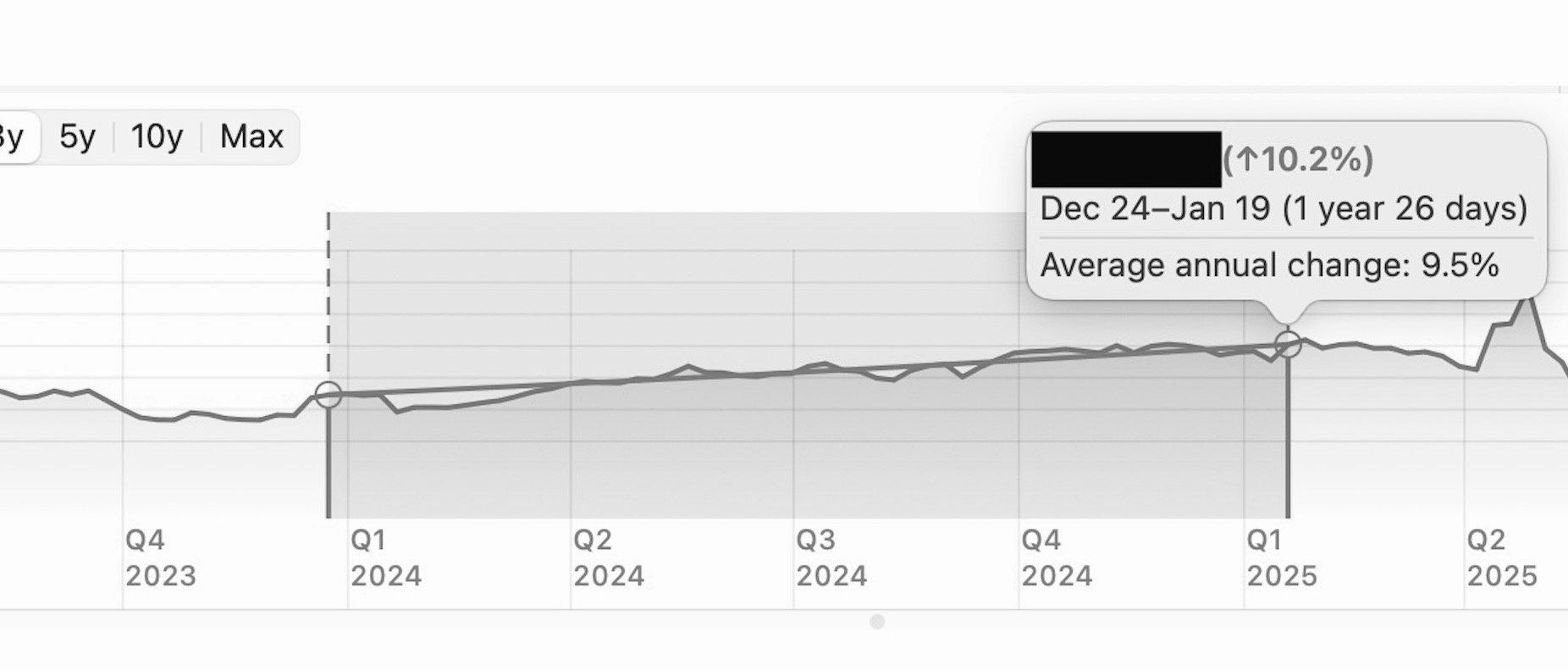
IMPROVED Added Compound Annual Growth Rate (CAGR) to the portfolio chart inspector. When you select a range on a line chart, the popover now shows CAGR alongside linear growth, and the CAGR curve is graphed within the selected range
Where is this? I have version 8.5.1 installed.
 0
0 -
Not sure how I didn't notice this before, but the text of one button in the mini toolbar says "Edit Schedule". Clicking this button to the Edit Details pane of the transaction. You can edit both Details and Schedule using this button, so the wording should probably be "Edit Series".
@RickO I pointed this out during beta testing of the 8.5 release, but the developers for whatever reason chose to keep it misnamed as "Edit Schedule", even though it opens the Details pane and then allows switching to the Schedule pane. 🤷
Quicken Mac Subscription • Quicken user since 19931 -
@Ploooplooo It's odd, because the 8.5.0 release notes did not originally include that feature; it just showed up in the 8.5.1 release notes — even though the feature was present in the 8.5.0 app.
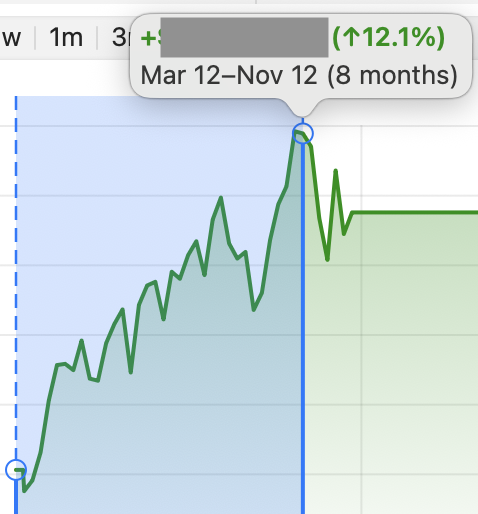
In any case, what it refers to is the "Average annual change" section of the pop-up. That is what's new since the 8.4.x release. And it now draws a straight line between the beginning and end to illustrate that average change.
Here's 8.4.x:
And here's 8.5.x:
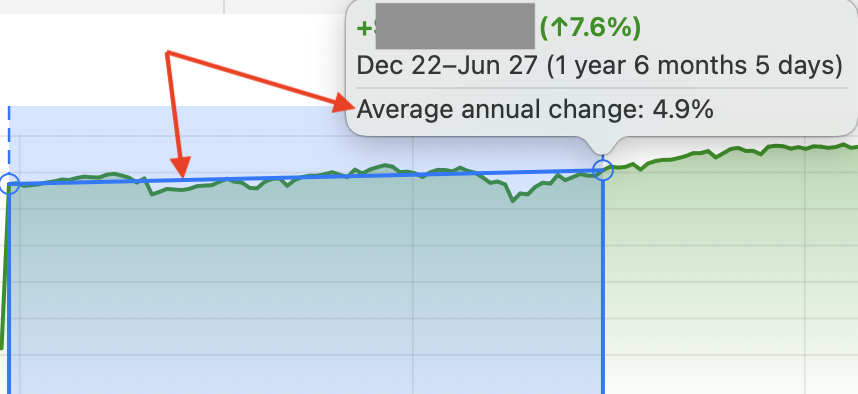
(Sorry I'm illustrating different data in my 8.4 test data file and my 8.5 test data file, so the graphs appear different, but it illustrates what's new.)
Quicken Mac Subscription • Quicken user since 19930 -
@jacobs @Ploooplooo The CAGR line in the Portfolio graph is another feature that apparently requires a Premier or better subscription without saying that in the release notes.
0 -
-
@Ploooplooo I know it says "average annual change", but I believe it is actually the CAGR. Average annual return would calculate the return for each year, sum those returns, and divide by the number of years — a true average of each year's returns. Whereas CAGR is calculated on the difference between the ending and beginning values (e.g. compounded annual growth).
I just did a manual CAGR calculation for one of my accounts over 2 years, and it matched what Quicken is showing in the chart as the "average annual change". In my case this CAGR value is 17.1% for 3 days less than two years (1.99178 years). The total gain is over that period, as shown in the box, is 37.1%, which would be an average annual gain of 37.1÷1.99178=18.6%.
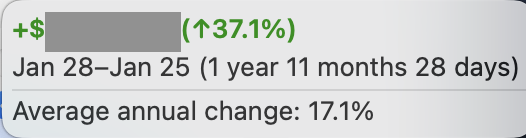
So Quicken does appear to be showing Compound Annual Growth Rate (CAGR) rather than Average Annual Rate of Return (ARR).
Quicken Mac Subscription • Quicken user since 19930 -
And I concur with @Jon that this CAGR display requires Quicken Premier and simply does not appear in Quicken Deluxe. It is an error in the Release Notes not to clearly state that this feature requires Quicken Premier or above. (I would think this new functionality should be labeled in the Release Notes as "New" rather than "Improved".)
These sorts of new features for Premier and above are problematic because Quicken's marketing team does not provide any comparison chart of what features are available at each subscription level.
Quicken Mac Subscription • Quicken user since 19930 -
Thanks @jacobs. I think I'll take your word for it. BTW - respectable ~2yr performance you've got there.
1 -
@Ploooplooo I was doing this in a testing file, so I can't guarantee that there's not some funny money transaction(s) in there somewhere which artificially goosed the return. 😂 I'm away from home now and don't have access to my live data file at the moment.
Quicken Mac Subscription • Quicken user since 19930 -
You too nice @jacobs. I feel a little better now 😅
0 -
My current version is 8.4.2 and I am prompted to update to 8.5.1 which I do it downloads and runs the install but once completed and install runs it still is on version 8.4.2 and it prompts to update. I have performed this process now about 5 times but still no luck. Is there a solution or a known problem with the update for Mac?
0 -
@izbrats Drag your current Quicken.app out of your Applications folder to your desktop. Then download a fresh copy of Quicken and run the installer. If the 8.5.1 app is installed in your Applications folder as expected, then throw the older application on your Desktop into the Trash.
Quicken Mac Subscription • Quicken user since 19930