Adding accounts after update - editing doesn't work properly

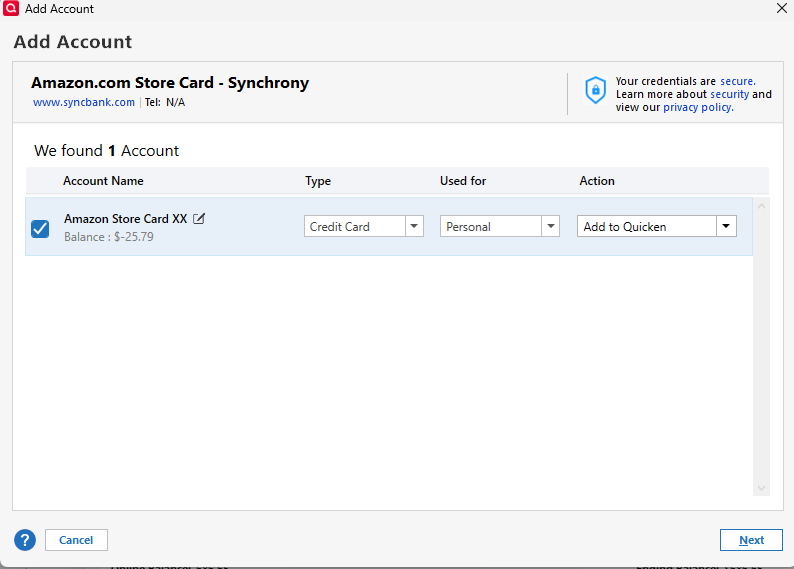
After updating Quicken Classic Deluxe to version R66.12 (build 27.1.66.12) when you add accounts (click the plus sign find the bank such as Amex or Chase). You login and authorize and it pops up a new window. Looks different from the previous version.
In the new one, you can click the pencil icon next to the account to edit/change the name (It USED to be the display name you could change so when Quicken Added it, it would show as you typed it). However, now when you edit that field, and have it added to quicken, your changes are NOT carried over. Is this working as designed?
Comments
-
Hello @mjonis,
Thank you for letting us know you're seeing this issue. To help troubleshoot, please provide more information:
- Does this happen only with accounts that connect using Express Web Connect Plus (EWC+)?
- When you edited the account name, did you click out of the textbox before clicking Next?
I look forward to your response!
Quicken Kristina
Make sure to sign up for the email digest to see a round up of your top posts.
0 -
Hi Kristina,
Yes, only on EWC+ account that I've noticed so far (Amex and Chase).
Yes, the boxes were checked, I clicked the pencil icon made my change and then clicked Next.
I've done this 3 times with 3 different accounts (one at Chase and two diff. Amex accounts). The first two didn't "take". The third one did for some reason. Very odd/weird. I'll have to see if it does this with US Bank as well.
0 -
Thank you for your reply,
To clarify, with the ones that didn't "take", you said that you click the pencil icon, edited, then clicked Next. Did you click out of the textbox before clicking Next? When I tested in my own file, not clicking out of the textbox first caused the program to not save the edit.
Did you see the same behavior with your US Bank account(s)?
Thank you!
Quicken Kristina
Make sure to sign up for the email digest to see a round up of your top posts.
1 -
Hi Kristina,
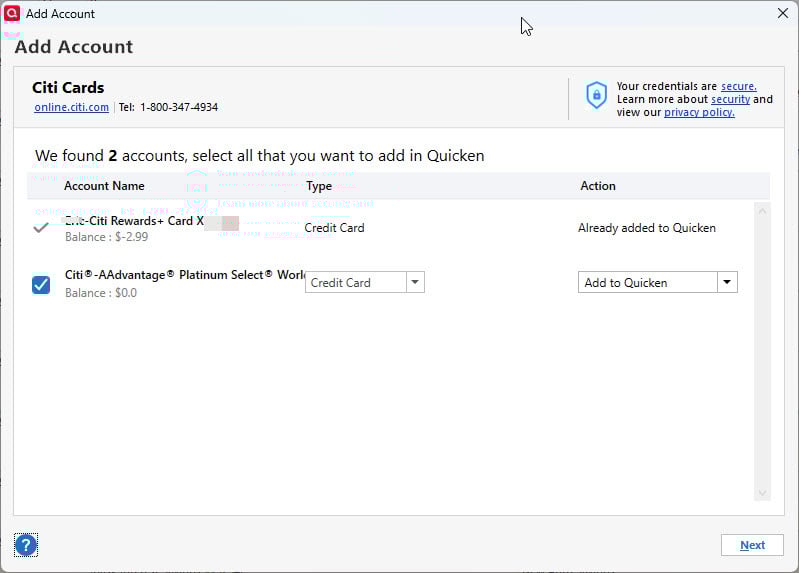
Yes, I don't think I clicked outside of the text box afterward. Unfortunately I was not able to test with US Bank because the window that quicken gives you is not resizable. The name that comes over from the FI is "too long" and thus, the Quicken UI cannot show you the edit/pencil icon (or even the rest of the text) and the box isn't resizable. (another "bug", IMO). I did screenshot that part (the inability to edit/do anything because the name is "too long" for the window).
0 -
Please do show us a screenshot of what you are seeing. It'll help us and possibly the programmers determine what's wrong.
Are you using View / Use Large Fonts or a Windows display setting to display text larger with a setting greater than 125%?
If so, please turn off Use Large Fonts or change the display setting to 100 or 125% temporarily to try to get around this problem1 -
According to my Windows 11 Display Options, I'm at 100% (not 125, etc.)
This was for Citibank, BTW (not US Bank, sorry).
 0
0 -
Thank you for your reply,
I'm not able to replicate what's happening in your Quicken. Is that long account name the way it comes directly from the financial institution?
To troubleshoot for a possible program issue, please try manually reinstalling the current update patch. Please use the article linked below for instructions and to download the patch:
Please let me know how it goes!
Quicken Kristina
Make sure to sign up for the email digest to see a round up of your top posts.
0 -
If I understand you correctly, you are trying to make Quicken add a new account register for the AAdvantage card. Correct?
There are (or once were) limitations on the characters you could use to create a new manual account register.
™© ® characters were among those not allowed.When clicking "Add to Quicken" are you given way to enter your own account name? If so, what happens after?
0 -
As you can see from the screenshot I posted, there's NO WAY to edit the name in the new updated version of Quicken, if it's "too long". Normally there would be a pencil icon to the right of the name and you could edit it. But again, as you can see from the screenshot there's no option to edit (pencil icon) because it's "hidden" behind other item in the new Quicken interface
0 -
OK, so you can't edit the account name because the dialog doesn't show a pencil icon …
What happens if you allow the process to add the new account to Quicken?
Does it work, albeit creating an account with a name that you don't want?If it does work, you can always edit the account name later, by going into Edit Account Details and changing the Account Name field.
If it doesn't work, first try creating a new offline credit card account with the desired name.
When done, repeat the Add Account process and, from the dialog screen above, instead of "Add to Quicken" click the selection, choose LINK and link the credit card account to the new offline account you just created.I do hope that the programmers will review the code in the dialog and make it so that it's long and flexible enough to display everything without truncation.
0 -
Yes, afterwards, you can still do the Edit Account Details and change what you want (like before).
0 -
Thank you for confirming,
I'm glad to hear you're able to edit it after the account is added. To clarify, does the issue with the pencil not appearing happen only when the account name, as it's sent by the financial institution, is too long to fit in the space provided?
Thank you!
Quicken Kristina
Make sure to sign up for the email digest to see a round up of your top posts.
0 -
Hi Kristina,
Yes, so far I've only seen the pencil icon not be available if the name (as sent by the FI) is "too long".
1 -
Thank you for confirming,
If you can reliably replicate the issue, it would be fastest to report the bug by reaching out to Quicken Support directly, since they have tools we don't have on the Community and they can escalate the issue as needed. The Quicken Support phone number can be found through this link here. Phone support is available from 5:00 am PT to 5:00 pm PT, Monday through Friday.
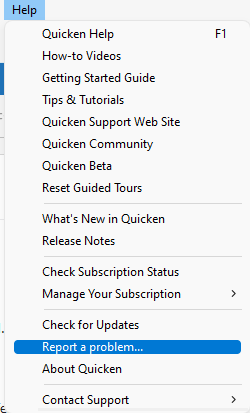
If that is not a viable option, then please let me know and submit a problem report with log files attached by navigating to Help>Report a Problem.
Thank you!
Quicken Kristina
Make sure to sign up for the email digest to see a round up of your top posts.
0 -
Hello @mjonis,
We haven't heard back from you in a while. Was Support able to assist?
Check back and let us know! Thank you.
Quicken Kristina
Make sure to sign up for the email digest to see a round up of your top posts.
0

