Bank of American Migration issue

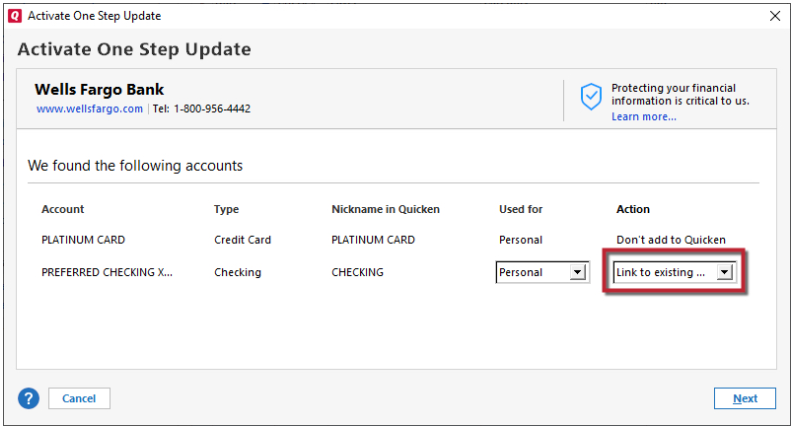
I am unable to LINK my exhibiting Accts\Registers upon Re-activation as per Announcement from Quicken to De-Activate…..Revoke 3rd party permission at Bank of American…and Re-Activate my Bank of American accts. I get the Populated download of my accts..all show ADD…clicking to LINK TO EXISTING acct….the list that opens fails to display several of my existing Accts
Answers
-
Hello @denmarfl,
Thank you for reaching out! Is this the same issue you contacted Quicken Support about yesterday (ticket #12258939)?
The most common cause of the problem you describe is that Quicken still thinks the accounts are connected and, as a result, doesn't show them as an option to link. To troubleshoot, please backup your Quicken file, deactivate all your Bank of America accounts, then navigate to Tools>Add Account and follow the prompts. Once you get to the Add/Link screen, carefully link your accounts to the correct nickname in Quicken.
Please let me know how it goes!
Quicken Kristina
Make sure to sign up for the email digest to see a round up of your top posts.
0 -
I have followed EXACTLY those steps….and…I have Revoked 3rd party security at BofA before each time when I have gone thru this process…and the QUICKEN populated list after connecting to Bank of America shows ADD on each acct…and going to LINK TO EXISTING ….several accts are not in the LIST that opens. Believe me, I have De-activated…removed Financial Name…acct Number from every one of my accts (I have 14)…before I try to re-Activate. I did post yesterday…but I have no idea if the case # is so…….
I spoke to a Supr in Q Support yesterday who told me the issue with the LINK TO EXISTING and not all accts displayed was a Known issue with this Migration…and suggested I wait and check everyday to see if this issue was resolved. So right now for the last 3 days…I have been unable to connect using Quicken with BofA….my Main Bank.
0 -
Thank you for your reply,
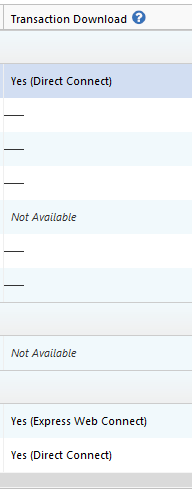
Is there any chance that the accounts that don't show as an option to link are still considered connected in Quicken? You can check this by navigating to Tools > Account List and checking the Transaction Download column. If it shows Yes, then Quicken thinks the account is connected.
Another possible culprit is if the account type in Quicken differs from the account type the financial institution shows. What account type are the problem accounts (checking, savings, etc.)? How do they appear when you're trying to link them in Quicken? If they show a different account type, is there an option to change it (sometimes the account type shows a dropdown)?
Thank you!
Quicken Kristina
Make sure to sign up for the email digest to see a round up of your top posts.
0 -
Every BofA Acct…the Download Column shows NOT AVAILABLE
Checked every acct…shows Correct type of acct…Checking or Credit…..
4 days now unable to connect with BofA. Yes, I could Link the accts that I do see the Accts in the List that opens when I click LINK TO EXISTING…but without all the accts Linking….I would not have all my accts Activated for download….. So thus far each unsuccessful attempt to re-activate…I have just exited….without completing the process
Just attempted another Re-Activate…this time the List that opens when you click LINK TO EXISTING…the List only displayed ALL CLOSED accts…and yes…accts that I have disconnected from the bank ….they are NOT connected
0 -
Thank you for your reply,
I can see that you're already working with an escalated team on this issue. Have they been able to help you resolve it?
Thank you!
Quicken Kristina
Make sure to sign up for the email digest to see a round up of your top posts.
0 -
Issue resolved. Tks
0 -
Thank you for the follow-up,
I'm glad to hear the issue is resolved!
If you need further assistance, please feel free to reach out!
Quicken Kristina
Make sure to sign up for the email digest to see a round up of your top posts.
0
