Error in categorizing option writing transactions in Fidelity Accounts

Currently, there is an error that has appeared with quicken's handling of stock option writing transactions.
When a put or call is written, quicken will default to categorizing the transaction as a "saleX" , instead of a short sale.
When the put or call is covered or it has expired, quicken will categorize the transaction as a "covered short sale". This is a correct categorization. However, because the original transaction was categorized as a regular sale, which results in a negative number of shares, the covering short sale doesn't match the origin sale transaction, leading to an error.
If you change the the original transaction to a short sale, the resulting covered short sale transaction does match and the position is nullified as expected.
Please get this error fixed ASAP.
Thanks,
Harry
Comments
-
Hello @HarryM,
Thank you for letting us know you're seeing this issue. It is most likely being caused by the known issue described in this Community Alert:
For assistance with this issue, please contact Quicken Support directly, as they have tools we can't access on the Community and they're able to escalate the issue as needed. The Quicken Support phone number can be found through this link here. Phone support is available from 5:00 am PT to 5:00 pm PT, Monday through Friday.
I apologize that I could not be of more assistance!
(Ticket #12255818)
Quicken Kristina
Make sure to sign up for the email digest to see a round up of your top posts.
0 -
Thanks Kristina,
I appreciate your getting back to me promptly. The ticket report you mentioned is pretty general, so it may or may not apply to my error report. My error report is very specific, and probably should be categorized as a new bug report. I've contacted quicken support and dumped the report in their chat box. I didn't see any way to report the bug at quicken support any other way!
Thanks,
Harry
0 -
Thank you for your reply,
Since I'm not seeing any ticket from your contact with Support, I suspect you may have provided the information before the AI Assistant got you in touch with an agent. To help get the issue reported please provide the following information:
- When did you first notice this issue?
- Was there anything that seemed to trigger it? (Examples below)
- After a program update?
- After re-adding or reauthorizing accounts?
- After resetting the connection?
- After restoring from a backup?
- Please provide screenshots showing the following (please censor any personal information & account numbers):
- The incorrect transactions in your Quicken register
- The corresponding transactions on the Fidelity website
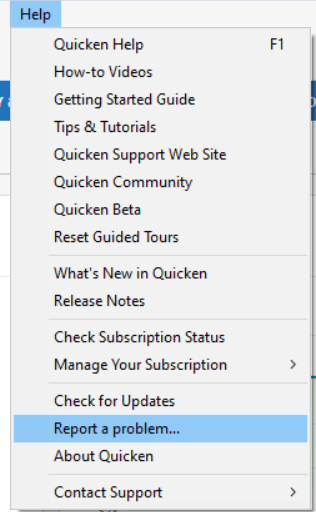
Please navigate to Help>Report a Problem and send a problem report with log files attached. Our teams will need this information in order to investigate the issue.
Thank you!
Quicken Kristina
Make sure to sign up for the email digest to see a round up of your top posts.
0 -
Hello @HarryM,
We haven't heard back from you in a while. Do you still need assistance?
Check back and let us know! Thank you.
Quicken Kristina
Make sure to sign up for the email digest to see a round up of your top posts.
0 -
Hello again,
We haven't heard from you, nor have you sent the logs our teams would need to investigate the issue. Checking in once more before this thread is closed.
Let us know if you still need assistance and please send logs if you need this issue investigated.Thank you!
Quicken Kristina
Make sure to sign up for the email digest to see a round up of your top posts.
0
