After applying latest update, checking register balance is waaay off. Why?

After the latest update, I started to reconcile my checking account (as I do monthly) against the "paper" statement, and noticed the beginning balance was off by about $5300. Looking back, the last "correct" balance was in Sept. 2023. The October 2023 balance was is off by $287.50 (see entry below), and it gets worse over time. Why, and what would you do? I'm inclined to add a balance adjustment after every "wrong" reconciliation transaction, but I shouldn't have to do that.

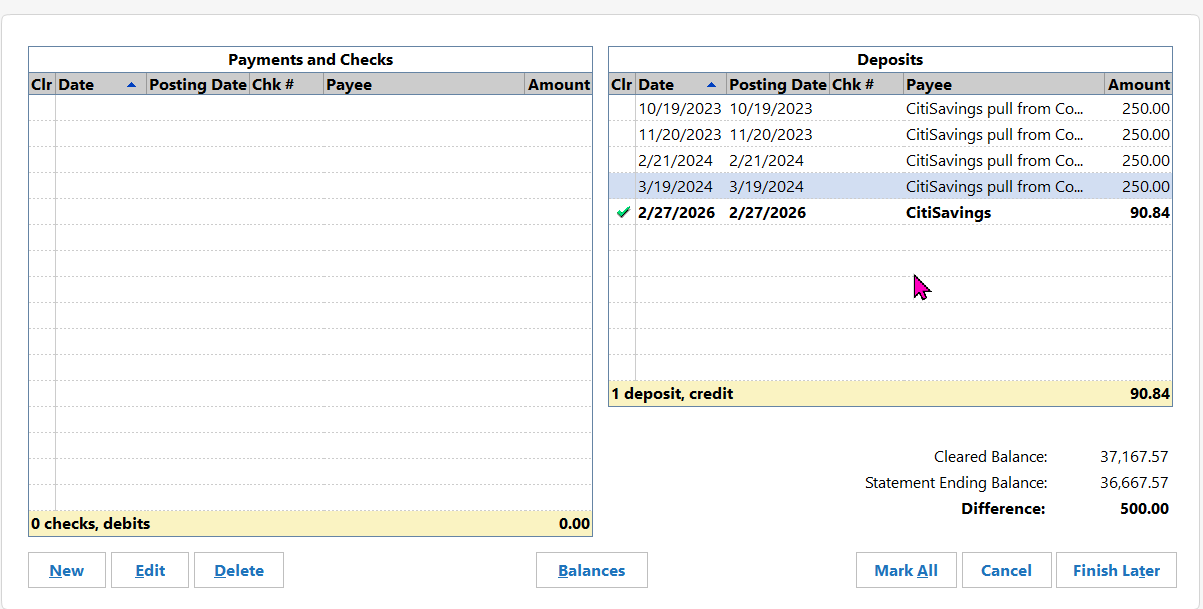
ETA: Oh, and it gets worse! I was reconciling a savings account and it says the balance is off by $500 (see below). Each of these "uncleared" transactions are NEW (with no posting date) and are duplicates of previously reconciled transactions.
Answers
-
What is the connection method of the affected accounts? DC, EWC, EWC+ or WC? (Tools > Account List will be the fastest way to get this information.)
By "latest update" do you mean the latest software version update or the latest download update?
Were you prompted to reset or reauthorize the accounts?
Or did you change the connection method from one type of connection to another?
I would not recommend simply entering an account balancing transaction. If the cause(s) of the balance issue(s) is not resolved entering an account balancing transaction might not permanently resolve the issue and could result in you needing to repeatedly entering account balancing issues in the future.
Here is what I would do to start troubleshooting this issue:
- Back up the data file.
- If the Opening Balance transaction dollar amount was not corrected, do that now. (Then I suggest entering/saving the correct opening balance transaction dollar amount into the Memo field. If this issue ever happens, again, doing this will make it very easy to identify and fix.)
- Since the issue appears to start with Oct 2023 I would start there and scroll forward looking for Duplicate Transactions. Since there are four $250 uncleared transactions showing in the reconciliation it is a pretty good indication that those are duplicates but there might be others. If any are found, decide which one to keep and then delete the other.
- If the account balance issue is not resolved, scroll through the register looking for a 2nd "Opening Balance" transaction. If one is found, keep the correct one and delete the other.
- If the account balance issue is not resolved, look for missing transactions starting with Oct 2023. Hopefully it will be resolved by the previous steps and you won't need to take this step because this can be quite time consuming.
Let me know if any of this helped resolve the issue.
Quicken Classic Premier (US) Subscription: R66.23 on Windows 11 Home
0 -
I'm sorry I wasn't clear, on the first post. This weirdness appeared after installing upgrade version R66.18, and a one-step update of all my accounts. The checking account uses "Express Web Connect", and the savings at Citi uses "Express Web Connect+". Also, there's another element I forgot to include. Earlier last week (before the R66.18 was applied), I turned on Mobile Sync in order to see my stuff in an web-browser on a different computer, during a meeting. I had tried Mobile sync many years ago, and now I remember I had turned it off way back then because it caused problems (exactly what I don't recall).
As for opening balances, the Savings account correctly has "0" when I opened it in 2019. Checking on the other hand isn't: We've had that account nearly 40 years, and I periodically purge old transactions. The checking account in Quicken has an opening balance of -412,674.49 with a 1/1/2010 date. I don't know if it is different now from what was in there on 1/1/2010, but I have my doubts.
Reconciliation transactions where I recorded the ending balance in memo are correct between April 2023 and Sept 2023. March 2023's reconcile ending balance is incorrect (see below), but Feb 2023 matches, as do those going back to late 2021. The reconciliation transactions earlier in 2021 are also incorrect. I did not adopt this practice of putting in a placeholder transaction with the matching ending balance in the memo field until mid 2020.

I'll go about looking for more duplicate (and unreconciled) transactions and see what I see, before I go much further. I really wanted to work on my Taxes this weekend, and not t-shooting Quicken bizarreness.
I used "Report a problem…" feature yesterday, and have not heard back so far.
0 -
Update: I reverted to a backup from last weekend (from before enabling Mobile Sync) and performed a one-step update. 16 different accounts failed including the Checking and the Savings accounts (different institutions). But I checked the manual reconcile on Checking and the beginning balance was correct. I re-authorized the Citi Savings, downloaded and reconciled. There were none of those old duplicate $250 transactions.
Next, I got checking account to download, and tried Reconcile again. This time I had to check off 6 transactions (dated Feb 22 & 23) as "cleared", so now I only have a $10 difference. I think I can deal with that, but I'll try to find the missing $10.
I hope the other 14 accounts which need re-authorizing turn out OK.
ETA: 3 hours later…. all but two accounts are re-authorized, updated, and reconciled. Will work on the other two later (might have to call those institutions because "re-authorize" isn't working correctly).
0 -
I'm glad restoring the backup file seems to have resolved the checking and savings accounts issues.
Sometimes when updating the installed version of Quicken there are some issues encountered. IMO, it seems the occurrence of issues is a little more common when the updating is done by the Quicken software than when I manually download and install the Manual Patch Update File so I usually update manually.
Issues that sometimes can occur:
- Opening balance sometimes changes.
- Duplicate transactions sometimes get added to the register.
- Some transactions will be changed from Reconciled or Cleared to not Cleared.
- Some Preferences get changed. (The one that most frequently happens to me and is most concerning to me is that my Automatic Backup settings get changed. So I ALWAYS review all of my preferences after each version update.)
- Tax Planner settings get changed.
- Sometimes saved reports will be corrupted requiring those reports to be recreated and saved, again.
- Unusual calculation results in various accounts, reports and planning tools.
- Sometimes the files is simply too corrupted to be useful for much of anything.
These things usually do not happen but they happen enough to be of a concern and to require diligence to check out everything.
Sometimes the fix is pretty simple: Download the Manual Patch Update File and install it right over the installed Quicken application.
Other times it might require the restoration of a backup file dated from just before the version update. As you noted, recently that has resulted in all of the EWC and EWC+ accounts to return CC-800 errors which requires those accounts to be Reset or to be added again via Add Account or Set Up Now and then to be Linked to the accounts that are already in Quicken. (This restoration process can also cause Opening Balance and duplicate transactions issues.)
Because of these issues I always recommend doing the following before proceeding:
- Enter and save the Opening Balance transaction dollar amount into the Memo field (if not already done previously.
- Always back up the data file.
Good luck!
Quicken Classic Premier (US) Subscription: R66.23 on Windows 11 Home
0 -
Thanks for the tips! How does one stop Quick from auto-applying software updates, so that I can download and manually install at my leisure? Seems like I'm not given a choice when I launch Quicken, and start One-Step update, when there's an software update available.
0 -
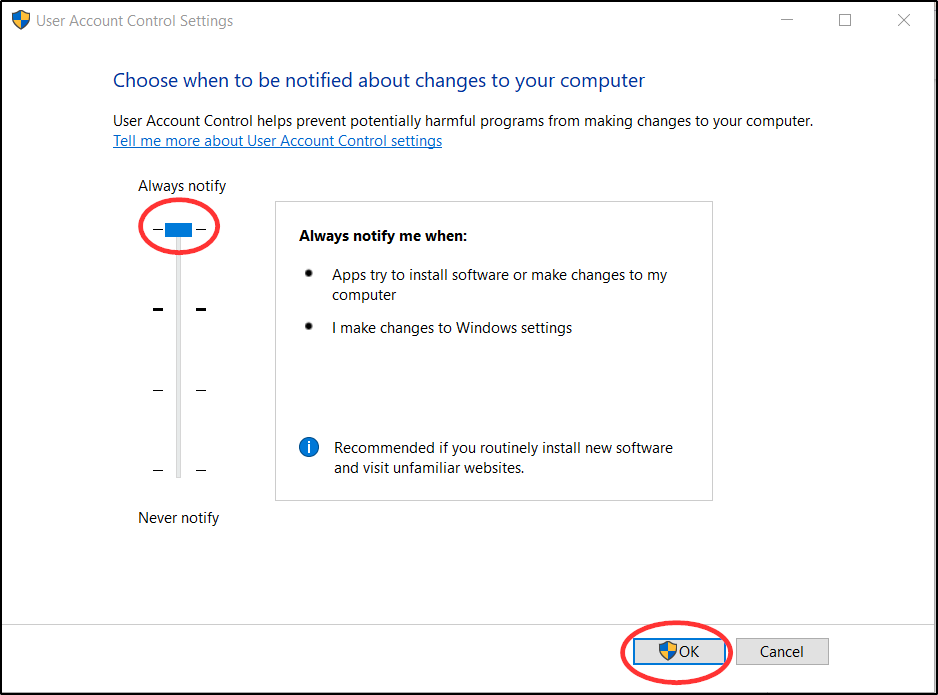
Quicken does not give us that option but Windows does. Update your Windows UAC Settings to Always notify as shown in the following picture. When Quicken tries to force update your installation you will be prompted to decide whether or not to let the update proceed. Works like a charm.:
Quicken Classic Premier (US) Subscription: R66.23 on Windows 11 Home
1 -
The UAC setting is a great tip! I bumped it one level to MAX. Thank you!!
Seems like adding the option to delay would be a great feature enhancement request for Quicken. I wonder where one might submit such a request…. (adding this to the mental list of RFE's I'd like to submit).
0 -
You can submit Product Ideas by going to and then clicking on the New Idea button. Other users are then able to view the request and if they like the idea they can cast their vote for it. The Quicken Team does review requests that are submitted. Generally, they do not take any action with regard to them until there have been about 50 votes cast for it. Then they will take it into consideration and decide whether or not to add the idea to their Development Plan.
If you decide to submit a Product Idea be sure to cast your vote for it. Below the original post that you submit there will be a voting button as shown in the following example picture. Click on that voting button to cast your vote for it.
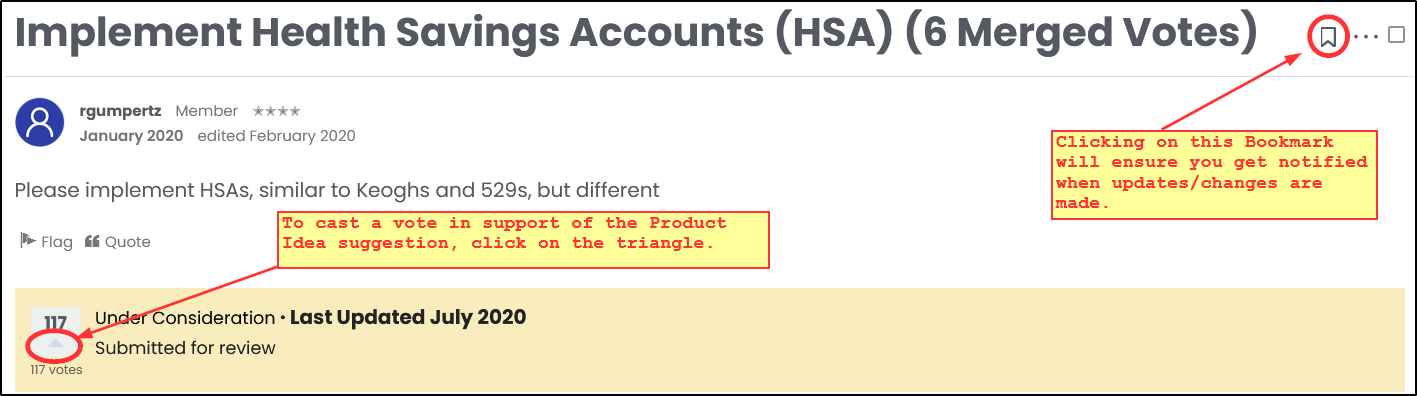
It is also suggested that before you submit a Product Idea you first conduct a search to see if someone has already done that. If so, then cast your vote for that one instead of submitting a new one.
Quicken Classic Premier (US) Subscription: R66.23 on Windows 11 Home
0

Categories
- All Categories
- 23 Product Ideas
- 34 Announcements
- 247 Alerts, Online Banking & Known Product Issues
- 19 Product Alerts
- 265 Welcome to the Community!
- 300 Before you Buy
- 1.5K Product Ideas
- 55.8K Quicken Classic for Windows
- 16.9K Quicken Classic for Mac
- 1K Quicken Mobile
- 834 Quicken on the Web
- 128 Quicken LifeHub