Quicken for Mac Classic assigns incorrect payee upon transaction import

Mac Version 8.4.2 (Build 804.59835.100)
I called in years ago with this issue and the 2nd instance—a thread on this site—is now closed without a solution. Now that it's tax time I discover these discrepancies and have to go into Quicken and FIX all the mis-assigned transaction imports that simply happen to have the same transaction amount. (Oh, there's a white man, it must be Gary! Oh, there's another white man, it must also be Gary, ….and on.)
The problem is that currently, I have four charities where, every month, I give the same amount to each. Quicken doesn't seem to care about the payee name that downloads from my bank because it seemingly randomly assigns one of the payees with the same payment amount to the imported transaction.
To get around this, I made one on-going transaction of the same amount (not charity but to a 529 account) 50 cents more so that I can give Quicken a helping hand since the software is apparently not so smart. Having been in IT for over 30 years, I find this simple problem to be very frustrating. Of all the important and complex calculations this software must now do, this must be the easiest.
I've been using Quicken since I got my first version on a single floppy disk (I think the first Windows version) but this will be my last year. There's enough competition out there now to draw me away.
Answers
-
Hello @millem1309,
Thank you for reaching out! To help troubleshoot, please provide more information:
- When did you first notice this issue?
- You mentioned you called in about the issue years ago. Do you recall roughly when?
- Has the issue been constant or intermittent?
- Was there anything that happened around the same time, such as a program/computer update, or crash?
- Is your Quicken file located directly on your local hard drive?
- Is your file synced to any cloud service, such as iCloud, OneDrive, or Dropbox?
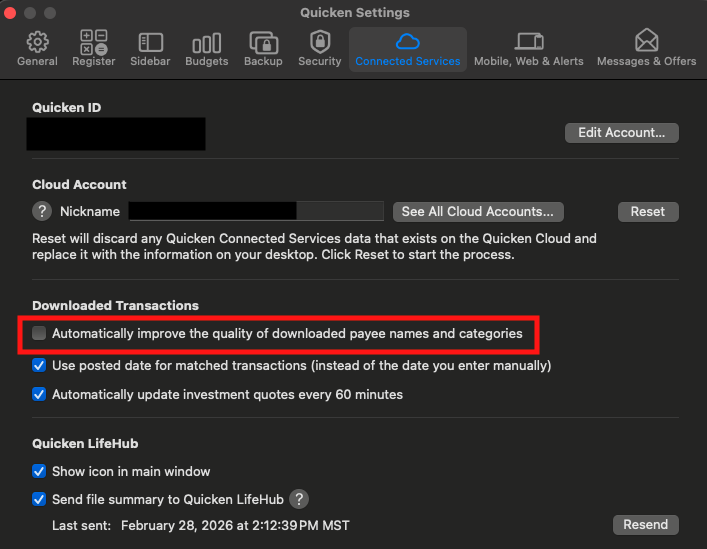
I can see you already confirmed that renaming rules aren't the culprit in the earlier discussion. If you haven't already done so, please go to Quicken>Settings>Connected Services and verify that "Automatically improve the quality of downloaded payee names and categories" is not selected.
I look forward to your reply!
Quicken Kristina
Make sure to sign up for the email digest to see a round up of your top posts.
0 - When did you first notice this issue?
-
Hello @millem1309,
We haven't heard back from you in a while. Do you still need assistance?
Check back and let us know! Thank you.
Quicken Kristina
Make sure to sign up for the email digest to see a round up of your top posts.
0 -
Hello again,
Checking in once more before this thread is closed.
Let us know if you still need assistance.Thank you!
Quicken Kristina
Make sure to sign up for the email digest to see a round up of your top posts.
0
