Unable to download Schwab Bank and Investment Transactions

Using Quicken Classic Premier (version R66.12 and build 27.1.66.12). Earlier this week, our ability to pull down transactions from Schwab and Fidelity Investments stopped as all accounts showed as "deleted" after running One Step Update.
Followed instructions in this community, re-authorized all accounts and relinked as needed. Fidelity is now downloading without issue when running One Step Update. Process appears to connect to Schwab and completes without error. But Schwab accounts are not listed on One Step Update summary nor are available transactions downloaded. I have deactivated and reauthorized multiple times.
Comments
-
Hello @Lammers,
Thank you for letting us know you're seeing this issue. To help troubleshoot, please provide more information. Did Schwab disappear from the One Step Update Summary screen about the same time that transactions stopped downloading?
To start troubleshooting the issue with transactions not downloading, please follow these steps from our article on missing transactions/transactions not downloading:
Be sure to follow these steps in order:
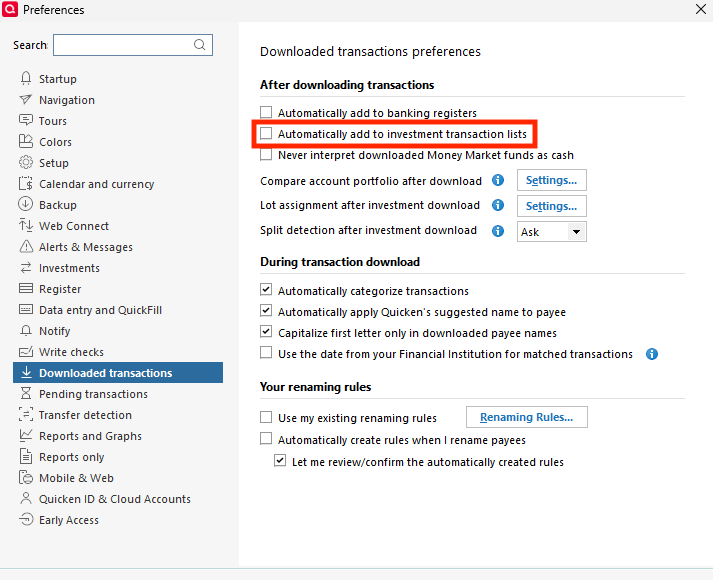
1. Go to Edit > Preferences > Downloaded Transactions. The option Automatically add to investment transactions lists needs to be unchecked.
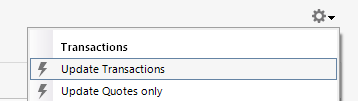
2. Refresh your online account information by clicking the Actions Gear Icon on the upper right of the register, and select Update Transactions. Follow the on-screen instructions to complete the update.
3. Confirm that the Sort Order in your account is by Date; just click the top of the Date column in your account register. It's possible the transactions are in your register, but not where you thought they'd be.

4. Try refreshing your login session: To do this, go to Help > Refresh Sign in. After completing the log-in process, try running a One Step Update again.
5. Go to Tools > Account List and check Show Hidden Accounts at the bottom left. Confirm the missing transactions haven't been added to a hidden account by clicking on the name of any account that appears with a check mark in the Hidden column.

If the issue isn't resolved and this is not a one-time event, please reach out to Quicken Support.
I hope this helps!
Quicken Kristina
Make sure to sign up for the email digest to see a round up of your top posts.
0 -
Hello @Lammers,
We haven't heard back from you in a while. Do you still need assistance?
Check back and let us know! Thank you.
Quicken Kristina
Make sure to sign up for the email digest to see a round up of your top posts.
0


Categories
- All Categories
- 22 Product Ideas
- 34 Announcements
- 247 Alerts, Online Banking & Known Product Issues
- 19 Product Alerts
- 265 Welcome to the Community!
- 682 Before you Buy
- 1.5K Product Ideas
- 55.7K Quicken Classic for Windows
- 16.9K Quicken Classic for Mac
- 1K Quicken Mobile
- 834 Quicken on the Web
- 128 Quicken LifeHub