Recording credit card payment

When I record a credit card payment, I use a "split" payment. I enter the total payment initially, and then as I add in the individual payments, Quicken would calculate the remaining balance at the bottom of the box. If I missed something, it would be easy to find how much was still not recorded. The outstanding balance calculation is no longer happening. How do I get it back?
Thank you!
Answers
-
I'm not experiencing that issue. First and easiest troubleshooting step would be to exit Quicken and restart your computer.
0 -
I'm not experiencing that problem either with 65.29 so what version are you using?
From what you've posted it also sounds to me like you are recording all your credit card activity in your checking Account as you make payments to your credit card company?
I guess that can work OK if you don't have very active credit card use but it comes just about unmanageable and very time consuming with a very active credit card. The generally accepted way of dealing with credit cards in Quicken is to create a credit card Account to capture those transactions as they occur - either by downloading or manual entries - and then simply recording the payment in the checking Account as a Transfer of money to the credit card Account.
2 -
Hi @jgblive,
Thank you for reaching out. That’s a great question.
In addition to the other helpful recommendations provided, I’d like to mention that Quicken will display the remaining amount in a split transaction only if you enter the full payment amount before creating the split. If the full amount is not entered first, Quicken will not calculate or display the remaining balance.
- Enter the full payment amount.

- Click split.

- Split the amount.
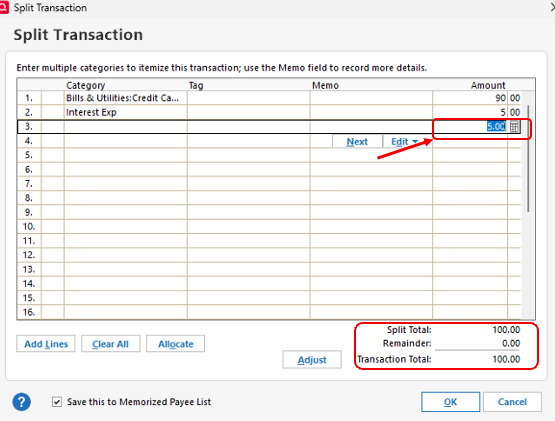
If even after entering the full amount before splitting the payment, Quicken doesn't calculate the amount remaining, please let me know. I'll be happy to help further.
Quicken Laura
Make sure to sign up for the email digest to see a round up of your top posts.
0 - Enter the full payment amount.


Categories
- All Categories
- 23 Product Ideas
- 34 Announcements
- 248 Alerts, Online Banking & Known Product Issues
- 19 Product Alerts
- 265 Welcome to the Community!
- 301 Before you Buy
- 1.5K Product Ideas
- 55.8K Quicken Classic for Windows
- 16.9K Quicken Classic for Mac
- 1K Quicken Mobile
- 834 Quicken on the Web
- 129 Quicken LifeHub