Golden 1 Credit Union Error FDP-163
Comments
-
Thank you for adding to this discussion.
Sorry to hear that you have been affected by this issue. I hope they are able to get this resolved soon for everyone impacted.
Thanks again!
Quicken Alyssa
Make sure to sign up for the email digest to see a round up of your top posts.
0 -
I too am getting the FPD-105 error. This started once Golden1 updated their website. Logs sent.
1 -
Wow movement, moved to a FDP-105 error code.
0 -
I received a response yesterday from the Golden 1 Member Advocate. They basically put the blame on Quicken:
"We understand how important it is to have seamless access to your data. At this time, Quicken is still under development to support options beyond manual data export. Unfortunately, we do not have an estimated timeframe to share, and we sincerely apologize for any inconvenience this may cause."
This is exasperating. I don't know which of these two organizations (Quicken or Golden 1) is more at fault, I don't know what either of them are doing, and neither of them will say.
0 -
Now this morning I'm getting this:
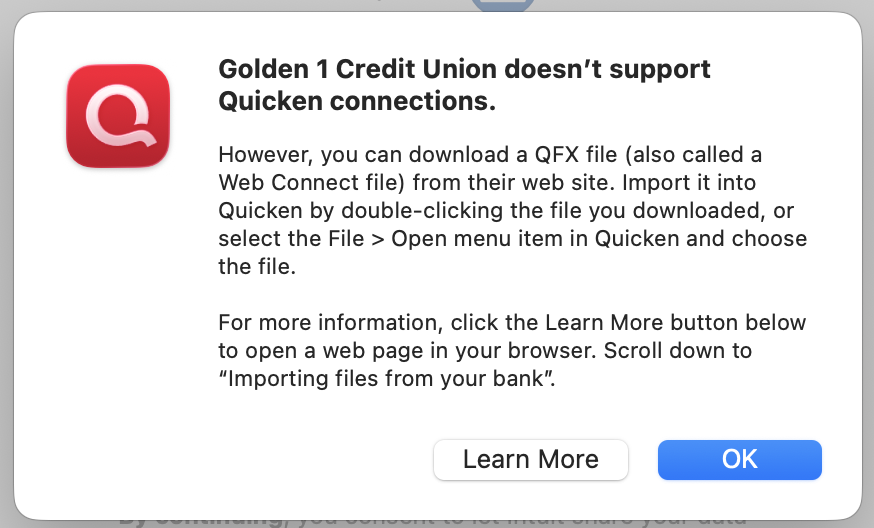 0
0 -
This is not a fault of Quicken. Every time a financial institution makes changes to their 'handshake' (login procedure), it breaks 3rd party software (such as Quicken). It has happened many times over the years and we end-users are the ones who must deal with it. I would never give up Quicken, I too am 25+ year customer. I like the fact that I have software that is double-checking my account activity and balancing all my accounts! When one of my financial institutions is not downloading as expected, it is natural to want to take action to show that institution one's displeasure. Meanwhile, I continue to use Quicken to monitor all my other financial tools (credit cards, other banks, etc).
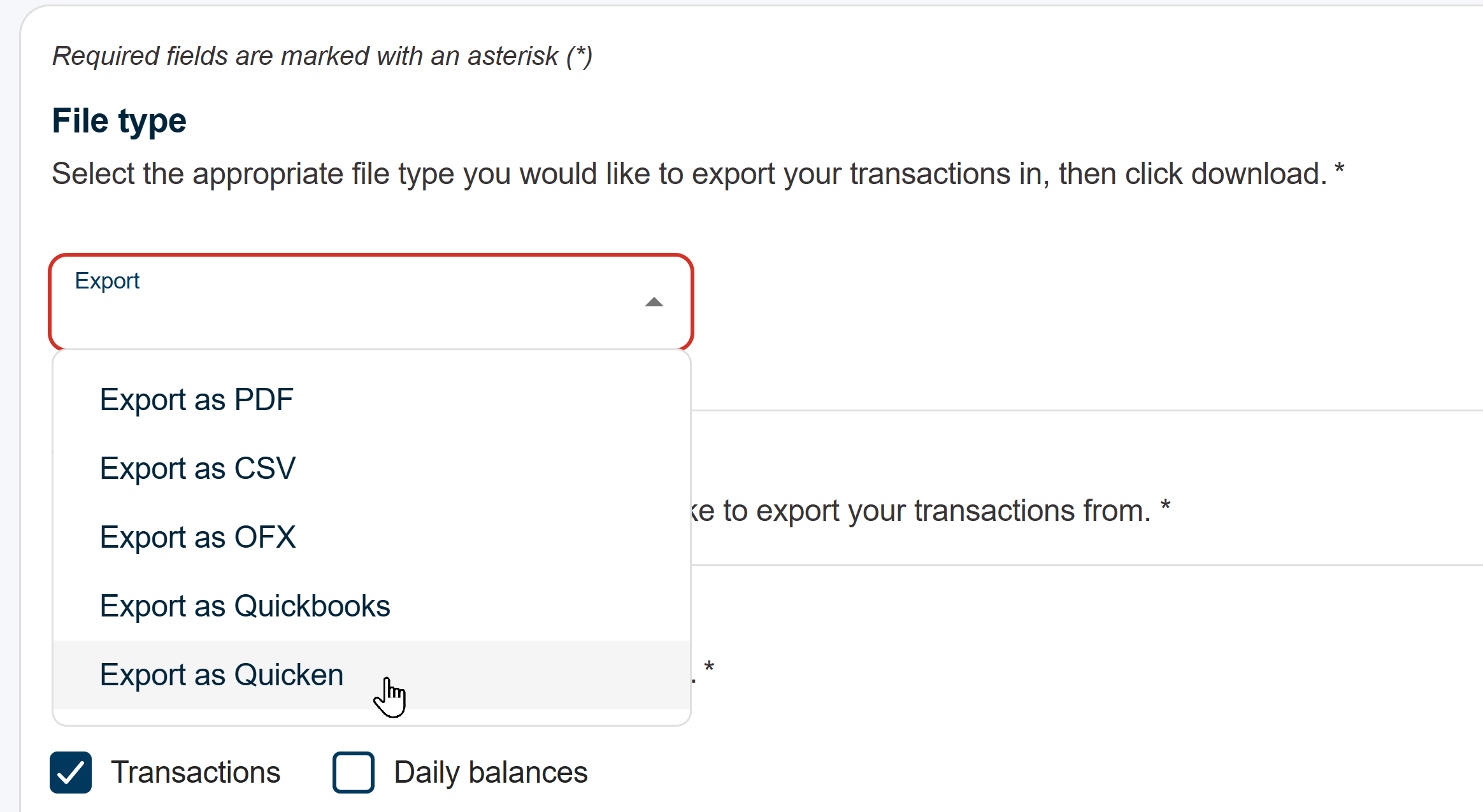
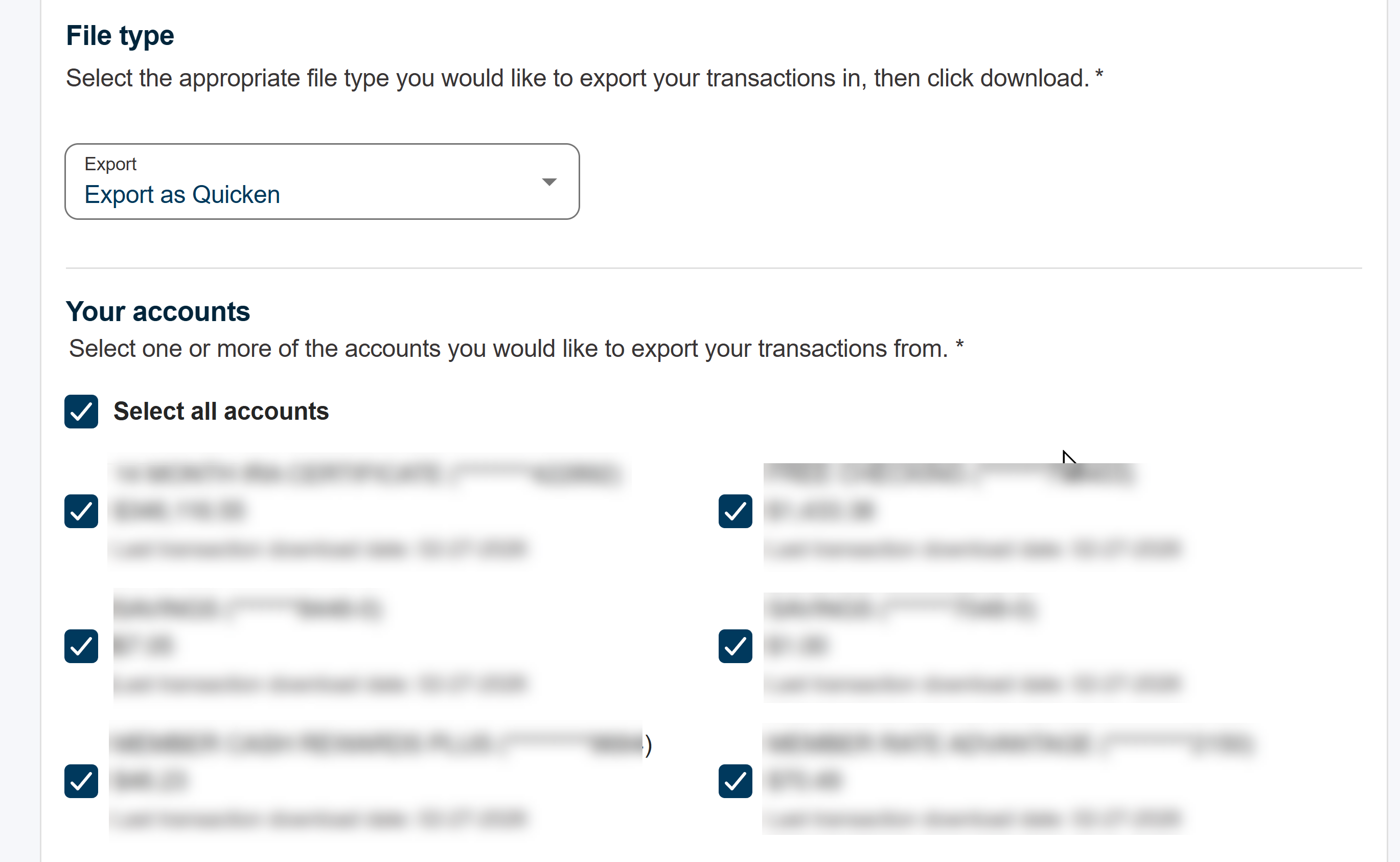
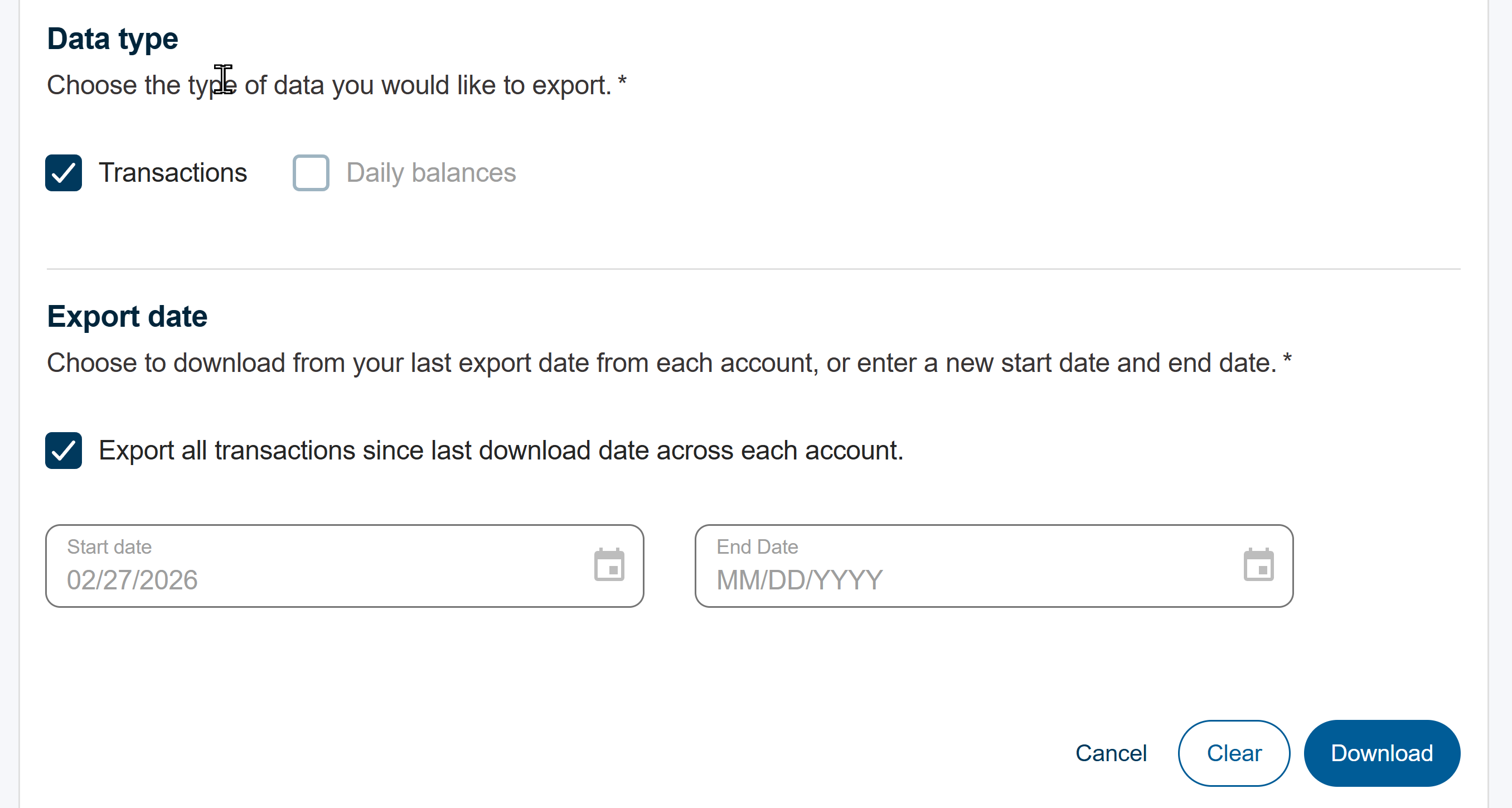
I can say that once you try the download from Golden 1 website, you will be prompted by Quicken to either create new accounts or else LINK to existing accounts. You want to LINK (match) each Golden 1 account to each Golden 1 account you have in Quicken. This is a simple process if you have not changed the nickname of your Golden1 accounts within Quicken - because the last 4 digits of each G1 account will show up in the list and you simply match each account to Quicken and complete the import process.
Then the very next time you download manually, all of your accounts will download and match up to Quicken just as they normally do when the regular online download process is working as expected! Important, when you EXPORT from Golden 1 website, choose file format "QUICKEN" (.QFX) and also select ALL ACCOUNTS to download. On your very first download from Golden 1, select a download date range that covers the time since you last successfully downloaded to Quicken (prior to this problem). Thereafter, for the download range, do not enter a date, just check the box that says "Export all transactions since last download across each account" and Bob's your Uncle!
Note that when selecting "ALL ACCOUNTS" each account will show the DATE you last downloaded.
The upshot is this is only really awkward the first time you do the download, thereafter it's quite simple and (relatively) painless, until such time as the backend programmers get the handshaking issue resolved.
Hint: I save my export file (that I generate from Golden 1 website) to my DESKTOP, that way each time I repeat the process as the days go by, I simply overwrite the "old" file with the "current" download. Then just double-click on that file and Quicken will open up and import the data you manually exported. Then Quicken will do your normal download of any other financial institutions and you can update each account that will show red flag meaning there are new transactions to accept and balance.
_____________________________________________________________________________________________________________________
Information in this post is without warranty and end-user assumes all risks of use. Always backup your Quicken file BEFORE making any changes or trying new procedures.
2 -
Thanks for posting this. I was downloading one account at a time. 🤦♀️ This makes it much easier.
1 -
You're welcome! I discovered and thought it worth sharing. I can live with this now .. it's not as painful as doing one account at a time. Appreciate your feedback.
1 -
25+ year user here as well. I mainly use Quicken for the downloads and reconciliation. I will likely be dropping Quicken at the next renewal.
[Removed-Rant]
-1 -
Chiming in here as well, just discovered that this hasn't been syncing for myself since around 2/21, likely since the Golden 1 Digital Banking experience upgrade (good upgrade overall honestly, I like the way their web portal works now much better) but I rely on Quicken to manage my primary Golden 1 accounts for Checking, Savings, Mortgage, a CD account and a HELOC…so this is extremely irritating. I've bookmarked the alert so I'll also be notified, please keep us updated regularly as this kind of issue makes Quicken almost useless to me, although we understand it's not Quicken's fault, we're relying on you to make sure it's fixed since Golden 1 is going to just try to push us to use their web tools instead.
Edit: Followed the instructions above and submitted info with the "Report a problem" tool
2 -
Did you happen to have a ticket number from them on the issue? I'd love to file a complaint to their support department too and reference it if you have it. That's completely ridiculous, they know they have Quicken users who rely on those tools syncing correctly, and would have/should have tested for that in their go-live preparations.
0 -
I have tried calling Golden1 to no avail. Multiple emails have gone unresponded to. I have been a customer since the early 90s. This release is awful.
2 -
You can send secure message to the Golden 1 "Advocate" when you are logged into their 'new' website. Click on Messages tab. I would address your comments to the CEO. You will likely receive a canned response stating no definite timeline but the issue is 'under development'. It won't make you feel better, but at least your 'vote' will be counted when they have their management meetings.
1 -
Note for RSM200O….You posted;""This is a simple process if you have not changed the nickname of your Golden1 accounts within Quicken - because the last 4 digits of each G1 account will show up in the list and you simply match each account to Quicken and complete the import process."" When I import, is does not show my current Quicken accounts ?? do do a link? It only give me an option to add a new account (Savings, and Money Market, etc). I did rename some of my Quicken accounts?
MY QUESTION: What can you do if you changed the nickname in quicken? My list does not show the quicken account to link to? Also can you / how do you include CD's??
0 -
@CAPPY What I discovered is that when I import, to see the names of all my accounts in Quicken to match with my Golden 1 accounts, I first had to go in and disconnect all of those accounts. Then it let me import manually very easily.
[Edited-Readability]
1 -
yes I have twice with no responce. Last time when this happened I should have found a new bank.
0 -
Hello All,
Thank you for continuing to update this thread with your comments, concerns, and progress made along the way.
Make sure you bookmark the alerts here and here, if you have not already done so, to stay updated on any changes to this situation. I am happy to see that you have found a workaround to use in the meantime.
Thanks again!
Quicken Alyssa
Make sure to sign up for the email digest to see a round up of your top posts.
0 -
I am having the same problem, in which I am unable to use the new login credentials for Golden 1 accounts. I receive the FDP-105 error message.
0 -
Why is Quicken (via Krista?) saying this issue is resolved??? What was the resolving solution?? Did I miss something??
[Edit - Enabled Link]
0 -
Hello @CAPPY,
The alert for the issue with FDP-163 errors has been marked resolved. Those who are still seeing an error would now be seeing a FDP-105 error. The alert for that error is still open. The last update we received is that the error is being caused by scheduled maintenance.
I hope this helps!
Quicken Kristina
Make sure to sign up for the email digest to see a round up of your top posts.
1 -
I just [03/04/2026] got a response from Golden1 and it essentially said they are working with 'QuickBooks' and seem to be unaware that Quicken and QuickBooks are not the same corporation. I pointed that out to them and hopefully that helps.
2 -
Sorry, no ticket number is available. I agree in a perfect world, pre-testing with 3rd party software such as Quicken would be the ideal prior to releasing massive web updates, but since G1 is not affiliated with Quicken, they likely are disinclined for liability reasons. That said, I love Quicken and would not desert it over issues like this, because I really like being able to search through all my accounts for a given transaction by amount, payee, or other criteria. This is a great help if you are involved with a dispute or doing taxes or other financial tasks. Many of the bank websites do not offer this deep search or limit 'how far back in time' you can search. Quicken does not have such limitations!
1 -
At present, it appears that the CD's are NOT exporting, which I have reported to Golden 1 Digital Management Support. I was able to prove this by exporting ALL of my G1 accounts to a .QFX Quicken Data File, then importing that into a brand new "blank" Quicken file. All my accounts imported except my CD.
With regard to your issue with the account names, you could go online to Golden 1 and obtain the last 4 digits of each of your G1 accounts, then go back into Quicken and rename your Quicken G1 accounts and tag the last 4 digits onto each existing name… example Golden 1 Ckg rename to Golden 1 Ckg 9072 where 9072 is the last 4 of the actual account number. Then you could import by LINKING the correct Quicken account to the correct Golden 1 account.
Hopefully you 1- did a full and complete backup of your Quicken file BEFORE doing all of this and 2- understand how to restore a Quicken file from your backup if you make a mistake. 3- You can reach out to Quicken chat support if you are unsure about making backups or restoring a damaged file from a known good backup.
Given we are all only human, and computers are NOT absolutely 100% reliable…backups are only a question of WHEN will you will need them.
Advice given is without warranty and end-user assumes all risks of use thereof.2 -
The Golden 1 webtools are fine as far as they go, but nowhere near the value of a Quicken subscription IMHO. I frequently hunt through all my past transactions for a variety of reasons, it's a SNAP to quickly search back weeks, months, even years to find that pesky proof of payment or item you need to verify for your tax return, etc, etc. Try going back years on the G1 website and searching by Payee, Amount Paid, Date, etc, etc. You will instantly see that maybe just the G1 web tools don't quite fulfill all your financial monitoring needs. Longtime Quicken user/subscriber… of all the things I pay for, financial monitoring software is at the top of value-for-money analysis.
1 -
Agreed, I've come to the same conclusion. It's a decent stop-gap until this is resolved but I very much miss my historical and comprehensive views. Same here otherwise, I think I've been using Quicken for…2 decades now? :D
0 -
Hello All,
Thank you for continuing to update this discussion with your findings and suggestions.
FDP-105/CC-505 with Golden 1 Credit Union is an ongoing issue, and our teams are working toward a resolution. Please continue to refer to the Open Alert, and bookmark it to stay updated on changes to the situation.
Thanks again!
Quicken Alyssa
Make sure to sign up for the email digest to see a round up of your top posts.
0 -
I emailed Golden 1 again and they finally responded that they do not have any update as to when it will work again.
0 -
Today, March 17,2026, I was told by a rep at G1 that they have been told it will be fixed in May.
1 -
As the man said in Princess Bride: "Inconceivable!"
0 -
Thank you for your response regarding Quicken. We apologize for the inconvenience the recent changes to online banking have caused you and I am happy to assist you. Our back-office team is working diligently to provide the best solution to resolve this matter and as we continue to make updates to make the experience more reliable, we are anticipating having Express Web Connect available sometime in May. We know waiting isn't ideal, and we truly appreciate your patience and understanding while these improvements are finalized.
0


