Getting an error saying the account doesn't exist when reauthorizing Discover

This discussion was created from comments split from:
Unable to reconnect Discover, getting "Sign in to Discover Card failed" error
.
Comments
-
I am having the same trouble, i.e. my Discover Card will not update transactions. The account is named "Discover Card". When I tried to reset it, I got an error message stating that I do not have an account named "Discover Card" in Quicken, even though I was literally connecting via my account named Discover Card.
0 -
Hello @Alfred R Cowger Jr,
Thank you for letting us know you're encountering this problem. To troubleshoot, please backup your Quicken file, then follow these instructions from our article on CC-506 (account not found/account mismatch) errors:
Deactivate all accounts for this financial institution, then force Quicken to "discover" all available accounts:
- Open the Account List in Quicken (Tools > Account List or Ctrl + A).
- If present, select the Show Hidden Accounts checkbox at the bottom of the Account List.
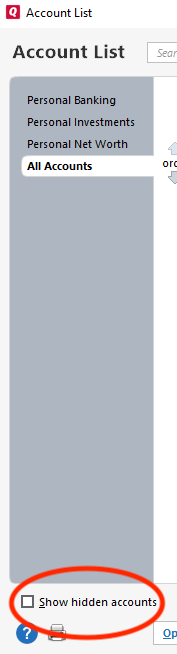
- Use the Edit button for each account with this financial institution to Deactivate (or Remove From One Step Update) on the Online Services tab.
- When finished, close the Account List.
- Close, then re-open Quicken.
- Click the Add Account + button at the top of the Account Bar on your main view.
- Walk through this process as if you were going to add a new account, providing the login credentials and answering any security questions/processes presented, until you reach the screen where Quicken displays the Accounts Discovered at the financial institution.
- Very carefully LINK each of the found accounts to the appropriate account you already have set up in Quicken.
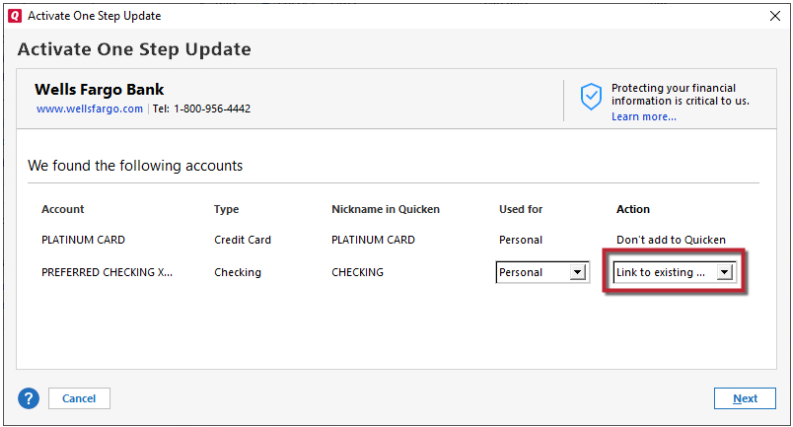
If the account was closed, deactivate it from future online updates
- Choose Tools menu > Account List.
- Click the Edit button next to the account you want to deactivate.
- In the Account Details dialog, click the Online Services tab.
- Click Deactivate to stop downloading transactions for this account.
Please let me know how it goes!
Quicken Kristina
Make sure to sign up for the email digest to see a round up of your top posts.
0 -
Hello @Alfred R Cowger Jr,
We haven't heard back from you in a while. Do you still need assistance?
Check back and let us know! Thank you.
Quicken Kristina
Make sure to sign up for the email digest to see a round up of your top posts.
0

