Can't activate online services

Running Quicken Classic Deluxe R66.18 build 27.1.66.18 on Windows 11 PC.
A Capital One credit card account prompted me to reauthorize the online services. However, when I get to the dialogue box to choose whether to add an account or choose an existing account, I run into a problem. When I choose link to existing account, the drop-down list of accounts is so long that all accounts can't display on the screen. The account I need isn't among the list on the screen, and that's where the problem occurs. The list isn't scrollable… it's static. Is there a workaround to get to the account I want to link to?
Comments
-
Hi @deriter,
Thank you for sharing what you're experiencing. I’m happy to help!
This may be a Windows display setting that’s preventing the scrollbar from appearing. Let’s check your visual settings:
Steps to Adjust Windows Visual Settings
- Click the Start button (Windows icon on the taskbar).
- Select Settings.
- Click Accessibility.
- Choose Visual Effects.
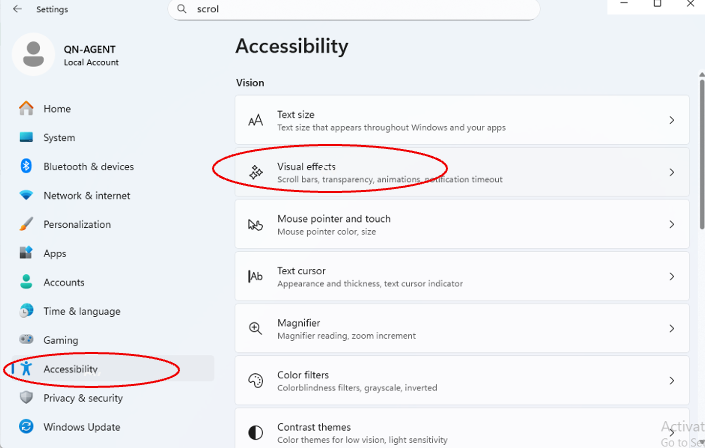
- Turn on the Always show scrollbars option.
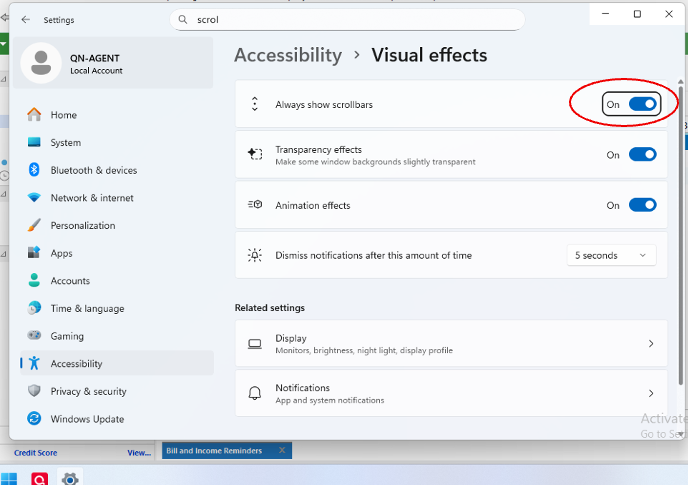
After enabling this setting, please try reconnecting the account again and see if the issue is resolved.
Let me know how it goes!
Quicken Laura
Make sure to sign up for the email digest to see a round up of your top posts.
0 -
Thanks for the response, but no joy. Although the scroll bar is now highlighted, the issue remains that the account I need to link to is not displayed. The drop down list is so long that all accounts cannot be displayed on the screen. I can scroll to the top or to the bottom, but cannot scroll any further to see the accounts not displayed. There is no arrow at the top or bottom of the list, like you see on some lists, to indicate there are more items to scroll to. Also, and I don't know if there's any relevance, but the list is not in alphabetical order. It appears to be in random order. I hope someone can come up with a fix or a work-around.
Addendum: I just clicked on "more accounts" in the main account list. That drop down list of accounts does have arrows at the top and bottom so you can scroll to see all accounts. Those arrows are missing from the list when you are trying to activate on-line services and link to an existing account.
0 -
Hi @deriter,
Thank you for following up, and I appreciate the additional information; that’s very helpful.
Your Windows display settings may be contributing to the issue. Please review and adjust your settings using the steps below:
Steps to Adjust Windows Visual Settings
- Click the Start button (Windows icon on the taskbar).
- Select Settings.
- Click System.
- Open Display.
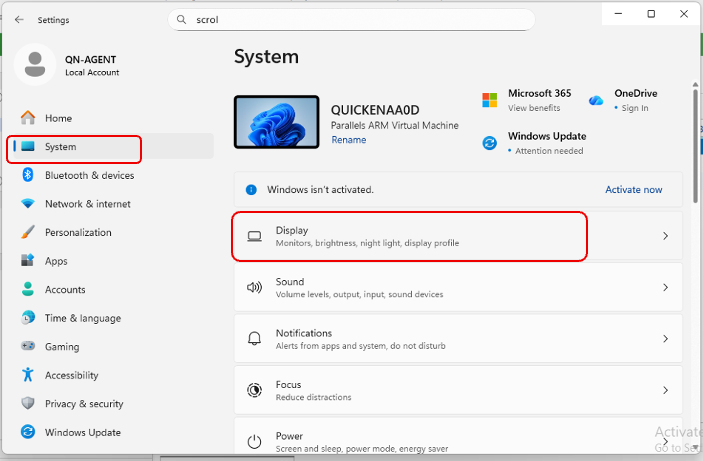
- Under Scale & Layout, confirm that both Scale and Display resolution are set to the 'recommended values.'
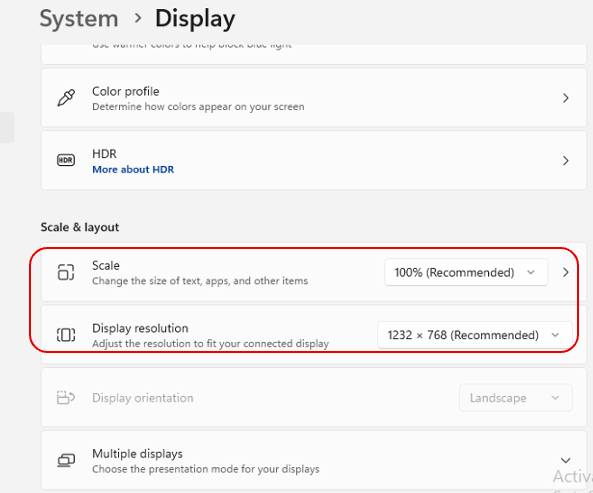
Let me know how it goes. I’m happy to help further if needed!
Quicken Laura
Make sure to sign up for the email digest to see a round up of your top posts.
0 -
The display settings are all correct. I'm pretty sure it's a Quicken problem because the list of accounts when you choose "more accounts" is also longer than what will display on one screen, but there are arrows at the top and bottom that you can use to move the list up or down so you can see all accounts. When trying to use the on-line services set up to choose an account to link to, the arrows are missing.
0 -
Hi @deriter,
Thank you for confirming that your display settings are correct and for providing the additional details.
Could you please check whether the account you're trying to link is listed in the Hidden Accounts list? Sometimes accounts may be hidden, preventing them from appearing during the linking process.
To Check for Hidden Accounts:
- Click Tools.
- Select Manage Hidden Accounts.
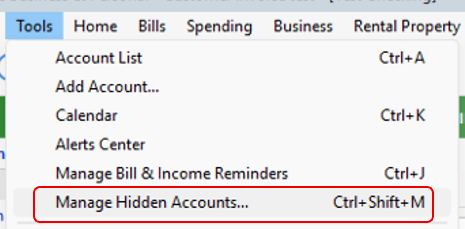
If the account appears in the list, please uncheck the Hide boxes to unhide it, then try linking the account again.
If the account is not listed there, please let me know the last time you recall seeing it in your file. That information will help determine the next steps.
I look forward to your response!
Quicken Laura
Make sure to sign up for the email digest to see a round up of your top posts.
0 -
The account is not hidden. In fact, it is an active account I use almost daily.
0 -
Hi @deriter,
Thank you for taking the time to review your account list. That helps us rule out any display or account setting issues.
Based on what you described, the behavior appears to be related to the design of the most recent version. I have reported the issue internally, but at this time, there is no estimated timeline for a resolution.
If possible, it would be very helpful if you could submit your log files so we can forward them to the appropriate team for further investigation.
To submit the logs
- Click Help.
- Select Report a Problem.
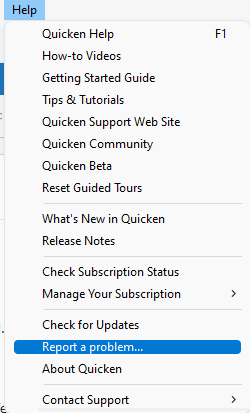
- Make sure all log files are selected.
- Click Send to Quicken.
In the meantime, if you need to reconnect your accounts, you may want to temporarily revert to Release R65.29, which has been reported to work properly when reactivating existing accounts.
Thank you in advance for your help with the logs, and I look forward to your update.
Quicken Laura
Make sure to sign up for the email digest to see a round up of your top posts.
0 -
@ Quicken Laura:
I submitted the requisite info to Report a Problem for the "Can't activate online services" mentioned above. Just FYI… I tried renaming the account that I'm trying to link to a new name that should have fallen within the range of names that shows up on the drop-down list of accounts. It didn't work. The list of account names appears to be static and unchangeable as well as unscrollable.
0 -
I have the same problem. Unfortunately, I have been fighting Quicken and Fidelity download issues for months now with no end in sight. This is the latest issue as I am trying to link one of my existing Fidelity accounts; however, the list won't scroll.
0 -
@ Quicken Laura: your suggestion to revert to R65.29 worked. The list of accounts is scrollable, but the account I needed was visible in the list anyway. Thanks
0 -
@ Quicken Laura: When do we expect the fix to roll out? I am on R66.23
0 -
Thank you for coming back and letting me know that the workaround worked properly. I’m glad to hear that it helped.
Regarding a permanent fix, our team is still actively working on this issue. At the moment, there is no estimated time of resolution, but I will be sure to keep you updated as soon as any new information becomes available.
We truly appreciate your patience and understanding while our teams continue working toward a resolution. Thank you!
(CTP-16544)
Quicken Laura
Make sure to sign up for the email digest to see a round up of your top posts.
0 -
@Quicken Laura I have not reverted back to older version. How do I do that? Currently, I have no workaround. I am afraid reverting back will cause other Fidelity download issues to pop-up.
0 -
Hi @ketan_vp,
I completely understand your concern about installing an older version. I strongly recommend saving a backup of your data before making any changes.
Here are the steps to install Release R65.29:
- Close Quicken.
- Download the Release R65.29 (click the blue link provided).
- Open the downloaded .exe file.
- Follow the prompts to complete the installation
- Open Quicken
- You may need to sign back in with your Quicken credentials
- Open your existing data file and try linking your accounts
If you have any questions or run into any issues, please let me know—I’ll be happy to assist!
Quicken Laura
Make sure to sign up for the email digest to see a round up of your top posts.
0 -
Looks like there was a fix (R66.28) rolled out today that I was able to scroll the menu. However, the list is not alphabetical. :-(
[Edited readability]
0 -
Hi @ketan_vp,
You’re correct, the issue with the scrolling bar in Release 66.28 has been resolved, and it now displays only the appropriate account types.
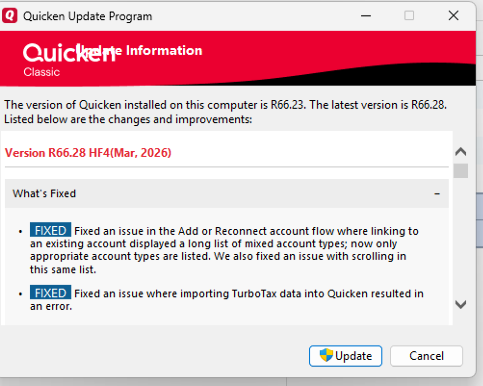
Showing the list in alphabetical order is a great suggestion and could certainly be considered for future updates.
Please don’t hesitate to reach out if you have any additional questions!
Quicken Laura
Make sure to sign up for the email digest to see a round up of your top posts.
0

Categories
- All Categories
- 6 Product Ideas
- 34 Announcements
- 248 Alerts, Online Banking & Known Product Issues
- 19 Product Alerts
- 265 Welcome to the Community!
- 301 Before you Buy
- 1.5K Product Ideas
- 55.8K Quicken Classic for Windows
- 16.9K Quicken Classic for Mac
- 1K Quicken Mobile
- 834 Quicken on the Web
- 129 Quicken LifeHub