FDP-104 Error: Caliber Home Loans

Been having a connection error on Caliber Home Loans for almost 2 weeks now. I've reported the error through Quicken, but without resolution for some time, I wanted to add it here:
Error #1
   Error Status: error
     Agg Status: CP_SCRIPT_ERROR
     Error Code: FDP-104
       WCC Code: CC-580
         Detail: Parsing error. JSON data parsing error
           Days: 11
        Snoozed: 0
        created: 2026-02-21 23:11:15 +0000
       modified: 2026-03-04 13:26:21 +0000
       lastSeen: 2026-03-04 13:26:21 +0000
          Count: 22
          fiBID: 61878
         fiName: Caliber Home Loans
       CER GUID: B11444F5-408E-4365-B771-5B4AAED69A82
     aggChannel: FDP_DEFAULT
Comments
-
Hello @WaterLover,
Thanks for reporting this!
The FDP-104 error you’re seeing with Caliber Home Loans indicates that Quicken’s financial data platform was unable to connect to the account, often due to something on the bank’s side blocking the connection.
Here’s what you can do:
- Wait 24 hours and try updating again.
- If the error persists after that window, contact Quicken Support and report:
- Error code: FDP-104
- Institution: Caliber Home Loans
Support may need to review your logs to determine whether this is a bank-side block or a connectivity issue that needs to be escalated.
Unfortunately, there isn’t a user-side fix for this error. It requires either the bank or an escalation on our end to resolve.
Hope this helps!
-Quicken Anja
Make sure to sign up for the email digest to see a round up of your top posts.0 -
Thanks for clarifying what the error code means, Anja. It's been going for almost 10 days now. Hopefully it will work tomorrow. I've sent logs via the "Report a problem" in the Quicken menu a few times now, but not via Quicken Support. We'll see what happens tomorrow.
0 -
Hi @Quicken Anja!
Error still occurs. I've reported it, but wanted to update here as well.0 -
@WaterLover Thank you for the update, and we appreciate you taking the time to submit a problem report with your logs.
While submitting reports through Help > Report a Problem is very helpful for our teams when investigating issues, those submissions are not automatically routed for escalation or follow-up. Instead, they are monitored to track when an issue is trending or becoming more widespread.
Because this issue has been persisting for some time, we recommend contacting Quicken Support directly so they can review your logs promptly and escalate the issue through the proper channels if necessary.
Doing so will help ensure the issue is formally tracked and addressed more quickly.
Thank you!
-Quicken Anja
Make sure to sign up for the email digest to see a round up of your top posts.0 -
Just an update. Shortly after your message, I contacted Quicken Support. I was basically in a chat for about 90 minutes while they tried to understand what was happening. It got to Tier 3, and at that point they allowed me to sign off saying they would continue to work on it.
As of today, still nothing. I have no plans to stay on another chat/call for more than an hour and since I have no expectations of resolution, I will track this account manually.
0 -
@WaterLover Thanks for the update and for letting us know what happened with Support. I checked your escalation ticket (12284183), and it’s still open and actively being worked on. There isn’t an ETA available at this time, but the escalation team will reach out to you directly via email once it’s resolved or if they need any further information or action from your side.
We appreciate your patience while they continue investigating this! Thank you.
-Quicken Anja
Make sure to sign up for the email digest to see a round up of your top posts.0 -
Thank you @Quicken Anja!
0 -
You're welcome!
-Quicken Anja
Make sure to sign up for the email digest to see a round up of your top posts.0 -
@Quicken Anja I have an interesting update.
I discovered that Newrez, who has Caliber Home Loans in their umbrella, completed an acquisition of Specialized Loan Servicing (SRS). I found SRS on the list of financial institutions to connect with, and so tried a connection with my Newrez/Caliber login credentials.
And it worked!
So it looks like they switched their primary login institution from Caliber to SRS. The only issue now is that each time I connect with Quicken, it asks to do multi factor authentication. But at least it is connecting.
Not sure if this can be communicated to the escalation team, so that maybe they can refine the connection process (ie: reduce the frequency of MFA requests).
0 -
@WaterLover That’s great news! I'm really glad to hear you were able to get connected!
Regarding the multi-factor authentication (MFA) prompts, in most cases the frequency of those requests is determined by the financial institution’s security requirements rather than Quicken itself. Some institutions require MFA on every connection.
If you’d like to verify whether this behavior is coming from Quicken or is being enforced by the financial institution, we can try isolating it by testing in a new (test) file. If the same MFA behavior occurs there, it would confirm it’s being required on the bank’s side.
Let me know if you’d like steps to set up a test file; I’d be happy to walk you through it!
Thanks again for sharing that update, it’s very helpful.
-Quicken Anja
Make sure to sign up for the email digest to see a round up of your top posts.0 -
@Quicken Anja That sounds like a great idea. I'd like to know as much as I can about how this account is working. Please let me know!
0 -
@WaterLover Thanks for following up!
Follow the steps below to create a test file:
- Choose File menu > New Quicken File.
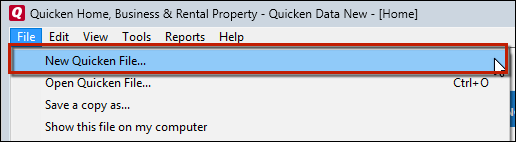
- Select New Quicken File.
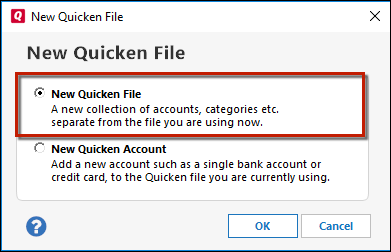
- Click OK.
- In the File name field, enter the name of the new file, then click Save. Use a name like "Test File" to easily be able to tell it apart from your main file.
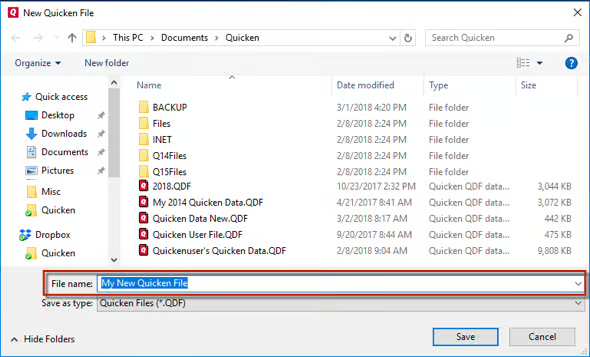 Don't use any of these characters: * ? < > | " : \ / (asterisk, question mark, left and right-angle bracket, pipe, straight quotation marks, colon, BACKSLASH, FORWARD SLASH). Also, don't add the .qdf extension; Quicken does that for you.
 - Sign in with your Quicken ID (if prompted). If you are prompted to create a Quicken ID, click Sign In under the Create Account prompt.
- Select to not use Mobile (if prompted).
- Click Add Account and connect the same account account you have in your original file. Run a few One Step Updates/Update Now to see if the MFA prompt occurs in the test file as it does in the original file.
From there, you can then switch back to your original file.
Follow the steps below to switch files:
- Click the File menu.
- Look near the bottom of the options list.
- Select the data file you want to open.
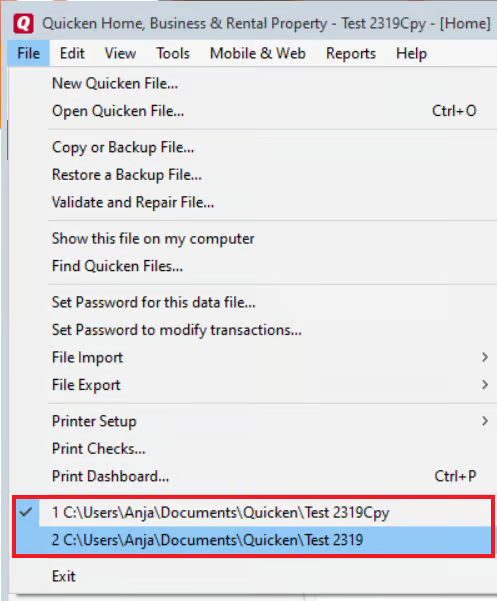
Quicken will list the most recently opened data files, with a checkmark next to the file you are currently viewing.
Let us know how it goes!
-Quicken Anja
Make sure to sign up for the email digest to see a round up of your top posts.1 - Choose File menu > New Quicken File.
-
Created the test file and tried it for a few days. The MFA occurs every day, but not multiple times a day. By your comments, it sounds like this is on SRS's side then and is something I'll have to live with. I guess it's better than not connecting at all.
Thanks for all your support with this and all the other issues!
0 -
@WaterLover Thanks for taking the time to test that and report back!
Based on those results, it does appear the MFA prompts are being required by the financial institution, so you’re correct—this is expected behavior on their end.
Glad to hear the connection itself is working now, even if it comes with that extra step.
Let us know if anything changes!
-Quicken Anja
Make sure to sign up for the email digest to see a round up of your top posts.0
