Unable to Re-connect Synchrony Accounts after latest update

After the latest Quicken update, I am getting persistent C800 errors on ALL 5 of my Synchrony Bank cards (Lowes, Care Credit Mastercard, Ashley Advantage, Sams Club Mastercard, Sleep Number beds):
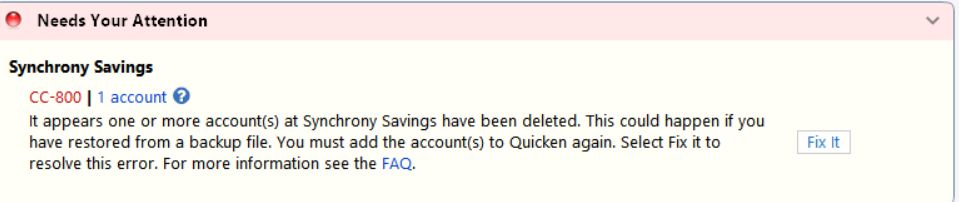
Have tried deactivating/reactivating them to no avail. Have also checked usernames/passwords outside of Quicken, and they work fine. When I try to re-add the accounts, I get the following error:
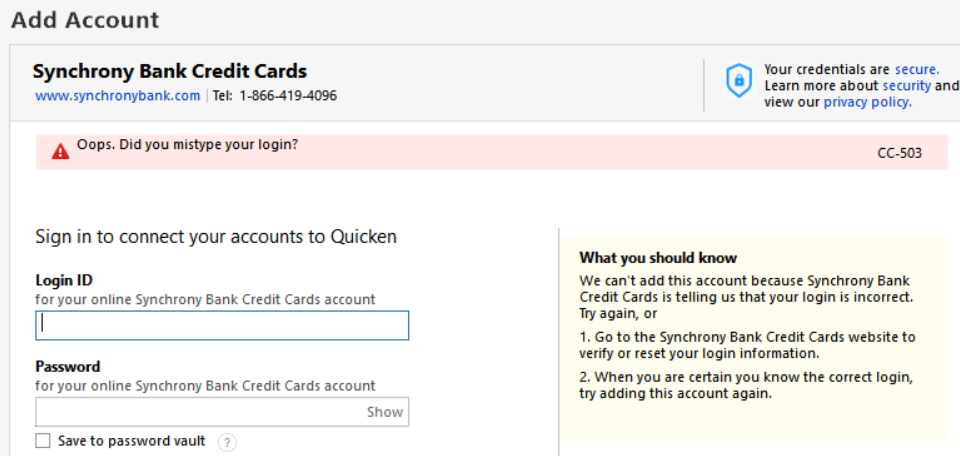
I have also taken all the recommended steps to resolve this but nothing works. Please help.
Answers
-
Hi @Bongo56,
Thank you for sharing the issue and outlining the steps you’ve already taken. I’ll be happy to help you troubleshoot further.
To better assist you, I’ll need a bit more information:
- Are all your Synchrony accounts under a single set of login credentials, or do you use different credentials for each account?
- Are you able to successfully log in on the bank’s website? If so, have you tried copying and pasting your User ID and password directly into Quicken to rule out any typing errors?
- What is the bank’s web address (URL) that you use to sign in?
- Have you noticed any recent changes on the bank’s website (such as security updates, multi-factor authentication changes, or interface updates)?
Once I have this information, I’ll be able to guide you through the next steps.
I look forward to your response.
Quicken Laura
Make sure to sign up for the email digest to see a round up of your top posts.
0 -
Laura, answers to the questions below:
- Are all your Synchrony accounts under a single set of login credentials, or do you use different credentials for each account? Yes, all accounts open under their new system with a single username/password
- Are you able to successfully log in to the bank’s website? If so, have you tried copying and pasting your User ID and password directly into Quicken to rule out any typing errors? Yes, and yes
- What is the bank’s web address (URL) that you use to sign in? Actually, ANY of the sites will log you in using the single set of credentials and take you to the accounts overview page. Try https://consumercenter.mysynchrony.com/consumercenter/Login.do
- Have you noticed any recent changes on the bank’s website (such as security updates, multi-factor authentication changes, or interface updates)? No, everything worked fine until after the latest Quicken update.
Additionally, I have tried resetting all of the accounts, deactivating and re-adding them, etc. Also note that the new account adding process does NOT take me to the Synchrony site to authorize the accounts like the rest of them do. It simply opens a username/password prompt within the Quicken interface and continues to return the username/password error.
Please let me know what the next steps are. Thanks!
[Edited - Readability]
0 -
Hi @Bongo56,
Thank you for the follow-up, and I appreciate you taking the time to answer those questions.
You are correct that the connection process does not open your bank’s website in a browser. This is because the accounts use the Express Web Connect connection method. Even so, it should still prompt you to sign in and connect your accounts during the setup process.
Please try connecting the accounts using the following financial institution listings:
- For the Mastercard accounts, try Synchrony Mastercard.
- For the Lowe’s account, try Lowe’s Commercial Card (Synchrony).
At this time, the other accounts do not appear to have an alternative listing available.
If you receive the same error message when trying these options, I recommend contacting Quicken Support directly for further assistance. They will be able to guide you through additional troubleshooting steps in real time and escalate the issue if necessary.
You can find the Quicken Support phone number here: . Phone support is available Monday through Friday, from 5:00 AM PT to 5:00 PM PT.
I apologize that I could not provide a more direct solution, but please don’t hesitate to reach out again if you have any other questions.
Quicken Laura
Make sure to sign up for the email digest to see a round up of your top posts.
0 -
Laura,
I seem to have got it working again. When I logged onto one of my accounts this morning (outside of Quicken), it prompted me to change my password. Once the new password was authenticated, ALL of my accounts re-linked sucessfully.
thanks for the help.
0 -
That's great news @Bongo56!
I’m glad to hear that you were able to connect all your accounts successfully.
Feel free to contact us if you have any additional questions!
Quicken Laura
Make sure to sign up for the email digest to see a round up of your top posts.
0

Categories
- All Categories
- 6 Product Ideas
- 34 Announcements
- 248 Alerts, Online Banking & Known Product Issues
- 19 Product Alerts
- 265 Welcome to the Community!
- 301 Before you Buy
- 1.5K Product Ideas
- 55.8K Quicken Classic for Windows
- 16.9K Quicken Classic for Mac
- 1K Quicken Mobile
- 834 Quicken on the Web
- 129 Quicken LifeHub