Fidelity CMA dividends downloading as Div not DivX

The dividends in my two Fidelity CMA Accounts for SPAXX download as Div in the investment account and don't transfer to the paired checking account. Changing the Div to DivX makes the cash balance in the checking account correct.
I have two other Fidelity brokerage accounts which are not CMA accounts. The SPAXX dividends for these accounts download as DivX and are automatically transferred to the paired checking accounts.
All four brokerage accounts and paired checking accounts are set up the same.
This has happened each month since I updated to EWC+ in November.
Comments
-
This has been happening to me ever since the October 2025 end of month SPAXX dividend. It only happens on the one (brokerage) account that has a separate linked checking account in Quicken. All other accounts (without a separate checking account) have been working fine for the past two months or so.
A few specifics:
- SPAXX is the money market fund for the problem account that Fidelity treats as cash.
- In the past (9/30/2025 and earlier), the dividend downloaded to the main account with an Action of DivX. The "Transfer account" on the transaction was the separate checking account.
- Since then, the dividend still downloads to the main account, but with an Action of Div. Like @WSAQ said, If I edit the transaction, it changes to a DivX and everything works the way it is supposed to.
- By the way, because there is a separate linked checking account, I cannot manually enter a Div transaction in this account. I can only enter a DivX.
@Quicken Kristina - if you need more specifics, let me know. I can take a lot of screenshots at the end of this month.
 0
0 -
I just downloaded the end of month SPAXX dividend for the account mentioned above and the above problem still exists. Here are the steps I went through to fix it along with some screenshots.
- Here are the downloaded transaction in my brokerage account. Note the Div (not DivX) for my core account - Fidelity Government Money Market (SPAXX).

- After I accepted the transactions it remains a Div in the brokerage account.

- Here is the linked checking account. The SPAXX transaction does not appear.
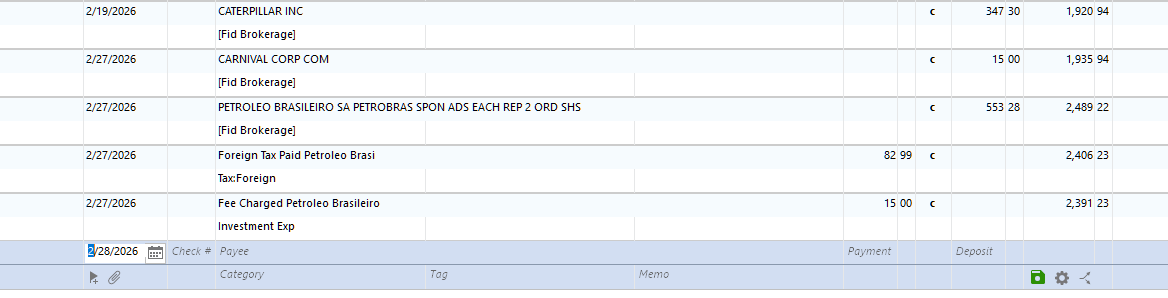
- Back in the brokerage account I highlighted the transaction. Note the linked checking account [Fid Brokerage Cash] appears on the transaction. I then clicked on the Edit button.

- Here is the edit screen. I did nothing except I clicked on the Enter/Done button.
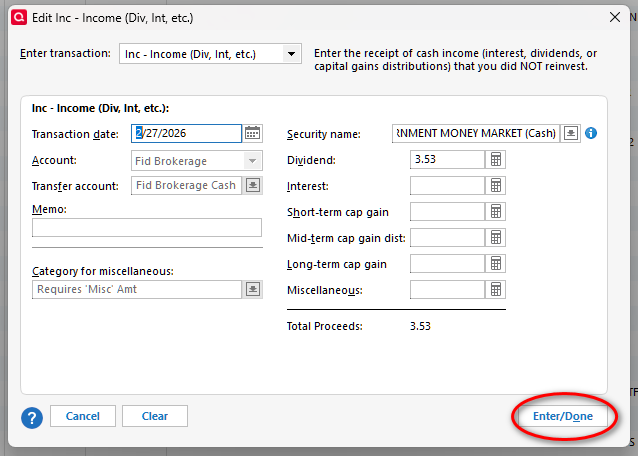
- Now the transaction in the brokerage account switched from Div to DivX.

- Back in the linked checking account, the cash transaction now appears. It says uncleared. After I cleared it everything is normal.

- Before the migration to Express Web Connect +, all of these steps happened automatically.to
0 - Here are the downloaded transaction in my brokerage account. Note the Div (not DivX) for my core account - Fidelity Government Money Market (SPAXX).
-
Thank you for your reply,
To check for file-specific issues that may be causing this problem, I suggest that you try validating your data file. Please save a backup file prior to performing these steps.
Validate:
- File
- Validate and Repair File...
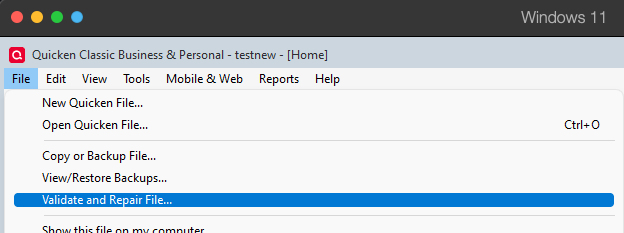
- Validate File
- Click OK
- Close the Data Log
- Close Quicken (leave it closed for at least 5 secs)
- Reopen Quicken and see if the issue persists.
Please let me know how it goes!
Quicken Kristina
Make sure to sign up for the email digest to see a round up of your top posts.
0 -
@Quicken Kristina I ran the validation and may try it again at the end of the month. I won't know if it helped until the end of the month. I will find out in early April.
1 -
Thank you for the follow-up,
Please let me know what happens in early April!
Thank you!
Quicken Kristina
Make sure to sign up for the email digest to see a round up of your top posts.
0 -
OK, so I fell into the same trap as jersey42, but unfortunately took advice from another posting and deleted the downloaded Div transaction from Fidelity SPAXX and entered a new Div transaction. Now I have a difference between the Cash balance shown in the Portfolio lists (which is correct) and that shown in the Checking balance (differs by the Div amount).
This was before realizing all I needed to do was the workaround of opening the transaction in Edit and closing which flips "Div" to "DivX" and updates the checking cash balance. This workaround shouldn't be necessary and should be corrected by Q coders.
Now how do I correct this to show the newly entered SPAXX Div transaction in the Cash Checking linked account?
0 -
Problem was solved by deleting the newly entered newly entered SPAXX Div transaction. Then using the CSV import transaction function to import the following CSV file:
DivX
2/27/2026
Fidelity ROLLOVER IRA Brokerage - XXXXXX
FIDELITY GOVERNMENT MONEY MARKET
SPAXX
33.1
Test of CSV import
Fidelity ROLLOVER IRA Brokerage (Cash)
I'm wondering what added-value is being gained when users are solving app issues that should be addressed by Q!
0 -
Hello @Chuck77,
Thank you for sharing your experience! Hopefully, the solution you found will help others encountering this issue.
Thank you!
Quicken Kristina
Make sure to sign up for the email digest to see a round up of your top posts.
0 -
I just updated my account for the past week and I continue to have the same problem I first mentioned on Feb 18. So the suggestion to validate the file did not help.

The cash amount came down as a Div once again. When I followed the steps in my Feb 28th post everything is now correct. I wish it would work automatically like it did before the switch to Express Web Connect+.
On the bright side, this is the only regular manual correction I still need to make.
0 -
Thank you for your reply,
I recommend that you contact Quicken Support directly for further assistance. They will likely need to review the logs to confirm how the data is being sent from the financial institution. They can also escalate the issue as needed. The Quicken Support phone number can be found through this link here. Phone support is available from 5:00 am PT to 5:00 pm PT, Monday through Friday.
I apologize that I could not be of more assistance!
Quicken Kristina
Make sure to sign up for the email digest to see a round up of your top posts.
0

