CC-601 on all Fidelity accounts + CC-800 on US Bank and Chase accounts

Problems have progressed to the point that I can only update my Ally Bank accounts. The other >90% are disabled by either CC-601 errors or CC-800 errors. This is getting ridiculous.
Initially, all 12 of my Fidelity accounts started getting the CC-601 errors. (This was immediately after I worked for over a week to resolve the CC-505 errors on my Fidelity accounts.) I have been watching the threads on CC-601 errors here and retrying updates daily for more than a week. No joy.
This morning my Chase and US Bank accounts all claim that they have been deleted (CC-800). They haven't, of course.
So instead of getting better, things just keep getting worse.
I did problem reports on all the errors.
I am on Quicken Classic Deluxe R66.23.
—Mike
Comments
-
Same here on my Fidelity accounts
0 -
Hello @Mike129 & @H.Richburg,
Thank you for taking the time to report this issue to the Community, although we apologize for any frustration or inconvenience experienced.
This issue with CC-601 errors with Fidelity has been reported to our Development and Product teams for further investigation and resolution. Though we do not currently have an ETA, you can bookmark the Community Alert linked below to get updates when available and to know when the issue is resolved. If you do not see the bookmark icon at the upper right, please make sure you are logged into the Community.
To troubleshoot the CC-800 errors you are seeing, please backup your Quicken file, then follow these steps from our article on CC-800 errors:
First, you'll need to deactivate the affected accounts:
- Select Tools > Account List
- If present, select the Show Hidden Accounts checkbox at the bottom of the Account List
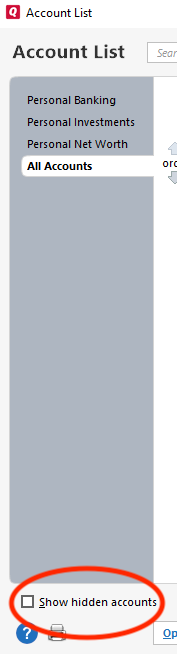
- Select Edit on each account with this error and Deactivate them on the Online Services tab
- When finished, close the Account List.
Second, reactivate the accounts:
- Select Tools > Add Account
- Complete the flow of re-adding the deactivated accounts to Quicken, using your bank login credentials and answering any security questions.
- When you reach the screen listing the accounts discovered at the financial institution, use the Action drop-downs to re-link your accounts:
- For accounts you want to re-link, select Link to existing account and choose the corresponding account to re-link with.
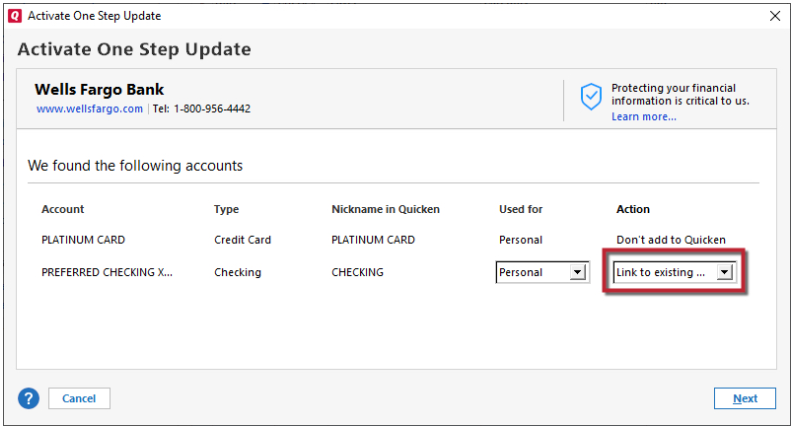
- Select Add to Quicken for new accounts you didn't previously track in Quicken.
- For accounts you don't want to link or add, select Don't add to Quicken.
- For accounts you want to re-link, select Link to existing account and choose the corresponding account to re-link with.
I hope this helps!
Quicken Kristina
Make sure to sign up for the email digest to see a round up of your top posts.
0 -
Okay. I reactivated the CC-800 errored accounts. I only left them deactivated in case you wanted a test for whatever defect caused them to be in the errored state in the first place.
—Mike
1 -
Thank you for your reply,
Have the CC-800 errors been a recurring issue? If they have, then how often does it happen? Does it always affect the same financial institutions?
Thank you!
Quicken Kristina
Make sure to sign up for the email digest to see a round up of your top posts.
0 -
It has never happened with any financial institution before, and I have been using Quicken since at least 1/1/1990.
—Mike
1 -
Thank you for your reply,
I'm glad to hear this is the first time it's happened. If it happens again, please let us know!
Quicken Kristina
Make sure to sign up for the email digest to see a round up of your top posts.
0


Categories
- All Categories
- 6 Product Ideas
- 34 Announcements
- 249 Alerts, Online Banking & Known Product Issues
- 19 Product Alerts
- 266 Welcome to the Community!
- 301 Before you Buy
- 1.5K Product Ideas
- 55.8K Quicken Classic for Windows
- 16.9K Quicken Classic for Mac
- 1K Quicken Mobile
- 834 Quicken on the Web
- 129 Quicken LifeHub